Zennaxx

Category: Software Development

  • How to Build a Telehealth Software: Complete Guide to Cost, Features & Development

    How to Build a Telehealth Software: Complete Guide to Cost, Features & Development

    What Is Telehealth Software?

    Telehealth software is a digital platform that allows healthcare providers to deliver clinical services, consultations, monitoring, and administrative tasks remotely without the patient ever needing to step inside a clinic or hospital.

    Whether it’s a video call with your family doctor in Toronto, a mental health session with a therapist in Ontario, or remote monitoring of a chronic condition anywhere in Canada, telehealth software makes it possible. And in 2025, it has become less of a “nice to have” and more of a core part of modern healthcare delivery.

    From hospitals and private clinics to independent practitioners and healthcare startups, organizations of all sizes are turning to telehealth software development to build scalable, patient-first digital health experiences. If you’re exploring this space whether you’re a healthcare business, a startup, or simply trying to understand how it all works this guide covers everything you need to know.

    Why Telehealth Software Is Booming in 2026

    The global telehealth market is projected to surpass $500 billion by the end of this decade. That’s not just a trend, that’s a transformation. And the drivers behind it are stronger than ever.

    Access to healthcare in remote or rural areas has always been a challenge, particularly across provinces like Ontario and British Columbia in Canada. Telehealth software bridges that gap efficiently. Patients no longer need to travel hours for a 15-minute consultation. Doctors can manage more patients in less time. Clinics can cut overhead costs significantly.

    The COVID-19 pandemic accelerated adoption, but what’s kept telehealth growing is the genuine value it delivers for patients, providers, and healthcare systems. Regulatory bodies in Canada, the US, the UK, and beyond have also updated frameworks to accommodate and encourage telehealth, making this an ideal time to invest in telehealth app development.

    Beyond convenience, telehealth software is now powering chronic disease management, behavioral health, post-surgical follow-ups, elderly care, and even pediatric consultations. It’s redefining what “going to the doctor” looks like and it’s not slowing down.

    You can also explore types of healthcare software to understand where telehealth fits in the broader digital health ecosystem.

    Key Features of Telehealth Software
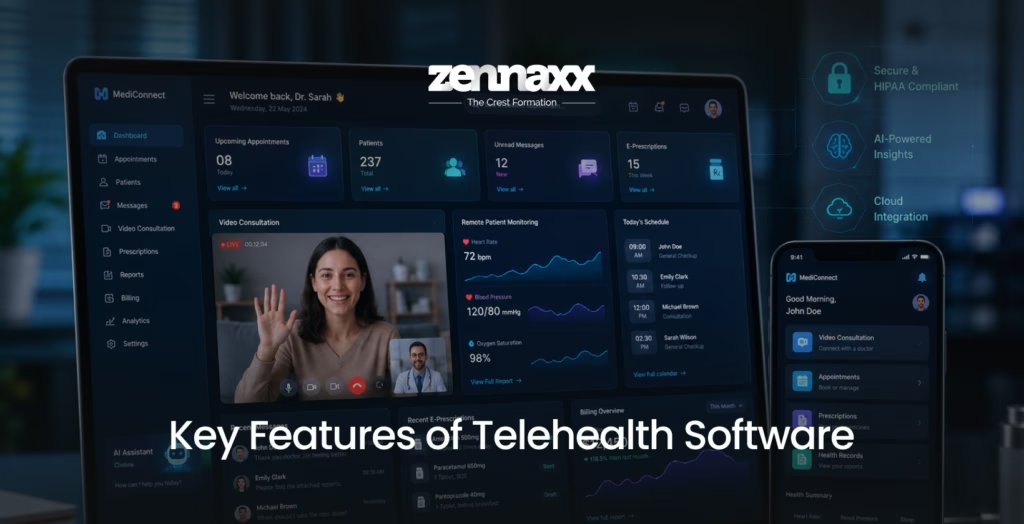
    Key Features of Telehealth Software

    Not all telehealth platforms are built equal. If you’re evaluating existing solutions or planning a custom telehealth app development project, here are the features that matter most:

    Video & Audio Consultation

    High-definition, low-latency video calling is the backbone of any telemedicine platform. The system must be reliable on both desktop and mobile, with fallback to audio-only when connectivity is poor.

    Appointment Scheduling & Management

    Patients should be able to book, reschedule, or cancel appointments without calling the front desk. Providers need an intuitive calendar view with real-time availability.

    Electronic Health Records (EHR) Integration

    Connecting telehealth software with EHR/EMR systems ensures continuity of care. Physicians can view patient history, prescriptions, and diagnostics all in one place, without duplicating data entry.

    Secure Messaging & Chat

    HIPAA-compliant (or PIPEDA-compliant in Canada) encrypted messaging lets patients ask follow-up questions and receive non-urgent guidance between appointments.

    E-Prescriptions

    Doctors can send prescriptions digitally to a patient’s preferred pharmacy saving time and reducing the risk of errors.

    Remote Patient Monitoring (RPM)

    With wearables and IoT devices, telehealth platforms can collect real-time vitals like heart rate, blood pressure, and glucose levels especially valuable for chronic disease management.

    Billing & Insurance Integration

    Telehealth billing is complex, especially across provinces or states. Integrated billing modules and insurance claim processing streamline the administrative side.

    Multi-Platform Support

    A strong telehealth solution works flawlessly on iOS, Android, and web ensuring accessibility for all patient demographics.

    AI-Powered Features

    From symptom checkers and triage bots to predictive analytics, AI is becoming a standard feature in next-generation telehealth software solutions.

    For a deeper look at how cloud infrastructure supports these features, read our guide on cloud computing in healthcare.

    Telehealth Software Solutions: Types You Should Know

    Telehealth isn’t a one-size-fits-all solution. Depending on the use case and patient population, different types of platforms serve different needs:

    Store-and-Forward (Asynchronous Telehealth)

    Patients submit health data, images, or medical history, which physicians review at a later time. Commonly used in dermatology and radiology.

    Real-Time (Synchronous) Telehealth

    Live video or audio consultations between patient and provider. The most common and widely recognized form of telehealth.

    Remote Patient Monitoring (RPM)

    Continuous collection of health data from patients at home using connected devices. Ideal for chronic conditions like diabetes, hypertension, and COPD.

    mHealth Apps

    Mobile health apps that deliver wellness programs, medication reminders, fitness tracking, and mental health support directly on a smartphone.

    Behavioral & Mental Health Platforms

    Specialized telehealth platforms for therapy, counseling, and psychiatric care a category that has seen explosive growth post-pandemic.

    Understanding which type of telehealth software solutions fits your business model is the first step before development begins.

    How Telehealth Software Development Works
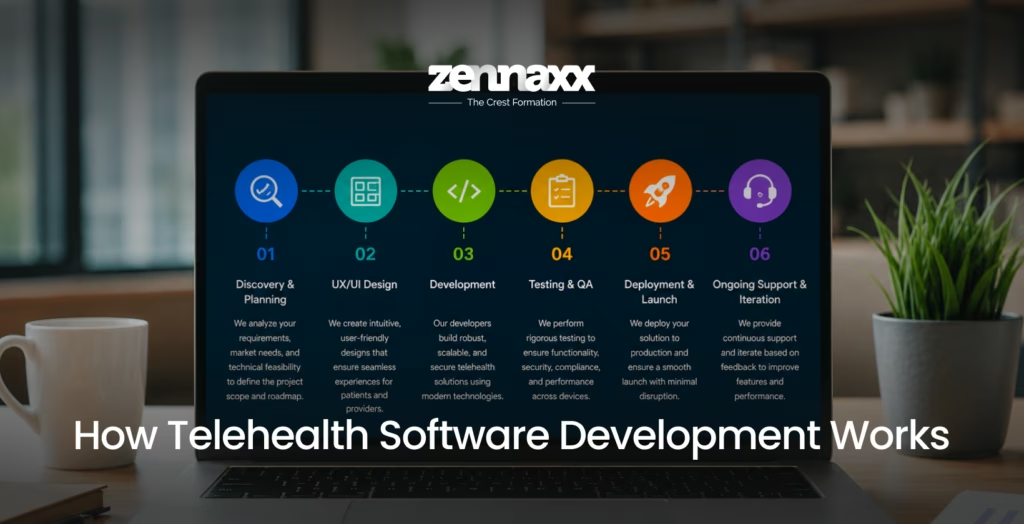
    How telhealth software development works

    Building a telehealth platform from scratch requires careful planning, technical expertise, and a deep understanding of healthcare regulations. Here’s a simplified view of the telehealth software development process:

    Discovery & Planning

    Define the product goals, target users, compliance requirements, and feature scope. This phase includes competitor analysis, user research, and technology stack selection.

    UX/UI Design

    Healthcare users both patients and providers, need intuitive, accessible interfaces. Design must factor in accessibility standards, multilingual support, and mobile-first experiences.

    Development

    The engineering team builds the front end (patient and doctor apps), back end (APIs, databases, cloud infrastructure), and integrates third-party services like EHR systems, payment gateways, and video SDKs.

    Testing & QA

    Rigorous testing covers functionality, security, load performance, and compliance validation. HIPAA penetration testing and data encryption verification are non-negotiable.

    Deployment & Launch

    The platform is deployed to cloud infrastructure (AWS, Azure, or Google Cloud), submitted to app stores if mobile, and launched with user onboarding flows.

    Ongoing Support & Iteration

    Post-launch, the platform requires monitoring, security updates, feature enhancements, and compliance audits.Working with an experienced software development company that understands both technology and healthcare is critical to getting this right. Whether it’s a startup or an enterprise, the right development partner can significantly shorten your path from idea to launch.For a comprehensive overview of the full process, explore our healthcare app development guide.

    What Cost is Expected for Telemedicine App Development?
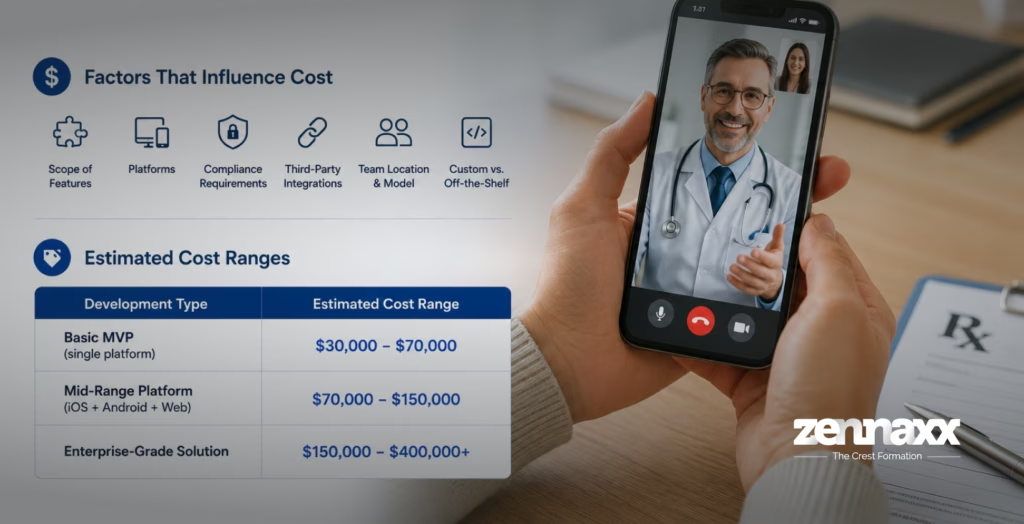
    What Cost is Expected for Telemedicine App Development

    One of the most common questions organizations ask is:

    “How Much Does It Cost to Build a Telehealth App?”

    The honest answer is – it depends. But here’s a framework to understand the major cost drivers:

    Factors That Influence Telehealth Software Cost

    • Scope of Features: A basic MVP with video calling and appointment scheduling costs far less than a full-featured platform with RPM, AI diagnostics, and EHR integration.
    • Platforms: Developing for iOS, Android, and web simultaneously increases cost compared to starting with a single platform.
    • Compliance Requirements: HIPAA, PIPEDA, PHIPA (Ontario), or GDPR compliance requires specialized development and security architecture.
    • Third-Party Integrations: EHR/EMR systems, insurance platforms, pharmacy networks, and IoT devices each add complexity.
    • Development Team Location & Model: Onshore vs. nearshore vs. offshore teams have significantly different rate structures.
    • Custom vs. Off-the-Shelf: Custom builds are more expensive upfront but offer far greater flexibility and long-term scalability.

    Estimated Cost Ranges

    These are industry estimates. The actual telehealth software cost for your project will vary based on your specific requirements and the development partner you choose.Investing in custom software development services from a specialized healthcare app development company can actually be more cost-effective in the long run because you avoid the licensing fees, limitations, and costly migrations that come with generic off-the-shelf platforms.

    Compliance & Security in Telehealth Software

    Compliance is not optional in healthcare, it’s foundational. Any telehealth software operating in Canada, the US, or internationally must adhere to strict regulatory standards:

    Key Compliance Frameworks

    • HIPAA (USA): The Health Insurance Portability and Accountability Act governs the privacy and security of patient health information in the United States.
    • PIPEDA / PHIPA (Canada): Canada’s federal privacy law (PIPEDA) and Ontario’s provincial health privacy law (PHIPA) regulate how healthcare organizations collect, use, and disclose personal health information.
    • GDPR (Europe): For telehealth platforms serving European patients, GDPR compliance is mandatory.
    • HL7 & FHIR Standards: Interoperability standards that govern how health data is formatted and exchanged between systems.

    Security Best Practices in Telehealth Development

    • End-to-end encryption for all video, audio, and messaging
    • Role-based access control (RBAC) to restrict data access by user role
    • Audit trails and activity logs for all data access
    • Two-factor authentication (2FA) for provider logins
    • Regular security audits and penetration testing
    • Secure cloud hosting with HIPAA/PHIPA-compliant infrastructure

    A reliable telehealth software development company will have documented processes for compliance architecture from day one not as an afterthought.

    Pros and Cons of Telehealth Software

    Like any technology, telehealth software has real strengths and real limitations. Here’s an honest look at both:

    Pros of Telehealth Software

    • Increased Access to Care: Patients in rural or underserved areas particularly in large provinces like Ontario or Alberta can access specialist care without lengthy travel.
    • Reduced Healthcare Costs: Both providers and patients benefit from reduced overhead. No physical space needed for every consultation. Fewer no-shows with automated reminders.
    • Improved Patient Engagement: Patients who can communicate easily with their care team are more likely to follow through on treatment plans and preventive care.
    • Scalability: A well-built telehealth platform can handle thousands of concurrent consultations with the right cloud infrastructure something a physical clinic cannot replicate.
    • Better Data Management: Digital-first platforms generate rich data that can be used to improve care protocols, population health management, and operational efficiency.

    Cons of Telehealth Software

    • Technology Barriers: Elderly patients or those with limited digital literacy may struggle with video-based consultations. Onboarding and support are essential.
    • Internet Connectivity Limitations: In remote areas, poor internet bandwidth can make video consultations unreliable, reducing the quality of care.
    • Regulatory Complexity: Operating across provinces or countries means navigating multiple regulatory frameworks simultaneously which requires ongoing legal and compliance attention.
    • Physical Examination Limitations: Telehealth cannot fully replace in-person care for conditions requiring physical examination, diagnostics, or procedures.
    • Data Privacy Risks: Without proper security architecture, telehealth platforms become targets for breaches. A data leak in a healthcare context carries severe legal and reputational consequences.

    How to Choose the Right Telehealth Software Vendors or Development Partner

    How to choose the right telehealth

    Whether you’re evaluating

    telehealth software vendors who offer ready-made platforms, or looking for a telemedicine app development company to build a custom solution, the selection process matters enormously.

    Key Questions to Ask

    • Do they have proven experience in healthcare software development specifically?
    • Can they demonstrate compliance expertise (HIPAA, PHIPA, PIPEDA)?
    • Do they offer post-launch support and ongoing maintenance?
    • What is their approach to data security and disaster recovery?
    • Can they integrate with your existing EHR, billing, or hospital management systems?
    • Do they offer transparent pricing and milestone-based delivery?

    When to Choose a Custom Build Over an Off-the-Shelf Platform

    Off-the-shelf telehealth software providers work well for standard use cases with limited customization needs. But if your organization has unique workflows, specialized patient populations, complex integrations, or strong branding requirements, a custom build is almost always the better long-term investment.

    A trusted software development company with healthcare domain expertise will help you define the right approach from the start whether that’s building from scratch, integrating with existing systems, or customizing a white-label solution.

    Zennaxx is a healthcare app development company that has helped healthcare organizations, clinics, and digital health startups across Canada and globally build compliant, scalable telehealth solutions. From initial discovery through launch and beyond, the team provides end-to-end custom software development services tailored specifically to the healthcare sector.

    Final Thoughts

    Telehealth software is no longer a niche solution; it is the future of healthcare delivery. As patient expectations evolve, regulatory support strengthens, and technology continues to advance, the organizations that invest in well-built, compliant, and user-centered telehealth platforms will be the ones leading healthcare forward.

    Whether you’re a hospital system in Ontario, a digital health startup in Toronto, a growing clinic network across Canada, or a healthcare entrepreneur with a bold vision, the time to build is now.

    Zennaxx is a dedicated software development company with deep expertise in telehealth software development. Our team of engineers, designers, and healthcare compliance specialists work with you from concept through launch, delivering custom software development services that are built to scale, built to comply, and built to make a real difference in people’s lives.

    FAQs

    Q1.Can I Hire Someone to Build Me a Telehealth App?

    Absolutely. You can hire a specialized telemedicine app development company or a healthcare app development company to build a custom telehealth platform tailored to your specific requirements. The key is to choose a team with proven healthcare experience, compliance knowledge, and a transparent development process. Companies like Zennaxx specialize in exactly this, delivering compliant, scalable telehealth solutions for businesses across Canada and beyond. You can explore our custom software development services for more details.

    Q2.How Long Does It Take to Develop a Telehealth App?

    The timeline depends heavily on the scope of features and the complexity of integrations. A basic MVP with video calling, appointment booking, and secure messaging can typically be delivered in 3 to 5 months. A mid-range platform with EHR integration, RPM, and multi-platform support usually takes 6 to 9 months. Enterprise-grade solutions with advanced AI, multi-region compliance, and deep system integrations can take 12 months or more. Working with an experienced telemedicine app development company that follows an agile process will help reduce time-to-market without compromising quality.

    Q3.What Are the Benefits of Telemedicine App Development Solutions for Doctors?

    Telemedicine app development delivers significant benefits for healthcare providers: reduced administrative burden through automated scheduling and digital documentation, the ability to see more patients per day with less physical overhead, access to patient history and health records during every consultation, secure digital prescribing, and the flexibility to consult from any location. Beyond convenience, telehealth platforms also help doctors improve patient retention and engagement leading to better health outcomes overall.

    Q4.How Does Telemedicine App Development Help Businesses in the Healthcare Industry?

    For healthcare businesses, telemedicine app development opens new revenue streams, expands geographic reach, reduces facility overhead, and improves patient acquisition and retention. Clinics, hospitals, insurance companies, and health tech startups are all using telehealth platforms to differentiate their services in a competitive market. Custom telehealth software solutions also enable better data collection, which supports more informed clinical and operational decisions. Partnering with a proven software development company ensures the platform is built to grow with the business.

    Q5.What Are Online Health Apps?

    Online health apps often referred to as mHealth (mobile health) apps are digital tools that help users manage their health and wellness through smartphones or tablets. They range from general wellness and fitness apps to specialized platforms for chronic disease management, mental health, telehealth consultations, medication reminders, and diet tracking. Telehealth apps are a subset of online health apps specifically designed for remote clinical care. As the demand for digital health solutions grows, more organizations are partnering with a healthcare app development company to build custom applications that serve their specific patient population.
  • Why CRM Software Is the Backbone of Every Successful Business

    Why CRM Software Is the Backbone of Every Successful Business

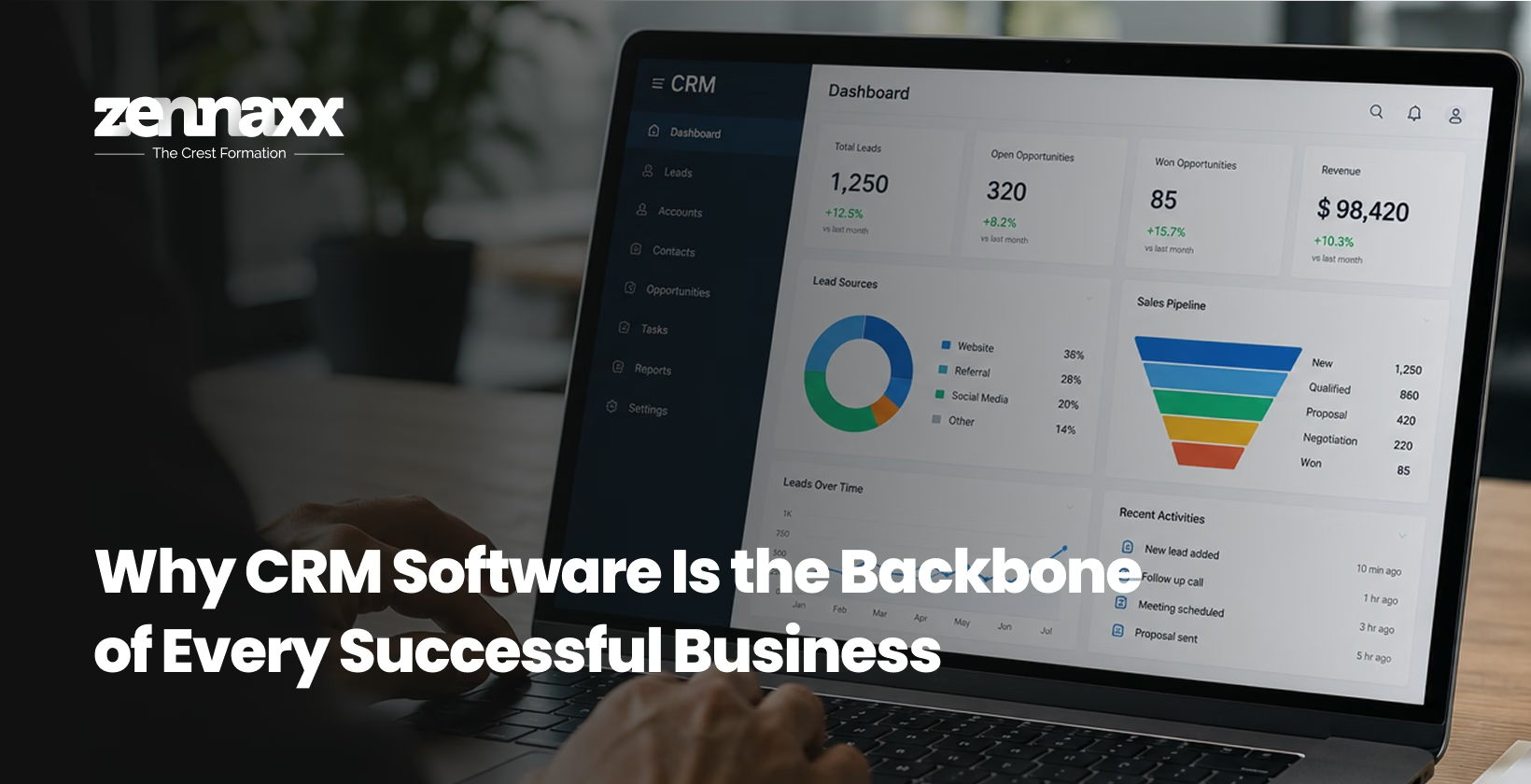
    In a world where customers expect fast responses, personalized experiences, and seamless interactions, businesses that rely on spreadsheets and disconnected tools are quietly falling behind. The solution? A robust, well-built CRM software system – one that doesn’t just store contacts, but drives sales, strengthens relationships, and scales with your business.

    Whether you are a growing startup or an established enterprise, the right CRM platform can be the turning point that separates average performance from extraordinary results. And when it comes to building that platform the right way, choosing an expert CRM Development Company in Canada makes all the difference.

    What Is CRM Software and Why Does It Matter?

    CRM stands for Customer Relationship Management. At its core, CRM software is a centralized system that helps businesses manage all interactions with current and potential customers from the very first touchpoint to post-sale support.

    Think of it as the nervous system of your business operations. It connects your sales team, marketing department, and customer support under one roof, giving everyone real-time visibility into customer data, communication history, and pipeline progress.

    Key Benefits of CRM Software

    • Improved Customer Retention: When your team knows exactly where each customer stands in their journey, they can engage at the right time with the right message.
    • Higher Sales Productivity: Automated follow-ups, lead scoring, and task reminders eliminate the manual work that slows down your sales reps.
    • Data-Driven Decision Making: Built-in analytics and reporting help leadership make smarter, faster decisions based on real customer behavior.
    • Seamless Team Collaboration: A shared platform ensures no lead falls through the cracks and everyone is on the same page.

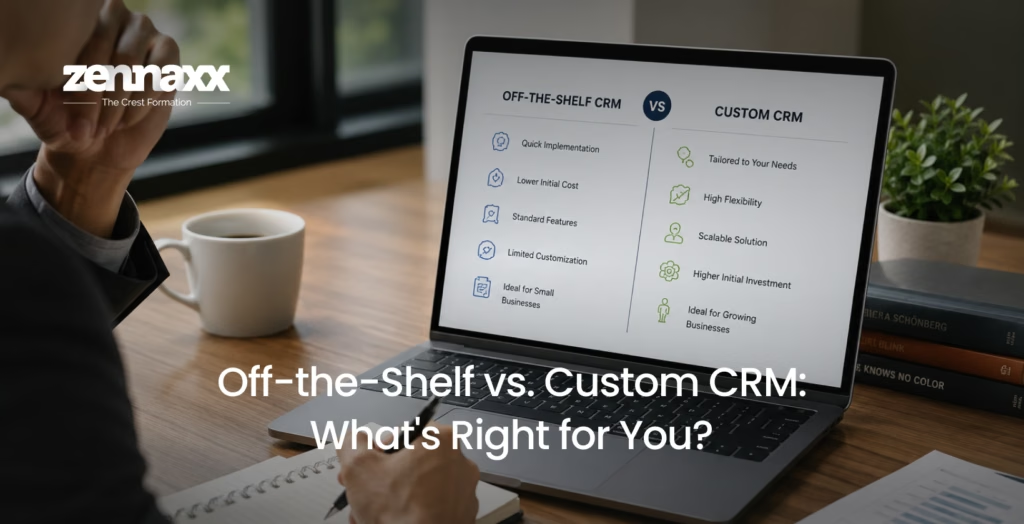
    Off-the-Shelf vs. Custom CRM: What’s Right for You?

    Custom CRM

    Many businesses start with out-of-the-box CRM tools like Salesforce or HubSpot. These are great entry points, but they come with limitations: rigid workflows, bloated features you never use, and ongoing subscription costs that pile up over time.

    Custom CRM Software Development offers a completely different experience. When your CRM is built specifically for your business processes, it works the way you work, not the other way around.

    Why Custom CRM Development Wins

    Tailored to Your Workflow: Every business has unique sales cycles, customer touchpoints, and reporting needs. A custom-built CRM adapts to your processes, not generic templates.

    Scalability from Day One: As your business grows, your CRM grows with it. Custom solutions are designed with future expansion in mind, so you are never locked into a system that cannot keep up.

    Seamless Integration: Whether it is your ERP, e-commerce platform, accounting software, or third-party APIs, custom CRM Software Development Services ensure everything talks to everything with no duct-tape workarounds.

    True Data Ownership: With a custom CRM, your customer data lives where you want it, with the security protocols you define. This is especially critical for industries handling sensitive information like healthcare, finance, and legal services.

    Lower Long-Term Cost: While the upfront investment in custom development may seem higher, businesses typically save significantly over time by eliminating expensive licensing fees and paying only for what they actually need.

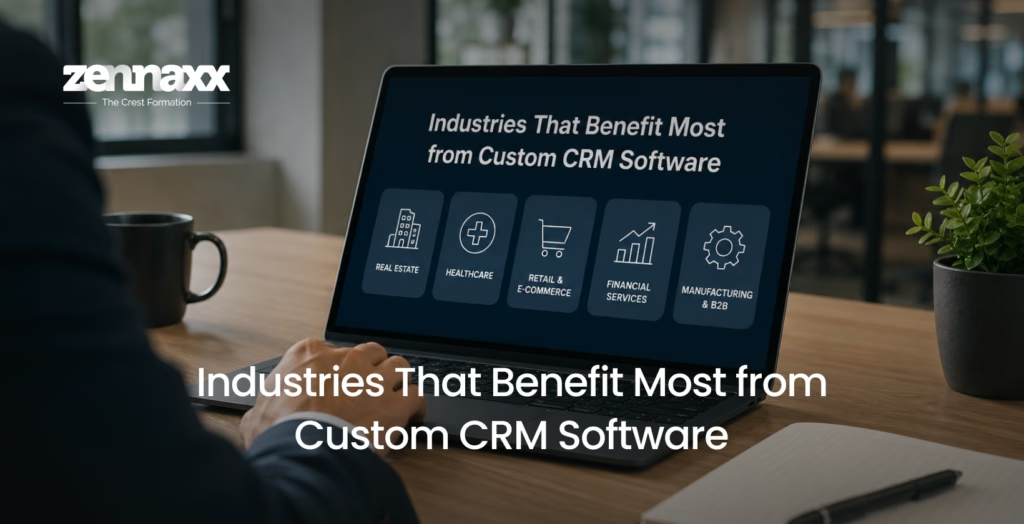
    Industries That Benefit Most from Custom CRM Software

    Benefit Most from Custom CRM Software

    The beauty of CRM software is that it is industry-agnostic. However, some sectors see especially transformative results from custom CRM solutions:

    Real Estate: Track leads, manage listings, schedule viewings, and automate follow-ups all in one place.

    Healthcare: Maintain patient records, appointment scheduling, and communication history while remaining fully compliant with privacy regulations.

    Retail & E-Commerce: Understand buying patterns, manage loyalty programs, and run personalized marketing campaigns backed by real data.

    Financial Services: Manage client portfolios, automate compliance tasks, and deliver timely, personalized financial guidance.

    Manufacturing & B2B: Track complex sales cycles, manage distributor relationships, and streamline quote-to-order processes.

    What to Look for in a CRM Development Company

    Not every development team is equipped to deliver enterprise-grade CRM software. When evaluating your options, here is what you should look for:

    Proven Industry Experience

    The right CRM Development Company has a portfolio that spans industries and project sizes. They understand both the technical architecture required and the business logic that drives CRM success.

    End-to-End Development Capabilities

    From UI/UX design and backend development to third-party integrations and post-launch support look for a team that handles the full product lifecycle so you are not juggling multiple vendors.

    Agile Development Process

    Businesses evolve quickly. An agile development approach ensures your CRM can adapt during the build phase, incorporating feedback and new requirements without derailing the entire project.

    Strong Post-Launch Support

    Your CRM needs ongoing maintenance, feature updates, and troubleshooting. A reliable development partner stays with you long after the launch date.

    Transparent Communication

    Clear timelines, regular progress updates, and a dedicated point of contact are non-negotiables when investing in custom software development.

    Why Choose a CRM Development Company in Canada?

    CRM development company in canada

    Canada has emerged as a top destination for high-quality software development, and for good reason. Canadian development firms combine global technical standards with a deep understanding of North American business environments, regulatory requirements, and customer behavior.

    Partnering with a trusted CRM Development Company in Canada means you get access to world-class engineering talent, rigorous quality assurance processes, and a team that understands the nuances of building software for competitive markets.

    For businesses across North America, working with a Canadian CRM development partner also simplifies time zones, communication, and project alignment making the entire collaboration smoother from kickoff to delivery.

    The CRM Development Process: What to Expect

    When you engage a professional team for CRM Software Development Services, the process typically follows a structured path:

    Discovery & Requirement Analysis: The team dives deep into your business processes, pain points, and goals to define the exact scope of your CRM solution.

    UX/UI Design: Wireframes and prototypes are created to ensure the interface is intuitive, user-friendly, and aligned with your brand.

    Development & Integration: The core CRM platform is built module by module contact management, pipeline tracking, automation, reporting, and all necessary third-party integrations.

    Testing & QA: Rigorous testing across devices, user roles, and edge cases ensures the platform is stable, secure, and ready for real-world use.

    Deployment & Training: The CRM is launched in your environment, and your team is trained to use it effectively from day one.

    Ongoing Support & Iteration: As your business evolves, features are added, refined, and optimized to keep your CRM performing at its best.

    Final Thoughts

    The right CRM software is not just a tool, it is a competitive advantage. It empowers your team to work smarter, keeps your customers happier, and gives your leadership the clarity needed to drive growth with confidence.

    If you are ready to move beyond generic, one-size-fits-all solutions and invest in a CRM platform built specifically for your business, now is the time to act.

    Partner with a leading CRM Development Company in Canada that brings the expertise, process, and commitment to turn your vision into a powerful, scalable CRM system built to grow as fast as you do.

  • Vibe Coding Vs Traditional Coding: Myths, Facts & Limits

    Vibe Coding Vs Traditional Coding: Myths, Facts & Limits

    The software world is buzzing with a new phrase – vibe coding. And with it comes a wave of opinions, strong claims, and a lot of confusion. Some say it’s the future of development. Others say it’s a shortcut that breaks things at scale. The truth? It’s somewhere in the middle and it’s more nuanced than most blog posts give it credit for.

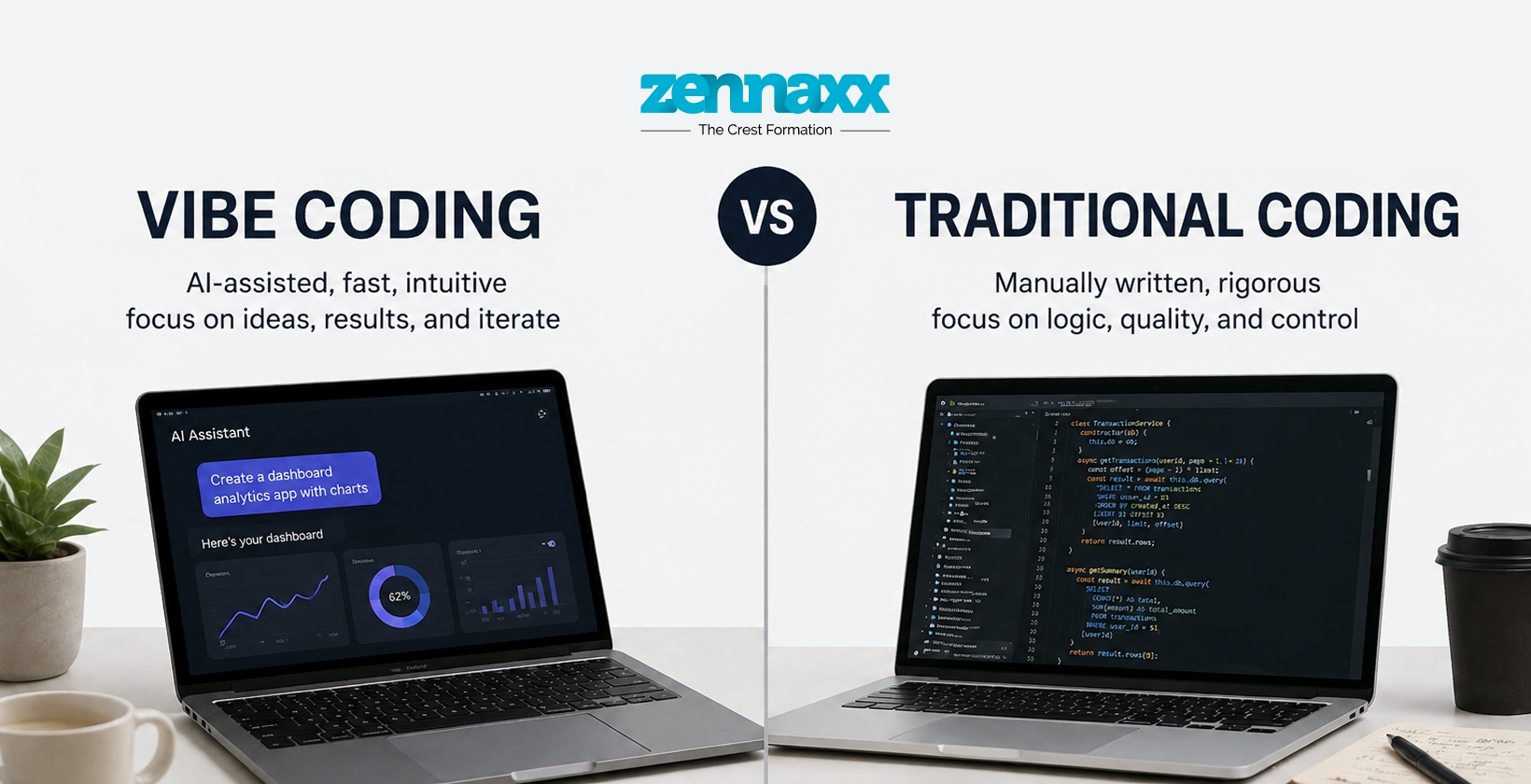
    This blog clears up any confusion you might have experienced about Vibe Coding vs Traditional Coding. We’ll clear up the most common myths, give you the facts, and be honest about the real limits of both methods so you can make better choices for your project.

    What is vibe coding, exactly?

    Let’s ensure we have the definitions right before we compare both of them.

    Vibe coding is a way to develop software with the help of AI. You write down what you want in simple words, and tools like Cursor or GitHub Copilot make the code for you. You don’t have to write every line by hand. You give the AI prompts, look over what it comes up with, and then quickly repeat the process.It’s fast.

    It’s accessible. And it’s changed how many teams – especially startups and solo developers build software.

    Writing software manually is what traditional coding is all about. From design to deployment, developers plan the architecture, write every function, deal with logic edge cases, and follow structured processes. It takes a lot of technical know-how, but the end result is code that is well-documented, easy to understand, and built to last.

    Both are good ways to do things, but you can’t use them both. And that’s where most myths start: a lack of understanding.

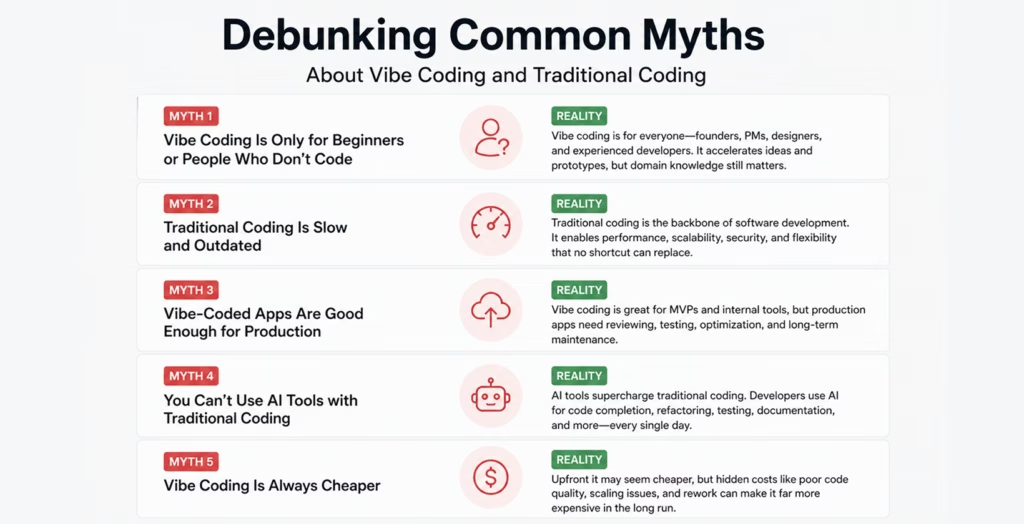
    Debunking Common Myths About Vibe Coding and Traditional Coding

    Debunking Common Myths About Vibe Coding and Traditional Coding

    Vibe Coding Is Only for Beginners or People Who Don’t Code

    Fact: Many experienced developers use vibe coding to speed up tasks that they have to do over and over again, come up with new ideas, and cut down on boilerplate work. It’s not about how good you are; it’s about how quickly you can do things. Professionals use it as a productivity layer, not a replacement for thinking.

    That said, when non-developers use vibe coding without any engineering oversight, the risks go up significantly. The tool is powerful, but understanding what it produces still matters.

    Traditional Coding Is Slow and Outdated

    Fact: Traditional coding isn’t slow; unplanned traditional coding is slow. When done right with a well-organized Software Development Life Cycle, traditional development is organized, easy to predict, and very scalable. In the long run, teams that follow best practices like clear architecture, code reviews, and automated testing move faster because they don’t have to keep fixing broken code.

    “It’s slow” myth comes from comparing early-stage vibe coding (fast prototypes) to full-scale traditional production builds (complex systems). That’s not a fair comparison.

    Vibe-Coded Apps Are Good Enough for Production

    Fact: For MVPs, internal tools, or testing ideas, vibe coding can help you make a working product quickly. But “working” doesn’t mean “ready for production.

    “Production systems need to be checked for security, planned for scalability, handle errors correctly, follow rules, and have code that can be maintained. AI-generated code often skips all of this unless the developer asks for it and checks it carefully. A report from 2026 said that AI-generated code is responsible for 1 in 5 security incidents in businesses. This is a serious number that should not be ignored.

    You Can’t Use AI Tools with Traditional Coding

    Fact: AI tools are a big part of modern traditional development. The way they are used is what makes them different. AI works as an assistant in traditional workflows, helping with tasks like auto-completion, suggesting refactors, and finding bugs. The developer still owns every line, knows how it works, and makes decisions about how to build it.

    The AI controls the output in vibe coding. In traditional coding, the developer drives — and sometimes uses AI to accelerate.

    Vibe Coding Is Always Cheaper

    The truth is that vibe coding costs less up front. The total cost of ownership (TCO), on the other hand, is a different story. When AI-generated code builds up technical debt, like inconsistent patterns, duplicate logic, and missing documentation, it becomes much more expensive to maintain, debug, and scale over time.

    This is especially important for businesses that work with a Custom Software Development Company in Canada or any other mature market where the quality of software over time has a direct effect on business continuity.

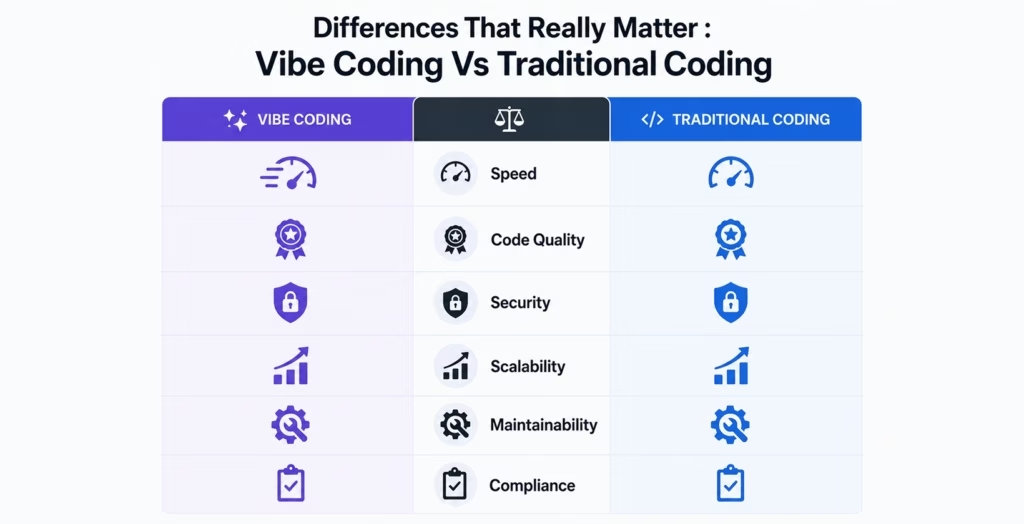
    Differences That Really Matter : Vibe Coding Vs Traditional Coding

    Differences That Really Matter : Vibe Coding Vs Traditional Coding


    The truth becomes clear once you get past the myths. Here is how Vibe Coding and Traditional Coding compare in terms of important factors in real projects:

    Speed: Vibe coding wins at first. You can have a working prototype in a few hours. Traditional development is more structured, but it makes steady, reviewable progress.

    Code Quality: When there are good reviews in place, traditional coding makes code that is cleaner and better organized. The output of vibe coding can be neat or messy, depending on how well the prompts are written and checked.

    Security: This is where traditional coding is clearly better. Threat modeling, input validation, access control, and compliance checks are all built into the development process. When something breaks or an audit flags it, security is often added after the fact with vibe coding.

    Scalability: Systems made with traditional coding are meant to grow. When traffic increases, vibe-coded systems often run into performance problems because the original design didn’t take load into account. This is a hard limit, not just a choice.

    Maintainability: A developer knows what their code does when they write it. The developer might or might not write it when AI does. It gets harder to debug, add to, or hand off to new team members over time when codebases are made entirely from prompts.

    Compliance: Must in fields like healthcare and finance, like AI in Fintech. GDPR, HIPAA, SOC2, and PCI-DSS all require that processes be documented, data be traceable, and audits be possible. This is naturally supported by traditional development, but not by vibe coding.

    Where Vibe Coding Works (and Where It Doesn’t)

    There isn’t one way to do every project. It’s more useful to know when to use each than to say one is “better.”When vibe coding works well:

    • You’re checking to see if an idea works or making a minimum viable product (MVP).
    • The project is low-risk and only for the company.
    • You need a quick proof of concept for a demo or pitch.
    • The team is small and working quickly on the early stages of exploration.
    • The feature is still in the testing phase and won’t affect sensitive data.

    When vibe coding stops working:

    • The system has to be able to handle thousands of real users.
    • Data privacy and security are not up for negotiation.
    • You work in an industry that is regulated
    • A team will keep the codebase up to date and add to it over the years.
    • It is necessary to connect to complicated old systems or APIs.

    When traditional coding works best:

    • You’re making a system for production that customers can see.
    • Your product is subject to compliance frameworks.
    • Several developers need to work together on a codebase that they all use.
    • Decisions about architecture have effects on business in the long term.
    • The system needs to be checked, written down, or given to someone else.

    Real Limits of Each Technique

    Let’s be honest: neither method is perfect.

    Limits of Vibe Coding:The biggest problem is who owns it. A lot of the time, the developer doesn’t fully understand the code that the AI writes. When something breaks in production at 2 AM, that becomes a big problem. AI tools also have a hard time with undocumented APIs, legacy systems, and multi-service orchestration, which are all things that enterprise software runs into all the time.There are also security holes that aren’t obvious. AI models learn from a lot of code, even code that isn’t safe. If you don’t check carefully, vulnerabilities can get into production without anyone noticing.

    Limits of Traditional Coding:There are also problems with traditional coding. Slow onboarding, high upfront costs, longer time-to-market in the early stages, and over-engineering are all real risks, especially for startups where speed is most important.Also, the quality of the team is very important for traditional coding. A traditional project that isn’t well-structured can be just as bad as a vibe-coded one that hasn’t been looked over.

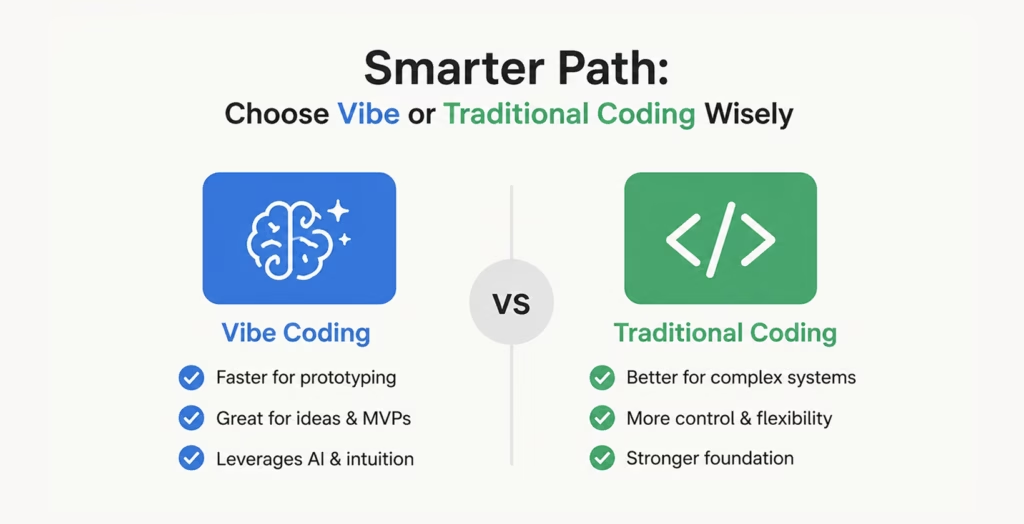
    Smarter Path: Choose Vibe or Traditional Coding Wisely

    Smarter Path: Choose Vibe or Traditional Coding Wisely

    The best development teams today don’t pick one over the other; they use both on purpose.

    When you want to explore an idea or make a prototype, start coding quickly with a vibe. Once the idea has been shown to be useful, switch to structured development methods. Before the system goes live on a large scale, break up the AI-generated code into clean layers, add proper testing, set service boundaries, and add security controls.

    A good Software Consulting Agency will help you make this change at the right time, before technical debt becomes a major issue and before security holes become a problem.

    This mixed method takes into account both the speed of vibe coding and the dependability of traditional development. It’s not about your beliefs; it’s about what your project needs at each stage.

    When to Bring in Expert Developers

    When to Bring in Expert Developers

    There’s a point in every product’s growth where the pace of vibe coding starts working against you. Features take longer to add. Bugs are harder to trace. The codebase feels brittle. That’s the signal.

    At that stage, bringing in skilled engineers makes more sense than continuing to prompt your way through. Whether you’re looking to Hire Dedicated Developers for a specific module or need a full team to take over the architecture, having professionals who understand both AI-assisted and traditional development is invaluable.They can audit what’s been built, identify where technical debt is accumulating, and create a roadmap to bring the system up to production standards — without throwing everything away and starting over.

    Conclusion

    The debate around Vibe Coding vs Traditional Coding isn’t really a debate at all — it’s a spectrum. Both have a place in modern software development. Both come with real myths that cloud good decision-making. And both have hard limits that you’ll run into if you rely on either one exclusively.

    The myth that vibe coding replaces engineering judgment is false. The myth that traditional coding can’t benefit from AI is equally false. The facts point to a more pragmatic truth: use the right tool for the right moment, and know when to shift.Build fast when you need to.

    Build right when it matters. And when you’re not sure which moment you’re in — that’s when talking to experienced developers makes all the difference.

    FAQs

    Q1. Is it possible that vibe coding will completely take over traditional coding in the future?Not likely, at least not for complicated systems that are ready for production. Vibe coding is great for speed and early-stage exploration, but it doesn’t have the architectural depth, security rigor, or code ownership that traditional development does. Even though AI tools are getting better, developers will still need to use their judgment, be accountable, and know a lot about their field. A more realistic future is one where both are more mixed together. AI does more of the boring tasks, and developers only make decisions that really need human thought.

    Q2. Is vibe coding safe to use for projects that deal with confidential user information?If you don’t watch it carefully, it can be very dangerous. AI-generated code can have small security holes, like not checking inputs, weak access control, or not handling data properly, that don’t show up until something goes wrong. If your project will be using personal information, financial records, or health information, any vibe-coded module should be thoroughly checked for security before it touches any real data. It’s best to think of AI output as a first draft that needs to be checked by a professional.

    Q3. How can I tell when it’s time to stop coding by feel and start using more traditional methods?There are a few clear signs that something is wrong: your codebase is getting harder to debug, adding new features breaks old ones, team members have trouble understanding what was built, or your product is getting closer to real users and real data. When compliance, scaling, or long-term maintenance become a priority, that’s another strong sign. At that point, continuing to build only with prompts makes things worse instead of better. Bringing in structured development practices becomes a business decision, not just a technical one.

    Q4. If I use vibe coding tools like Cursor or GitHub Copilot, am I not “really” coding?No, using AI tools doesn’t make software development any less of a skill. AI coding assistants don’t take the place of developers, just like calculators didn’t take the place of mathematicians. The way things get done changes. You still need to know what the code does, look at it carefully, make decisions about the architecture, and take responsibility for what gets shipped. Using tools like Cursor or GitHub Copilot well doesn’t mean that developers are skipping the thought that goes into making good software. They’re just working more efficiently.

    Q5. Which way is better for a new business to make its first product?Vibe coding is a good choice for the very first steps, like validation, MVP, or a proof of concept. It lets you move quickly, test your idea for a low cost, and learn quickly. But as soon as your product starts getting real users or you’re ready to grow, it’s worth putting money into good software architecture and development methods. A lot of startups that take shortcuts early on have to rewrite a lot of their code later on. Getting even the most basic structural choices right from the start, with help from a Software Consulting Agency, can save a lot of time and money in the long run.

  • Guide About POS Systems for Restaurant in Ontario

    Guide About POS Systems for Restaurant in Ontario

    Simply running a restaurant in Ontario with great food no longer suffices in today’s world. It also involves speed, accuracy, customer experience, and intelligent technology. Whether it is a dine-in rush hour or online orders from popular food delivery apps in Canada, restaurants must have systems that operate smoothly behind the scenes. POS systems for restaurant are where this important role is played.A POS system nowadays is not only a tool for billing. It is a whole operational backbone that integrates order, payment, inventory, staff, and customer information into one single ecosystem. This guide is going to explain everything that restaurant owners in Ontario must know. We also cover how Zennaxx through custom point of sale software development enables restaurants to create scalable POS ​‍​‌‍​‍‌solutions.

    What Is a POS System for Restaurants?

    Hardware and software are combined to create a Point of Sale (POS) system. It helps restaurants to process orders, accept payments, and manage daily operations smoothly.

    Modern POS systems in Ontario are cloud-enabled, flexible, and built to support today’s hybrid restaurant models. Whether it’s dine-in, takeaway, curbside pickup, and online delivery.Now ditching the traditional cash registers, these systems offer real-time insights, automation, and integrations with third-party platforms.At its core, a POS system helps restaurant owners:

    • Reduce manual errors
    • Improve order accuracy
    • Speed up service
    • Gain visibility into sales and performance

    Why​‍​‌‍​‍‌ POS Systems Are A Must-Have for Restaurants in Ontario

    Why​‍​‌‍​‍‌ POS Systems Are A Must-Have for Restaurants in Ontario The restaurant industry in Ontario is both very competitive and fast-moving. Customers nowadays are looking for quick service, digital payments, and convenient online ordering. Having a good POS system in place is one of the ways a restaurant can differentiate itself by enabling:
    Faster Order Processing

    Orders made at the counter, through QR codes, or by delivery platforms are sent straight to the kitchen. This helps you to minimize delay and also prevent mistakes.

    Support for Online & Delivery Orders

    The popularity of food delivery apps in Canada has reached a point whereby restaurants have to be capable of serving high volumes of online orders without letting their in-house operations get affected. POS systems unify these channels on a single dashboard.

    Real-Time Business Insights

    Things such as sales reports, busiest hours, top-selling items, and inventory consumption can now be accessed within a blink easily and quickly. This helps business owners to make decisions based on facts.

    Compliance & Secure Payments

    State-of-the-art POS systems come with special features that allow tax compliance, digital invoices, and safe payment processing not only through cards but also through wallets and UPI.

    Key Features of a Restaurant POS System

    A well-built POS system goes beyond billing. Here are the essential features restaurants in Ontario should look for:

    Order & Menu Management

    You should easily manage dine-in, takeaway, and online orders. Should easily update menus in real time. Easily apply special discounts and also be able to manage requests without any hassle.

    Table & Reservation Management

    Able to track table occupancy, waiting lists, and reservations in real time. Especially useful for busy restaurants during festive seasons and fine-dining establishments.

    Billing & Payment Processing

    Can easily generate accurate bills with taxes, tips, and discounts. Accept multiple payment methods for faster checkout.

    Inventory Management

    Monitor stock levels, receive low-inventory alerts, and avoid over-ordering or stockouts.

    Reports & Analytics

    You should easily understand daily sales, staff performance, customer behavior, and revenue trends with detailed analytics.

    Multi-Location Management

    For restaurant chains, the best POS system in Canada is really helpful. It allows centralized control across multiple outlets with consolidated reporting.

    Types of POS Systems for Restaurants

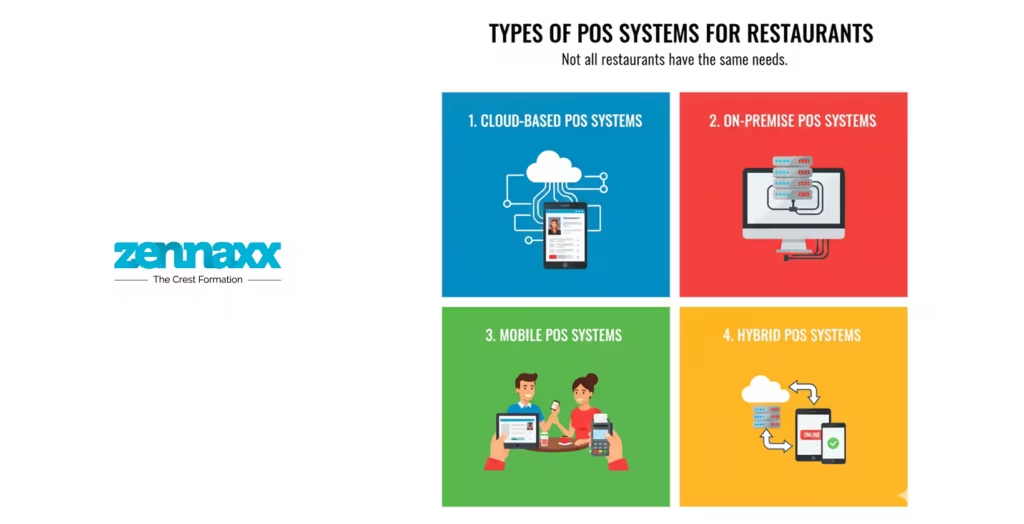
    Types of POS Systems for Restaurants Not all restaurants have the same needs. So for all restaurants POS systems are available in different models based on business size and operations.
    Cloud-Based POS Systems

    These systems store data securely in the cloud. It can be easily accessed from anywhere. They offer real-time syncing, automatic updates, and scalability. It is ideal for growing new restaurants and cloud kitchens.

    On-Premise POS Systems

    Data is stored locally on servers. And yes it’s highly customizable. These systems come with higher upfront and maintenance costs. It is suitable for large, established restaurants.

    Mobile POS Systems

    It is designed for flexibility. Mobile POS systems allow staff to take orders and process payments using tablets or smartphones. It is especially popular with cafés, food trucks, and pop-up kitchens.

    Hybrid POS Systems

    These systems work both online and offline. It ensures uninterrupted operations even during internet outages.

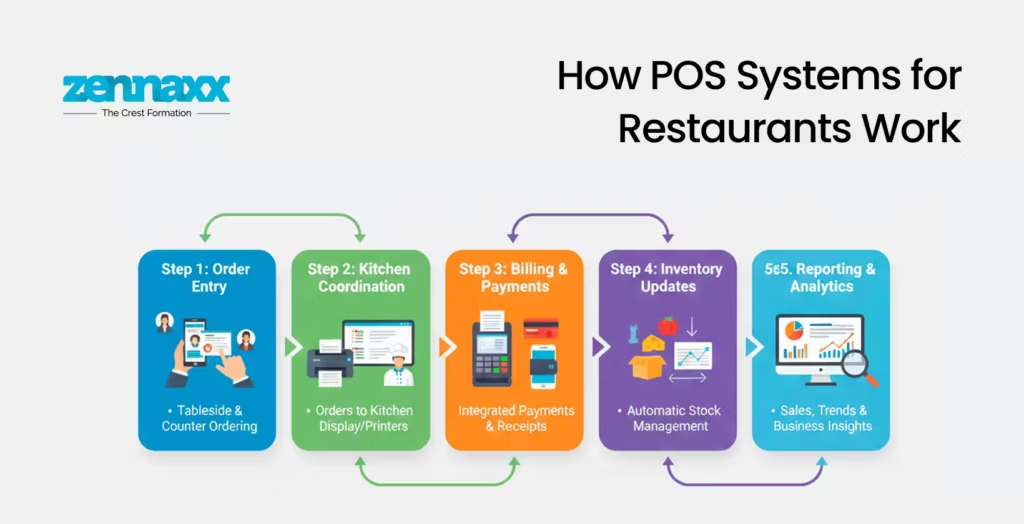
    How​‍​‌‍​‍‌ POS Systems for Restaurants Work

    How​‍​‌‍​‍‌ POS Systems for Restaurants Work A restaurant POS system links together the hardware and software for a smooth operation.

    Order Entry

    Orders are input by waiters through the POS terminals, handheld devices, or QR-based system and associated with a table or customer.

    Kitchen Coordination

    Kitchen staff receive orders on the display system along with requests for custom dishes and preparation progress.

    Billing & Payments

    The POS figures the amounts, adds taxes and discounts, and enables the customers to pay by different methods.

    Inventory Updates

    Stocks are changed automatically every time an order is finished.

    Reporting & Analytics

    Reports capture the sales trends and thus serve as a tool for business ​‍​‌‍​‍‌development.Read more about famous food delivery apps in Canada and how they use POS systems to streamline business processes.

    Hardware and Software Components of a POS System

    Hardware Components

    • POS terminals or tablets
    • Payment card readers
    • Kitchen display screens
    • Customer-facing displays
    • QR code scanners

    Software Components

    • POS application
    • Inventory management software
    • CRM and loyalty modules
    • Reporting and analytics dashboards
    • Integration services

    POS Systems and Food Delivery App Integration

    With online food ordering becoming the norm, POS systems must integrate seamlessly with food delivery app development services Canada. Instead of managing multiple tablets for each platform, a centralized POS ensures all delivery orders flow into one system. It helps to reduce errors and save time.Zennaxx specializes in building POS solutions that integrate smoothly with delivery platforms, custom ordering apps, and restaurant websites.

    How Much Does an Ecommerce Website for Restaurants Using POS Cost?

    When it comes to setting up an ecommerce website with a POS system for online ordering, restaurant owners frequently inquire about the cost. It mostly depends on a number of factors such as:

    • Features and integrations
    • Custom UI/UX design
    • Payment gateway support
    • Delivery and tracking modules

    Custom POS development is a more leveraging choice in the long run as it ties the technology closely with the unique business needs of the ​‍​‌‍​‍‌restaurant.

    Why Choose Zennaxx for POS Software Development?

    As a technology partner, Zennaxx focuses on building reliable, scalable, and future-ready POS systems. It is especially customized for restaurants in Ontario. With expertise in point of sale software development, Zennaxx delivers solutions that integrate operations, enhance customer experience, and support every business growth.

    What​‍​‌‍​‍‌ is the future of POS systems in Ontario’s restaurant sector?

    What​‍​‌‍​‍‌ is the future of POS systems in Ontario’s restaurant sector POS systems involving AI-driven analytics, contactless payments, real-time insights, and deep delivery integrations are the trend to watch. Restaurants that are investing for a state-of-the-art POS system technology are the ones that will find it easier and quicker to scale up, adapt and stay competitive.
    FAQs

    Q1 Which is the best POS system for restaurants in Canada?

    The best POS solution varies as per your business needs. Like size, business, and integration requirements of your restaurant. A custom-developed product usually gives the user more control and adaptability.

    Q2 Are POS systems safe?

    Absolutely! Contemporary POS systems communicate over encrypted channels, employ secure payment gateways, and help to comply with standards to ensure the safety of your business data.

    Q3 Is it possible for a POS system to connect with food delivery apps?

    Of course! The latest POS systems are designed to integrate smoothly. With the help of well-known food delivery apps in Canada.

    Q4 Is cloud-based POS superior to on-premise?

    For the majority of restaurants, a cloud-based POS system offers more advantages. It provides benefits like flexibility, scalability, and ​‍​‌‍​‍‌cost-effectiveness.

  • How Much Does It Cost To Build a Chatbot?

    How Much Does It Cost To Build a Chatbot?

    AI and GPT have changed the habits of people around the world. Every person prefers to ask AI rather than search manually or scroll anything on the internet.

    The impact of finding a quick answer makes customers more likely to engage with websites that offer chatbot services.

    Every popular service worldwide comes into the race for chatbot development to improve the user experience and increase customer satisfaction.

    Chatbot development cost is the main concern for small businesses or budget-conscious companies.If you integrate a chatbot into your website or platform, you must be aware of the basic development cost and the proper development time and process.

    The cost can vary depending on the complexity of the chatbot and the features required. A basic chatbot development cost is between $10000 and $30000, or based on your requirements, it can go higher.

    In this development costing document, we highlight the factors that can influence the developing cost. We also suggest some effective ways to monetize your chatbot.

    What is a chatbot?

    A chatbot is a software program that engages in conversations with people through chat. Chatbots are often used for customer support and virtual assistance. A chatbot uses NLP and ML to understand and answer questions.

    There are various chatbot development options for your business needs. Each chatbot type has a different development cost.

    AI chatbots are at the top of recent chatbot development trends. Because they learn from their conversations and improve over time, they can solve tough problems.

    Button-based chatbots, on the other hand, give users a menu they can select from, making them fit for simple things.

    Rule-based chatbots give users knowledge. They trigger responses using specific keywords, making programs smarter.

    Chatbots are popular in e-commerce, travel, and customer service. They can help customers anytime, day or night. They can answer questions, schedule appointments, and help with simple tasks.So, they are great for improving customer experience and business efficiency.

    Key Statistics and Trends in the Chatbot Market

    • Market Size: The global chatbot market was valued at USD 5.13 billion in 2022 and is projected to reach USD 20.81 billion by 2029, exhibiting a CAGR of 24.32% during this period.
    • Year-over-Year Growth: The market is expected to surge from USD 6.7 billion in 2023 to USD 8.43 billion in 2024, reflecting a remarkable CAGR of 25.9%.
    • Long-Term Projection: From a modest USD 190.8 million in 2016, the market is poised to escalate to USD 1.25 billion by 2025.

    How Much Does It Cost To Build A Chatbot?

    Depending on your platform demands, a chatbot development cost can be between $10,000 and $200,000. The total development cost depends on your tech, features, and dev team.It also depends on your customers and business area. Many companies need to be aware of chatbot development’s true costs.

    Based on Complexity Estimated Cost
    Basic Chatbot $10,000 – $15,000
    Moderately Complex Chatbot $15,000 – $30,000
    Highly Complex Chatbot $30,000 – $40,000
    Advanced AI-Powered Chatbot $50,000+

    With these cost estimates, you can start planning your chatbot development. If you need more clarification about adding a chatbot to your site, consult a software development company.

    They can give you a cost estimate and guidance based on your needs.

    Factors Affecting Cost to Develop a Chatbot

    Finding out what impacts the chatbot development cost will help you to maintain your budget.

    The choices you make regarding these factors significantly influence the development cost of your chatbot project. Let’s understand every factor in detail.

    Custom Development

    Going for custom development helps you maintain your overall factors. It can greatly affect the cost of chatbot development.

    Customization helps develop your chatbot according to your business needs. You can adjust its features, design, and functions that your customer likes most. For instance, you might want a user-specific interface that reflects your brand.

    In addition, you may require advanced NLP, and you can integrate it into your project smoothly. It would help the chatbot understand and answer long and complicated questions.

    You can change existing chatbot frameworks or make a new one for customization. Each new customization can be plus or minus your development cost.

    Chatbot Features, Complexity, and Scale

    The features related to your business also affect the complexity and the project scale. Simple chatbots use pre-defined responses to answer simple customer questions.

    They’re cheaper to develop than more advanced solutions. The latter provides automated lead generation and personal suggestions for a dynamic interaction.

    Adding multilanguage support and extra advanced features increases the compatibility of your project. They need more development time and specialized skills.

    Also contributing to this are AI analytics and integrations with systems such as CRMs and payment gateways.

    The chatbot development cost will also depend on the size, whether it is a small business or an enterprise. You need a strong architecture and lots of testing for a large-scale deployment.

    App Platform

    The platforms you choose also affect the cost of chatbot development. Each platform—website, app, messaging service, or voice assistant—needs unique development and testing.

    For example, a website chatbot might need to adapt for mobile devices. It must work on different screen sizes and operating systems.

    Developing for multiple platforms at once increases time and costs. Also, each platform may have its standards.

    This requires extra work to ensure compatibility and performance. The broader the platform support, the higher the investment required.

    Integration with Internal Processes

    Integrating the chatbot with your company’s internal processes can be challenging and costly. For example, your company’s ERP systems, CRM software, and other custom tools fall into this category.

    For immigration, you need some extra hours from the developer team. Verifying the chatbot’s ability to interact with these systems is essential, as it will determine whether data is collected or forwarded.One example is that a chatbot connected to a CRM system could change customer records based on conversations.

    However, careful development work is required to guarantee safe, uninterrupted data flow. Additionally, extra layers of security are often needed to keep private information secure, which raises the development cost even more.

    The difficulty level of these integrations will depend on the systems being used.

    Third-Party Integrations

    Third-party integrations are another factor that can drive up the cost of chatbot development. Adding payment gateways and content management systems (CMS) makes the chatbot more useful.

    However, it also adds complexity. For example, if your chatbot needs to accept payments, it must have a secure integration with a payment gateway.

    Including tools like video or voice chat also complicates development and increases expenses. These connections help your chatbot be more valuable.

    However, achieving success requires meticulous preparation and execution. Our discussion on integration also raises the chatbot development costs. Your project’s rate and technology determine this.

    To keep chatbot costs low, consider the platform to use, how to connect it to other apps, the features’ complexity, and if you need custom development.

    Your business goals will guide the choices you make about how to use your chatbot.

    Planning to develop EHR software?

    Contact us today and let our team of experienced professionals transform your vision into an innovative and user-friendly app that stands out in the market!

    Incredible Ways to Reduce Chatbot development cost

    Making a chatbot requires careful cost management. The success and sustainability of a project are contingent upon this.Here are five ways to make a high-quality chatbot development cost.

    Clear objectives and scope

    One of the most effective ways to reduce chatbot development costs is to start with a well-defined set of objectives and a clear project scope.You can avoid costly, unnecessary features by clearly defining your chatbot’s goals.

    Do you want to improve customer service, increase engagement, or automate tasks? A focused scope helps prevent scope creep, which can lead to budget overruns and delayed timelines.

    Focus on the most important features that support your goals. You can add more later if needed.

    Automate testing and deployment

    Automating testing and deployment can cut time and costs in chatbot development.Manual testing and deployment are labor-intensive and prone to human error, which can lead to costly rework.

    Automated testing tools can quickly find and fix issues in development. Making a better product this way will take less time and work.

    Also, automated deployment pipelines speed up updates and new features. They cut costs by reducing downtime and manual work.

    Choose cost-effective platforms

    Choosing the right platform for your chatbot is important for keeping costs down.

    Depending on your needs and the people you want to reach, some platforms are cheaper than others.

    If you know that the people you want to get use a certain messaging app, for example, make your chatbot work on that platform first.

    Then, increase your scope to include others.

    Focusing your resources this way enables you to achieve the greatest possible impact. It reduces the need for extensive cross-platform development.Also, some chatbot development platforms offer tools and templates. They can help you build a functional chatbot faster and cheaper.

    Adopt agile methodologies

    Using agile methods in chatbot development can save money.

    Agile methods stress iterative development, feedback, and flexibility.They let you adapt quickly to changes without much rework. Breaking the project into smaller tasks will help.

    You can deliver parts of it faster, get user feedback, and make changes before moving on.

    This process helps prevent costly mistakes.It ensures the final product meets user needs. This ultimately reduces development costs.

    Continuous monitoring and optimization

    Monitor and optimize your chatbot once it has been launched. This will maintain long-term cost savings.

    If you want to discover ways to make the chatbot better, you should regularly examine user interactions and metrics.Optimization includes improving responses, getting more people involved, and fixing bugs.

    Fixing these problems now will keep them from growing into big, expensive problems.With monitoring, you can scale the chatbot and modify its resources according to real usage. So you don’t waste money on features or space you don’t need.

    Follow these tips to make a good chatbot and save money simultaneously. Define clear objectives.

    Automate processes.Choose cost-effective platforms. Adopt agile methods. Commit to continuous optimization.

    Effective Ways to Monetize Your Chatbot to Get ROI

    If you want to get a good ROI, you should think about the qualification of monetization as a priority. If you want to turn your chatbot into a way to make money, here are five suggestions.

    B2B Bots

    Businesses that provide B2B services are in demand. Businesses can benefit greatly from B2B chatbots because they help them improve customer service, collect data, and encourage direct communication within the business.

    Show these chatbots to your clients as a subscription service to firms to get them interested in buying those chatbots.

    They will save you time and automate jobs. B2B chatbots help companies drive more sales and partly achieve a higher return on investment, for example, by fixing certain business issues like cutting down on customer service costs and making things run more smoothly.

    Freemium Model

    A freemium model has become a preferred way to capitalize on the chatbot market. It provides free basic functions but charges extra for advanced features.

    As a result, end users will try out the chatbot without paying anything. This might attract people to use it. If users find real value in the service, they might subscribe to the exclusive functionality.

    Have you got enhanced analytics, additional visibility, and advanced integrations? You are getting there. They are designed to serve different market segments and ensure you have revenue streams.

     Affiliate Marketing and Sponsorship

    Chatbots have emerged as a potential resource for affiliate marketing and sponsorship. Your chatbot can earn money or rewards by suggesting related products, services, or subjects to the conversations your users are having.

    A commission is given to the owner of the affiliate links for sales made. In addition, you can join forces with brands to put paid content in the chatbot or offer sponsored content to the users.

    A chatbot designed for travel can include links to hotels or flights through which it can earn a portion of the income generated.

    As a bonus, these steps will also help your money. They will improve the user experience by giving useful ideas in real-time.

    Lead Generation and Qualification

    The chatbots that generate and qualify leads sell for businesses. Although they are only a small part of your sales funnel, they are still useful tools.

    Chatbots can spot and qualify potential buyers. They do so by interacting with the users, for they require the user to be engaged with the relevant questions and information they provide. You are going to get money from this source by selling the promising leads to the companies that are interested in the new customers.

    Ultimately, you can use the information to increase your sales as well. This method is a very fast way to get your ROI.

    This also plays a substantial role in long-term growth by automating the collection of potential clients` data.

    Advertising and In-App Purchases

    You can monetize your chatbot in ways other than through advertisements. Through the provision of in-app purchase tasks, chatbots can generate additional revenue.

    Advertising makes money every time a user sees or interacts with it. To do this, you can use user behavior and interest data to display ads that are relevant to each user.

    You can also offer in-app purchases through the chatbot.

    You can sell these for various things, like the user account for the exclusive content, the premium features, or even the provision of certain services.

    For instance, a chatbot in the gaming industry gives a virtual cat or different game enhancements for money.This method is an income earner and also improves the user experience. Personalizing and being relevant are both good things about it.

    Apply these methods to monetize your chatbot on B2B bots, freemium models, and affiliate marketing through lead generation and the use of ads.

    All of them will help you convert your chatbot into a successful business with the high ROI you seek.

    How Much Does It Cost to Maintain a Chatbot?

    The cost of maintaining a chatbot is permanent based on your business and technology upgrade. Costs vary with the unit’s complexity, functions, and user interaction.

    A simple chatbot that needs minor maintenance and monitoring costs around $500 to $1,000 annually. That comprises servers, regular updates, and basic support. However, as the chatbot becomes more sophisticated, costs increase.

    Natural language processing (NLP), multi-platform integration, and advanced AI are the causes of this. The period of maintenance can be from $1,000 to $2,000.

    Furthermore, the cost of chatbot maintenance depends on many different critical areas. A moderately complex chatbot with advanced features may be offered for $15,000 to $30,000.
    It would entail options such as personalized answers and API integration. A chatbot with ultimate complexity can be added to an app for $30,000 to $40,000.

    It would use AI, deep learning, and many languages. A unique AI chatbot that has custom capabilities might have a price tag that exceeds $50,000. If we focus on technology, maintenance costs will rise with your company’s model. The cost will rise if frequent updates are needed to keep up with AI advancements.

    The best way to get a chatbot cost estimate is to contact an AI development company.They do everything possible to make sure that the chatbot you pick fits your needs and your budget.

    Ready to Develop Your Own Chatbot With Us?

    Chatbot development costs vary depending on the features, complexity and need for integration. Both small and large businesses need to know how much it costs to set up a chatbot for customer service or a quality AI solution.It is an important part of making a clear budget for chatbot development. To compete in business, every company needs these robots. They provide great customer service and are vital to survival.If you need clarification on the actual cost of developing a chatbot, our free AI consultation can help. It will clarify your vision for your future development and its cost.If you want to integrate a chatbot into your business or invest in AI technology but are still determining the cost, Zennaxx Software Solution can help. We will clear up any doubts and provide a detailed cost analysis.

    FAQs

    Q1.How much does the chatbot cost to develop?

    Chatbot development costs differ depending on the complexity, features, and platform it is built. The most basic text chat bots may cost from $500 to $2,500, while the smart AI-powered chatbots may range from an affordable $10,000 to even $150,000.

    Q2.Can I create a chatbot for free?

    Free chatbot-building tools are available on some platforms, but they are usually very basic and can’t be used by businesses. If you build a flexible chatbot for your business, you must work with a dev company. It must create a lifelong solution with advanced features and custom options.

    Q3.How much does it cost to develop a WhatsApp chatbot?

    The WhatsApp chatbot development cost is dependent on the features you want to add to your bot. Some developers may offer WhatsApp chatbot services at a high price. But Zennaxx Technology can build the perfect model for you within your budget.

    Q4.Does chatbot development require coding?

    Today, many platforms let you create and design chatbots without coding. But, as a business, you must code your chatbot for a more flexible solution. However, you need to know coding in some cases: JavaScript, Python, or Node.js.

    Q5.How does the choice of platform affect chatbot development costs?

    The choice of website, app, or messaging service will affect chatbot development costs. The initial cost may increase if accessories are added to other devices and platforms.

  • 4 Different Types of Software Maintenance [A Detailed Guide]

    4 Different Types of Software Maintenance [A Detailed Guide]

    Software maintenance is an important aspect of the software lifecycle. As technology evolves and user expectations grow, software maintenance becomes increasingly important.

    Whether it’s fixing bugs, updating features, or enhancing performance, regular maintenance is crucial to keeping your software relevant and reliable
    And understanding the different types of software maintenance can help you improve the performance and longevity of your software. In this post, you will learn:

    • The four main types of software maintenance and their purposes
    • How to apply different types of maintenance
    • Best practices and strategies to overcome common maintenance challenges Let’s dive in.

    What is Software Maintenance?

    Software maintenance involves updating and improving a software application after it has been released.

    This process is essential to ensuring your software stays relevant and continually runs smoothly. Maintenance ensures that your software remains useful and effective, even as technology and user requirements change.Without maintenance, your software can become obsolete, insecure, and unable to meet the needs of its users.

    Though some people might think software maintenance is just about fixing bugs, it includes much more. It involves optimizing software performance, adding new features, adapting to new environments, etc.

    Understanding the full scope of maintenance helps you appreciate its value and plan for it effectively.

    Overview of the Software Lifecycle and Where Maintenance Fits In

    The software lifecycle includes the following stages: planning, development, testing, deployment, and maintenance.

    Maintenance is the final stage but it lasts the longest because it’s ongoing. It is a continuous process that begins once the software is deployed and lasts until it is no longer in use.

    After you deploy your software, maintenance ensures that it remains useful and functional. Without regular maintenance, your software application can develop issues that result in more significant problems later.

    Types of Software Maintenance

    Software maintenance can be divided into four main types. Each type serves a specific purpose and is necessary for different reasons. Let’s explore each of them:

    Corrective Maintenance

    Corrective maintenance involves fixing bugs and errors found in your software after it has been released. Think of it as patching up holes in a road.These errors could be things like software crashes, glitches, or security vulnerabilities that need immediate attention.

    For example, if users report that a program crashes every time they try to save a file, corrective maintenance would address this issue to prevent further disruptions.This ensures that your software continues to function properly and provides a good user experience.

    Adaptive Maintenance

    Adaptive maintenance involves updating your software to work in new or changing environments.This could be due to updates in the operating system, hardware changes, or new laws and regulations that the software must comply with. Imagine you have a mobile app that needs to be updated because a new version of the operating system has been released.

    Adaptive maintenance would ensure that your app continues to work seamlessly on the new OS, so your end-users can enjoy a smooth experience.

    Perfective Maintenance

    Perfective maintenance focuses on improving and enhancing your software. This type of maintenance aims to increase user satisfaction and software performance.It might involve adding new features, improving user interfaces, or optimizing app performance.

    For example, if users suggest adding a new search feature to your software, perfective maintenance would involve designing and implementing this feature.By continuously improving your software, you can meet the evolving needs of your users and keep them satisfied.

    Preventive Maintenance

    Preventive maintenance aims to prevent potential problems before they occur. This involves regular monitoring and updates to ensure that your software remains stable and secure.Think of preventive maintenance as regular health check-ups for your software application.

    It might involve updating security protocols, optimizing code, or conducting performance tests.By being proactive, you can avoid major issues down the line and ensure the long-term health of your software.

    Importance of Software Maintenance

    Maintenance is necessary to ensure that your software remains functional, secure, and efficient. As technology evolves and user needs change, you need to update your software to ensure it remains relevant. Regular maintenance helps prevent security vulnerabilities, improves performance, and ensures that your software continues to meet user needs.

    And software maintenance can help you reduce downtime and save costs in the long run by addressing issues on time before they result in bigger problems.

    Don’t Wait for Downtime

    Protect your investment with expert maintenance—ensure peak performance and seamless operations. Schedule today!

    Challenges in Software Maintenance

    Maintaining software is not without its challenges. Here are five key challenges that can impact the effectiveness of software maintenance.

    Complexity of Software Systems

    Modern software systems are often highly complex, with numerous interconnected components. This complexity makes identifying and fixing issues difficult, requiring specialized knowledge and tools.

    Solution: Use modular design principles and comprehensive documentation to simplify the maintenance process.

    Disruption to Business Operations

    Coordinating with users and other stakeholders to schedule maintenance without disrupting operations can be tricky.Also, maintenance activities can sometimes disrupt business operations, leading to downtime and lost productivity.This can be particularly problematic for businesses that rely on continuous software availability.

    Solution: Schedule maintenance during off-peak hours to minimize disruption. Use rolling updates and phased deployments to ensure continuous availability and reduce downtime.

    And maintain clear communication with users.

    Legacy Systems

    Maintaining older, legacy systems can be particularly challenging. These systems may lack proper documentation, have outdated technologies, and be poorly understood by current developers, thereby complicating maintenance efforts.

    Solution: Gradually modernize legacy systems by updating components incrementally. Also, maintain thorough documentation and provide training to current developers on legacy technologies.

    Dependency on Third-Party Components

    Many software applications rely on third-party libraries and components. Keeping these components updated and ensuring compatibility can be challenging, especially when third-party updates introduce new issues.

    Solution: Regularly monitor and update third-party components. Establish a testing environment to assess the impact of updates before deploying them to production.

    What is Software Reverse Engineering?

    Software reverse engineering involves analyzing a software application to understand its design and functionality.

    This process helps you see how the software works, even if you don’t have the original source code. This may involve decompiling the code, studying its structure, and identifying how it works. Reverse engineering is often used in software maintenance to understand and fix issues, especially when documentation is lacking or the original developers are unavailable.

    For instance, if you inherit a legacy system without proper documentation, reverse engineering can help you understand its structure and functionality.Then you can use this knowledge to effectively maintain the legacy application.

    Benefits of Reverse Engineering

    Reverse engineering helps you update or fix software when you do not have detailed information about its original development. Basically, it helps you:

    • Figure out how to safely and effectively make changes to your software
    • Understand and fix bugs, optimize performance, and add new features
    • Recover lost documentation, understand legacy systems, and ensure compatibility with new technologies

    Advantages and Disadvantages of Software Maintenance

    Now let’s explore some advantages and disadvantages of software maintenance to help you make informed decisions about managing your software. Here are five key points for each.

    Advantages of Software Maintenance

    Improved Performance

    Regular maintenance ensures your application runs efficiently and enhances performance. This helps you retain more users and maintain a competitive edge.

    Enhanced Security

    Software maintenance helps you identify and fix security vulnerabilities in order to protect your application from potential threats. With this, you can prevent major issues such as data breaches, financial losses, legal issues, and damaged reputations.

    Extended Software Lifespan

    Through regular updates and optimizations, maintenance extends the lifespan of your software. This maximizes your initial investment in building or purchasing the software and delays the need for costly replacements or redevelopments.

    User Satisfaction

    By addressing bugs, adding new features, and improving usability, maintenance increases user satisfaction. And happy users are more likely to continue using your application and recommending your business to others.

    Compliance with Standards

    Regular maintenance ensures your software complies with industry standards and regulations. Compliance reduces the risk of legal issues and penalties, ensuring your business operations run smoothly.

    Disadvantages of Software Maintenance

    Cost

    Maintaining software can be expensive sometimes. The maintenance process might require ongoing investment in resources, tools, and skilled personnel.

    Complexity

    Software maintenance can be complex, often requiring specialized knowledge and skills. This complexity can make the maintenance process challenging and time-consuming.

    Potential for New Issues

    While fixing existing problems, maintenance can sometimes introduce new issues. This can lead to additional work and unforeseen complications.

    Dependency on Original Developers

    Effective maintenance may require knowledge from the original developers, who may no longer be available. This can complicate the maintenance process and increase dependence on existing staff.

    Comparison of the Different Types of Software Maintenance

    To help you understand the differences between the types of software maintenance, here is a comparison table summarizing the key aspects of each type:

    Type of Maintenance Definition Purpose
    Corrective Fixing bugs, errors, and defects in the software. For example, repairing a feature that does not work as expected. Ensure the software functions correctly and reliably.
    Adaptive Updating the software to work with new environments, platforms, or operating systems. For example, making the application compatible with a new OS version. Maintain compatibility with changing technologies and environments.
    Perfective Enhancing the software by improving performance, usability, or adding new features. For example, introducing a new feature based on user feedback. Meet evolving user needs and improve the overall user experience.
    Preventive Making improvements that reduce the risk of future issues. For example, optimizing code, refactoring, or strengthening security. Reduce the likelihood of future problems and improve long-term maintainability.

    Best Practices in Software Maintenance

    Following best practices in software maintenance ensures that your software remains efficient, secure, and user-friendly. Here are some best practices to help you maintain and improve your software:

    Regular Maintenance Schedules

    Establish and stick to regular maintenance schedules to keep your software updated, secure, and performing well. This prevents issues from accumulating and ensures continuous improvement.

    Use of Automated Tools

    Leverage automated testing and monitoring tools to identify and address issues quickly. These tools can help streamline the maintenance process and reduce the risk of human error.

    Comprehensive Documentation

    Maintain comprehensive and up-to-date documentation for your software. This aids in understanding the software’s structure, making maintenance tasks easier and more efficient.

    User Feedback Integration

    Regularly gather and integrate user feedback to improve your software. This feedback helps ensure that your software continues to meet user needs and remains relevant.

    Proactive Issue Identification

    Implement proactive measures, such as performance monitoring and security audits, to identify potential issues before they become critical. Being proactive helps you maintain the stability and security of your application at all times.

    Conclusion

    No doubt, software maintenance is essential for improved performance, enhanced security, and user satisfaction.Ensure you have a regular maintenance schedule to stay ahead of potential issues, extend your software’s lifespan, and ensure its long-term success.Ready to maximize the value of your application through effective software maintenance?
    Contact Zennaxx today for reliable software maintenance services that enhance performance, improve security, and ensure long-term user satisfaction.

    Read Also: 

  • Custom Hospital Inventory Management Software in 2024

    Custom Hospital Inventory Management Software in 2024

    Hospital inventory management software is a critical aspect of healthcare administration. Proper management of inventory ensures that hospitals can provide uninterrupted patient care, maintain safety standards, and operate efficiently. Without it, hospitals may face significant challenges, including shortages of essential supplies, wasted resources, and increased operational costs.In this post, you will learn:

    • Why hospital inventory management is important for patient care and operational efficiency.
    • The challenges hospitals face without proper inventory management.
    • How hospital inventory management software can help overcome these challenges.

    Let’s dive into the details of hospital inventory management and discover how you can optimize your hospital’s inventory system.

    What is Hospital Inventory Management?

    Hospital inventory management refers to the systematic approach of ordering, storing, tracking, and controlling the supplies, medications, and equipment used in a healthcare facility.

    It includes everything from surgical instruments and medical devices to pharmaceuticals and everyday consumables.Effective inventory management ensures that you have the right items in the right quantities at the right time.

    It involves maintaining accurate records, forecasting demand, and ensuring timely replenishment.This process is particularly important in hospitals because the availability of supplies directly impacts patient care and safety.

    Types of Hospital Inventory

    Let’s briefly take a look at the types of inventory that hospitals maintain.

    Understanding the different types of hospital inventory can help you identify suitable software for your facility’s inventory management needs.

    Periodic Inventory

    Periodic inventory involves counting inventory at specific intervals, such as monthly or quarterly.This method provides a snapshot of inventory levels at a particular point in time. However, it can be labor-intensive and prone to inaccuracies.

    Perpetual Inventory

    Perpetual inventory continuously tracks inventory levels in real-time. This method provides up-to-date information and reduces the need for manual counting.It is more accurate and efficient but it requires reliable software and systems.

    Why is Hospital Inventory Management Important?

    Hospital inventory management is important for several reasons, including:

    • Quality Patient Care: Shortages or delays can compromise patient safety and treatment outcomes. So, the availability of necessary medical supplies and equipment ensures that patients receive timely and appropriate care.
    • Operational Efficiency: Efficient inventory management reduces waste, minimizes overstocking, and ensures that resources are utilized effectively. Consequently, this leads to cost savings and improved financial performance.
    • Compliance and Safety: Hospitals must comply with various regulatory requirements related to the storage and handling of medical supplies. Proper inventory management helps maintain compliance and ensures that expired or unsafe items are not used.

    For example, imagine a scenario where a hospital runs out of a critical medication due to poor inventory management.

    This could lead to delayed treatments, poor patient outcomes, and potential legal liabilities. By contrast, a well-managed inventory system ensures that such situations are avoided.

    Challenges of Hospital Inventory Management

    Managing hospital inventory without reliable inventory management software can be challenging. Let’s examine some of these challenges:

    Increased Operational Costs

    Inefficient inventory management can lead to increased operational costs due to emergency purchases, rush orders, and waste from expired supplies.Additionally, it increases labour costs as staff spend more time managing inventory manually.

    Sorting Pharmaceuticals

    Sorting and categorizing pharmaceuticals can be complex due to the vast variety of medications, their storage requirements, and their varying expiration dates. Incorrect sorting can lead to misplacement and inefficient use of resources.

    Stockouts and Overstocking Issues

    Stockouts occur when necessary medical supplies or medications run out, leading to delays in patient care and potentially compromising patient safety.On the other hand, overstocking leads to excessive inventory levels, increased storage costs, and the risk of supplies expiring before they can be used.

    Tracking Expiry Date of Medical Supplies and Pharmaceuticals

    Without effective inventory management, hospitals may face issues keeping track of expired medical supplies and medications.This not only leads to waste but also poses risks to patient safety if expired items are accidentally used.

    Tracking and Accountability Problems

    Manual inventory tracking methods are prone to errors and can lead to discrepancies in inventory levels.This makes it difficult to hold staff accountable for inventory usage and can result in loss or theft of supplies.

    Planning to Optimize Your Hospital Inventory?

    Ready to Transform Your Hospital’s Inventory Management? Let’s Build Your Custom Software Solution Today!

    How Hospital Inventory Management Software Helps Solve These Challenges

    To address these challenges, many hospitals are turning to inventory management software. Hospital inventory management software offers several solutions to the challenges discussed above:

    Cost Reduction Through Efficient Inventory Use

    By optimizing inventory levels and reducing waste, hospital inventory management software can lead to significant cost savings.In fact, it minimizes the need for emergency purchases and rush orders, which helps to reduce operational costs.

    Sorting Pharmaceuticals

    Hospital inventory management solutions use barcodes or RFID technology to sort and track medications automatically.This ensures that medications are stored correctly and are easily accessible.

    Automated Tracking and Real-Time Updates

    Hospital inventory management software automates the tracking of medical supplies and medications, providing real-time updates on inventory levels.

    This gives healthcare providers access to accurate information about available supplies in order to reduce the risk of stockouts and overstocking.

    Expiry Date Alerts and Batch Tracking

    The software tracks expiration dates and provides alerts when supplies are nearing their expiration date.So, it ensures that supplies are used before they expire, reducing waste and ensuring patient safety.Inventory management software supports batch tracking, which allows hospitals to manage inventory more efficiently by tracking supplies by batch, ensuring that older supplies are used first.

    Features of Hospital Inventory Management Software/System

    When choosing hospital inventory management software, it’s important to consider the key features that will benefit your facility.Let’s take a look at the essential features that your hospital inventory management software should have:

    Real-Time Inventory Tracking

    Stock tracking is a fundamental feature that provides real-time visibility into inventory levels. Moreover, it helps you monitor stock levels, track usage patterns, and identify trends.

    This feature ensures that you always have the necessary supplies on hand and can avoid overstocking or understocking.

    Medical Supply Management

    This feature manages the ordering, storing, and distribution of medical supplies.
    It ensures that supplies are available when needed and that they are stored correctly to prevent damage or contamination.

    Medical Equipment Management

    Managing medical equipment involves tracking the location, usage, and maintenance schedules of equipment.This feature helps ensure that equipment is available and functioning correctly when needed.

    Inventory Automation

    Automation reduces the need for manual intervention in hospital inventory management.
    It includes features like automated reordering, real-time tracking, and alert systems, which improve accuracy and efficiency while reducing the risk of human error.

    Integration with Electronic Health Records (EHR) and Other Systems

    The software should be able to integrate with other systems within your organization, such as EHR software, pharmacy management, and procurement systems, to ensure that inventory data is shared seamlessly across your healthcare facility.

    Integration streamlines processes, reduces duplication of effort, and improves operational efficiency.

    Detailed Reporting and Analytics

    Detailed reporting and analytics features provide valuable insights into inventory management.So, your hospital inventory management software should generate reports on inventory levels, usage patterns, and expiration dates in order to facilitate informed decision making.

    Security and Compliance

    Hospital inventory management software ensures that all inventory processes comply with regulatory standards.And it includes security features to protect sensitive data and prevent unauthorized access.
    Usability Testing

    Benefits of Healthcare Inventory Management Software

    Implementing healthcare inventory management software offers numerous benefits for your hospital. Here are some of the benefits:

    Improved Patient Care and Safety

    Healthcare inventory management software ensures that necessary supplies and medications are always available, enhancing patient care and safety.Moreover, it ensures that patients receive timely care by reducing the risk of delays in treatment and surgeries.

    Simplified Inventory Management

    The software simplifies inventory management by providing a centralized system for tracking all assets.With real-time tracking features, it ensures that you have accurate and up-to-date information about inventory levels and usage.

    Improves Accuracy

    By automating inventory management, the software reduces inaccuracies and provides easy access to analytics.

    As a result of this, you can maintain a steady supply of necessary items and make informed decisions based on data.

    Enhanced Operational Efficiency

    Healthcare inventory management software streamlines processes, improving operational efficiency.It automates inventory tracking, reordering, and expiration date management, reducing the time and effort required for manual inventory management.

    Cost-Savings and Waste Reduction

    Efficient inventory management leads to significant cost savings. It reduces waste, prevents overstocking, and ensures that resources are used effectively.Also, efficient inventory management reduces storage costs and frees up space for other critical needs, further contributing to cost savings.

    Important Factors to Consider When Choosing the Right Software for Your Hospital

    Choosing the right hospital inventory management software is critical to ensuring it meets the specific needs of your healthcare facility.Several factors need to be considered to make an informed decision. Let’s examine some of the important factors to consider when selecting your hospital inventory management software:

    Scalability and Customization Options

    Scalability is essential to ensuring that the software can grow with your hospital.Therefore, the software should be able to handle increasing inventory levels, additional users, and more complex workflows as your hospital expands.Customization options are also important to tailor the software to your hospital’s specific needs.Look for software that allows customization of features, workflows, and reports to match your hospital’s unique requirements.

    User-Friendly Interface and Training Support

    A user-friendly interface is crucial to ensure that staff can quickly learn and effectively use the software.Furthermore, the software should have an intuitive design, easy navigation, and clear instructions to minimize the learning curve.Training support is equally important to ensure that staff are adequately trained to use the software.Look for vendors that offer comprehensive training programs, including tutorials, webinars, and on-site training sessions.

    Integration Capabilities with Existing Systems

    Ensure that the software can be easily integrated with your hospital’s existing systems and IT infrastructure.Integration ensures that inventory data can be efficiently shared across IT systems within your hospital to improve accuracy.

    Cost and Return on Investment

    Cost is an important factor to consider when choosing hospital inventory management software.

    So, you should evaluate the total cost of ownership, including licensing fees, implementation costs, training expenses, and ongoing maintenance and support costs.

    Also consider the potential return on investment (ROI) by evaluating the cost savings and efficiency improvements the software can provide.Look for software that offers a good balance between cost and features to get the best value for your hospital.

    Vendor Support and Reliability

    You should consider vendor support and reliability to ensure that the software operates smoothly and any issues are promptly addressed.Look for vendors with a strong track record of providing reliable software and excellent customer support.Evaluate the vendor’s reputation, customer reviews, and support services, including availability, response times, and the quality of support provided.

    Best Practices to Follow for Hospital Inventory Management Software Development

    When off-the-shelf solutions can’t meet your healthcare facility’s inventory management needs, you should consider building custom hospital inventory management software solutions.

    To ensure your custom software meets the needs of your healthcare facility and provides optimal performance, here are some best practices to follow for effective hospital inventory management software development:

    Involve Stakeholders in the Development Process

    Involving stakeholders, including healthcare providers, administrators, and IT staff, in the development process ensures that the software meets the needs of all users. So gather feedback and input from relevant stakeholders to identify their requirements, preferences, and pain points to ensure that the final product addresses their needs and improves their workflows.

    Focus on User-Friendly Design and Ease of Use

    A user-friendly design is essential to ensure that staff can quickly learn and effectively use the software. Focus on creating an intuitive interface, easy navigation, and clear instructions to minimize the learning curve.

    Ensure Robust Data Security Measures

    Inventory data includes sensitive information that must be protected.Therefore, it is important to implement security measures that prevent unauthorized access and ensure compliance with regulatory standards. You should also ensure that the software complies with relevant regulations and standards, such as HIPAA, to protect patient privacy and data security.

    Continuously Monitor and Improve the System Based on Feedback

    Continuous monitoring and improvement play an important role in ensuring that the software meets the evolving needs of your healthcare facility.So you should gather feedback from users and monitor the software’s performance to identify any issues or areas for improvement.Then use the feedback and performance data to make necessary updates and improvements, ensuring that the software continues to provide optimal performance and meets the needs of healthcare providers.

    Regularly Update and Maintain the Software

    It’s important to conduct regular updates and maintenance to ensure that the software continues to perform optimally and remains secure.So you should develop a maintenance plan that includes regular updates, bug fixes, and security patches.

    Conclusion

    You can improve your hospital’s inventory management and ensure that your facility operates smoothly and efficiently with quality hospital inventory management software.

    With this software, you can effectively address your inventory management challenges and ensure that medical supplies, medications, and equipment are available when needed, resulting in enhanced patient care and reduced operational costs.

    Looking to improve your hospital inventory management? Partner with Zennaxx for reliable hospital inventory management software development services as well as customization and installation of off-the-shelf solutions.

    Reach out to us today to learn more about how we can help you optimize your hospital’s inventory management processes.

    Read Also: 

  • DevOps Implementation Plan: Strategy & Roadmap

    DevOps Implementation Plan: Strategy & Roadmap

    Software delivery performance is a significant indicator of how efficient your process is. However, it’s not just about processes.It would be best to have a structural change to accelerate delivery performance. Implementing DevOps can help you improve software delivery performance.

    According to Google Cloud, DevOps has the highest impact on software delivery performance. This means DevOps is the final block to solving your software delivery puzzle.

    Well, there are many dynamics to consider! DevOps implementation and actual execution can differ, resulting in suboptimal results.

    You need strategic planning, proper execution, and best practices to maximize DevOps implementations.

    This article will help you with a comprehensive guide on planning, strategizing, and implementing DevOps, along with best practices. But first, you must know the basics of DevOps.

    What is DevOps, and Why is it Important?

    DevOps is a set of practices that bridge development and operations teams for faster, more efficient, and streamlined software development.

    Embracing the DevOps culture, your organization can transform how software is developed.It enables your organizations to accelerate software delivery through automation, collaboration, faster feedback, and incremental iterations.

    This article will help you with a comprehensive guide on planning, strategizing, and implementing DevOps, along with best practices. But first, you must know the basics of DevOps.

    Understanding the Basics of DevOps

    Most organizations have a siloed structure where teams work independently. DevOps breaks down siloed teams and creates cross-functional teams that make continuous improvements leveraging CI/CD implementations.

    Using DevOps culture, you can merge operations, development, and multiple teams to form a single dedicated team.

    For example, you can integrate the security and QA teams with the development and operations teams to leverage DevSecOps.

    These teams help automate processes, improving software development time compared to the conventional approach.

    Embracing the DevOps culturewill result in merging teams and adopting tech stacks and tools that improve software development efficiency.

    These tools and technologies enable the DevOps team to efficiently deploy code and provision infrastructure.

    Why is DevOps Implementation Important?

    DevOps allows the creation of a cross-organizational working culture. Your organization will have improved accountability, transparency, and unified goals.

    In a conventional software development process, collaborations are challenged.

    Most teams work within their confined boundaries, which makes unified development activities challenging.For example, if you are developing a complex feature that integrates innovative technology like artificial intelligence(AI), you need multiple teams to work together.

    This is where an organization’s conventional structure needs to be comprehended. DevOps, on the contrary, breaks the boundaries across teams, making a unified approach to development come alive. DevOps implementation can help improve collaboration and allow your organization to build cross-functional teams.

    This means you will have talents who can work across teams in different orientations. However, the benefits of DevOps implementation are far more than just collaboration or functional teams.

    Benefits of DevOps Implementation

    The value of DevOps lies in the increased focus on developing cross-functional skills and faster software delivery.

    Beyond these two benefits, DevOps implementations help maintain consistency of product experience, system stability, and efficient planning. Here are some of the benefits you can expect from DevOps implementations.

    Organizational Stability

    Organizations that rapidly change their structure and processes are often met with resistance within the team. However, with DevOps implementations, you can reduce such resistance and improve change management. You can use a tighter feedback loop across the organization with DevOps to ensure stable operations.

    Improve collaborations through a gamification approach, where team members are encouraged to perform cross-functional tasks. Improve QA, testing automation, staging, and more.

    Plus, you will have a quicker turnaround time, which will help with speedier product delivery and improve team efficiency.

    Quicker Time-to-Market

    DevOps implementation can reduce the time to market, helping you gain a competitive edge. Enterprises have strategic product launches to gain first-mover advantage.

    However, conventional development approaches can be detrimental to such strategies..

    Implementing DevOps allows you to streamline development and rapidly build software. This can be helpful even for startups looking to take advantage by quickly bringing their ideasto market.

    However, initially, DevOps can be challenging for startups to implement with smaller teams. On the contrary, large enterprises can benefit from DevOps due to the large number of teams that work in a siloed environment.

    Improved Product Quality

    DevOps implementations paired with CI/CD enable improvements in product quality. Using DevOps, you can automate testing and accelerate deployment. Most importantly, you can test extensively, as less time is needed for testing and QA processes.

    You can implement DevSecOps practices to ensure product security. Increased security and an error-free experience can also contribute to customer satisfaction.

    DevOps can help you gain such user experience through automated CI/CD pipelines, ensuring conscious improvements to the product.

    Accelerated Time-to-Resolution

    Using DevOps practices, you can improve the feedback loop time, improving seamless communication and transparency. Most significantly, DevOps helps improve the time-to-resolution.Due to slower feedback integrations, most enterprises need help to address customer queries faster. You can leverage agile with DevOps to ensure faster feedback integration and improve response time.

    Dynamic Task Management

    You can strategize with all the expertise at the helm of planning and yet will experience sudden tasks. Such operational challenges can be complex to manage with siloed teams.DevOps ensures dynamic task management with a unified approach and streamlined processes. It allows you to prioritize important tasks with effective resource management.This means there is a sufficient workforce and infrastructure when you need resources to handle unplanned tasks.Now that you know the benefits of DevOps implementations, here is how to implement it.

    Planning to Implement Devops?

    Contact us today and let our team of experienced professionals transform your vision into an innovative and user-friendly app that stands out in the market!

    What are the Key Steps in a DevOps Implementation Plan?

    The implementation plan needs a detailed roadmap, from initiating the introduction of DevOps to integration across processes and structuring the teams based on its principles.

    Initiate the Introduction of DevOps

    An initiative to introduce the DevOps culture to your organization needs a push from management.CTOs and IT directors can primarily introduce DevOps practices across the organization. This will create a sense of authenticity and help your employees understand the vision of introducing DevOps.

    Identify The Need For DevOps

    Analyze the organizational structure, processes, and teams to identify critical areas where DevOps will play a vital role.The product design, development, and deployment processes must be analyzed mainly.

    Define Key Roles And Responsibilities

    Once you identify the key areas of DevOps implementations, you must determine critical roles that will play an active role.

    For example, you need to define teams that will be unified to form a DevOps team. Plus, you can hire DevOps consultants or DevOps management services for better planning.

    Creating a DevOps Implementation Strategies

    Most commonly, dedicated managers assigned to the implementation process design DevOps strategies. These strategies are focused on two common goals,

    • Supporting the process of continuous software releases
    • Enabling teams with efficiency and productivity through enhanced collaborations.

    You must align teams in a shared environment to achieve the above goals. This can be done by creating common team goals where each member takes on specific responsibilities.

    Choosing the Right DevOps Tools for Your Organization

    You must implement various DevOps tools, including technologies for designing, developing, testing, and managing software delivery. Choosing the right tools is crucial. They can help you automate critical tasks and enable continuous improvements.

    You need to check the DevOps tools to select the right tools to see if they align with best practices and business objectives.Here are some tools that you can use during the DevOps implementation stages,

    • Establish essential functionalities to lay the DevOps groundwork with tools like Git, Jenkins, and Spinnaker. Here, Git is used for version control, Jenkins is used for continuous integration, and Spinnaker is used for continuous delivery.
    • Use Ansible for configuration management and efficient control of your infrastructure.
    • Containerize your applications with the Docker and Kubernetes packages.
    • Optimize the performance of your applications leveraging DevOps tools like Datadog or Dynatrace.
    • Automate testing using Selenium and security testing tools like StackRox.

    Developing a DevOps Implementation Roadmap

    Once you identify the needed tools, build a roadmap for your DevOps implementation that includes critical touchpoints, areas for improvement, roles, and key objectives.The roadmap will be a foundation for your strategy for implementing it and maximizing gains.

    It will help you ensure efficient DevOps implementations with strategic plans aligned with critical objectives. Now that you have the plan ready, it’s time to implement DevOps.

    Step Guide to DevOps Implementation

    DevOps implementations need a systematic approach that involves initiating, establishing, defining, and integrating critical practices. Here is a step-by-step guide to DevOps implementation.
    devops implementation roadmap

    Initiate DevOps Practices

    Once a program or DevOps manager introduces the concept to the entire organization, it’s time to initiate critical practices.

    This allows your team to begin the DevOps implementation focused on practices such as CI/CD, agile, and others.

    Define The Objectives For the DevOps Team

    DevOps objectives are like the goalposts your teams need to know before they initiate the project.

    First, you must ensure the software quality and delivery expectations are set. Communicate key objectives regarding the software quality you want to deliver through DevOps implementations.

    Next, and one of the most important aspects of defining the objectives, is establishing KPIs.

    This allows your DevOps teams to measure the system’s performance and identify critical bottlenecks.

    Get Your DevOps Structure Ready

    Developing your DevOps team structure is one of the crucial steps in implementing it.You need to structure the team for faster development cycles and innovations that boost your business’s time to market. You can start by grouping specific teams with overlapping tasks and train team members to work across functions. Further, leverage DevOps practices to improve collaborations.

    The DevOps team structure can have dedicated team members working on CI/Cd implementations.

    Teams working on the development activities must collaborate efficiently with release managers within your DevOps structure.

    Identify the Need For Migration

    Shifting your existing app architecture from monolithic to microservices can further enhance your DevOps implementation. This will allow you to improve the speed, performance, and efficiency of software delivery. Plus, using microservices architecture, you can scale operations quickly. Updating new features will be faster without app disruptions, as each service can be updated independently.This means you can quickly release newer versions and updates without affecting the user experience. DevOps structure helps you migrate to and implement microservices architecture, enabling faster releases.But even with microservices, there can be complexities, and that is where containerization becomes crucial.

    Implement Containerization

    Using containers is an important part of the DevOps method as it provides your organization with the ease of deploying software quickly and reliably.You can containerize your applications through the following steps, Pick a way to manage containers. You can use Docker, Containers, or Kubernetes to create, deploy, and manage containers.

    • Break down your app into smaller parts—Split your app into smaller services. Put each one in a container with what it needs to work well. This ensures that it always runs smoothly. Set up automatic systems for building, testing, and deploying apps.
    • Set up container management- Use a tool like Kubernetes to handle and grow applications.
    • Keep it safe and follow the rules- Use innovative safety steps like checking images and dividing up the system.
    • Keep an eye on containers- Use tools to monitor containers, find, and fix problems fast.
    • Integrate Infrastructure With CI/CD Tools
    • Once you containerize applications, maintaining and managing them becomes crucial. You can leverage CI/CD tools like Jenkins, Bamboo, and GoCD.

    These tools will help you manage configurations and fault tolerance, monitor apps continuously, and streamline software development.CI/CD tools are the best options, especially when you need to deploy software releases quickly.

    Automate Testing and Align QA with Development

    Testing automation is one of the critical activities for DevOps implementations. While you are planning the DevOps structure and creating a roadmap, testing needs to be an active part of that plan.The first thing you need to determine is which tests you can automate.

    The second is the approach you will take to automate tests. For example, you can conduct some tests manually while automating others or go all out on the test executions.You also need to make sure your QA objectives align with development activities.

    For example, if you are developing an MVP, QA needs to first check the app’s basic function rather than go all out on testing for user acceptance and other such parameters.

    Monitor Application Performance

    The last and most important step of DevOps implementation is monitoring activities. Establishing observability systems is a key aspect of implementing your DevOps structure.These systems help you ensure high availability and resilience for your apps.It allows you to monitor the system state, leveraging logs, metrics, and traces.

    Implementing observability mechanisms using DevOps tools ensures higher app resilience against disruptions.Now that you know the key steps to DevOps implementation, optimizing results will require best practices.

    Best Practices for Successful DevOps Implementation

    DevOps practices can help you create an efficient deployment process. Implementing these practices allows you to accelerate and automate key activities across SDLC.
    best devops practice

    Embrace DevOps + Agile!

    If you have ever used the Facebook or Instagram app, you must have observed how quickly they update it.You will find an update once every couple of weeks. Such quick releases are due to agile practices.

    Embracing the DevOps culture and agile methodology, you can implement an iterative approach.

    These iterations are incremental and provide continuous growth. Plus, you can leverage sprint-based development and deployment for faster releases.

    Implement Security-First DevOps

    A security-first approach ensures users have a secure experience. From introducing DevOps to roadmap creation and implementation, you must ensure mechanisms prioritize security.For example, you can create role-based access controls(RBAC) when you define the roles and responsibilities of the DevOps team.

    You can also ensure proper authentication by implementing an adequate mechanism so that each data access request is first authenticated.This will help you reduce the need for extensive testing and improve the security of sensitive data.

    Align Your Objectives With Sprint Plan

    Aligning your sprint plans with the DevOps objectives is crucial to achieving the organizational goal.For example, if you plan to accomplish two weekly releases, your sprint plan must be designed to achieve that objective.You need to plan resources and teams and formulate strategies that can help achieve two releases per week.

    This practice best ensures optimal results at the end of each sprint. Well-aligned sprint plans can mean optimal DevOps implementations and yield the results you had planned initially.

    Equate Continuous Improvements With Learning

    Continuous improvements and learning are two activities that can be equated with strategic DevOps implementations.Educate the team on essential DevOps practices, tools, and principles using a continuous learning approach.

    One crucial aspect of constant learning is cross-functional activities, where team members across departments can be quickly oriented due to their vast experience working in different departments.

    Automate, Accelerate, and Monitor

    While automation and testing are crucial to DevOps implementations, you can’t ignore the monitoring aspect.So, plan your DevOps roadmap to combine automation-boosting acceleration with continuous monitoring.

    The best way to accelerate your software development process across the stages of SDLC is to break down tasks into small units.You can then focus on improving each unit using sprints deploying the DevOps team.

    The Future of DevOps: Emerging Tech & Trends

    Although DevOps has existed for some time, it is full of innovations. Emerging innovations in DevOps can help accelerate development and ensure quality.

    Using AI to Streamline DevOps

    AI and ML Integration with your DevOps can enhance the decision-making process. It can also automate key activities in the DevOps implementations to improve efficiency.

    The best part of integrating AI into your DevOps is how it will provide business intelligence for your organizations.Using elevated predictive analytics through AI/ML integration; you can transform the user experience.

    Embrace DevSecOps

    Embracing DevSecOps can help not only to improve security but also ensure compliance. Increasing cybersecurity threats make compliance a challenge for many organizations.Especially with stringent data regulations like GDPR, HIPAA, and PCI DSS applied across regions, you must ensure your deliverables are secure and comply with their standards.Using DevSecOps practices, you can ensure your deliverables are secure against cyber attacks and comply with all the data regulations.

    Leverage FinOps for Cloud Cost Optimization

    Cloud FinOps is like a family monthly budget policy! Yes, every stakeholder in the Cloud FinOps approach is responsible for optimizing costs and resource usage.

    It is a framework that you can leverage with DevOps to ensure maximum savings on cloud costs. Here are some essential tips to master FinOps for your DevOps!

    • Establish cloud governance policies that help reduce costs
    • Define KPIs for financial accountability and value realization
    • Modernize budgeting, forecasting, and chargeback methods
    • Use cloud cost optimization tools for better ROI.

    How to Start Your DevOps Journey WIth Zennaxx

    DevOps adoption drives success for many organizations, enabling enhanced collaboration and improved software delivery.It helps you break the boundaries of different departments in your organization and create a unified effort to achieve critical objectives.

    However, achieving this requires proper DevOps implementation, extensive planning, structural changes, and best practices. Planning, creating a roadmap, and implementing the DevOps culture across your organization can be complex.

    You need experts in DevOps implementation to ensure optimal results. This is where Zennaxx can help with a team of DevOps experts. Get an estimate of your DevOps implementation project now.

  • Most Popular Types of Healthcare Software Existing in 2024

    Most Popular Types of Healthcare Software Existing in 2024

    Digging into the depths before jumping into any software business is necessary. Every field is full of competition; without any knowledge, getting into it is like walking blindfolded into a minefield.

    Researching and understanding the different types of software available can help you make the right decision for a successful business.It is full of competition if you want to invest in medical software.

    Getting significant revenue from it requires a proper development strategy and complete knowledge of healthcare software development.

    Worry not! We have expert ideas to help you take your business to the next level. We create 16 types of healthcare software development ideas to build an online medical business.

    The Role Of Software In Healthcare Industries

    Around 11 billion U.S. dollars were spent on artificial intelligence (AI) in healthcare in 2021.European physicians were thought to spend about half of their time working on AI administrative tasks and treating patients. A compound annual growth rate of 37% is expected from 2022 to 2030.

    And now it’s expected to grow even more, to $662 billion by 2026. Overseas healthcare leaders all agree that digital technology is the way of the future. People need to become more skeptical about digital solutions.You can improve health management and reduce hospital mistakes with medical practice management software.

    This software helps the medical field progress by making hospitals work more quickly and effectively.

    Hospitals are using more specialized medical software as they get bigger and more complicated every year. It makes hospital operations run more smoothly and efficiently, this software helps keep costs down, make the best use of inventory, and keep important equipment in good shape.

    16 Types Of Healthcare Software That You Can Use

    Many types of healthcare software are developing, and each one is meant to improve particular tasks.

    Some are for the patients, and others are for research, clinical management, or making predictions. Every types of healthcare software is very important for improving the quality and efficiency of care in the healthcare industry.

    This healthcare software document will discuss the top 16 types of healthcare software and their possible benefits.

    Electronic Health Record (EHR) Software

    EHR software is among hospitals and clinics’ most widely used tools, functioning similarly to CRM but designed for the medical field.It gathers comprehensive patient information, such as medications, doctor recommendations, and past procedures.

    Many EHR systems also feature financial modules for billing and payments and offer a patient portal. This portal lets patients access their consultation history, medical records, and prescriptions.

    Health clinics and hospitals use electronic health records (EHR) software, often combined with software for running a hospital. The two main types of EHR software are:

    • Electronic Patient Record (EPR) Software: Used internally by hospitals to manage and process patient information.
    • Electronic Medical Record (EMR) Software: Stores detailed data on medications, dosages, past and planned procedures, and the patient’s recovery progress.

    These tools streamline patient data management, enhancing administrative efficiency and patient care.

    Telemedicine Software

    Medical database software stores patient histories and treatment plans like EHR software.

    However, it categorizes information by disease rather than individual patient profiles.This software aids doctors in two main ways:

    • Improving Treatment Decisions: Doctors can cross-reference a patient’s case with similar cases to make better-informed decisions.
    • Educational Resource: Physicians can review clinical cases of specific diseases to enhance their knowledge.

    For example, a dermatologist can use this software to browse cases of atopic dermatitis and compare symptoms, treatments, and recovery plans.This helps identify the most effective therapies and understand disease patterns, ultimately improving patient care.

    Telehealth Software

    According to reports, the telemedicine market is projected to be worth $64 billion in the U.S. by 2025. Telemedicine platforms simplify communication between doctors and patients. As technology has improved, modern telemedicine systems work like virtual clinics, combining medical tasks like prescriptions and scheduling appointments.

    Doctors and nurses can make appointments online using web browsers or mobile apps. Some telemedicine software also has video call recording, e-prescriptions, and billing modules, which make medical care more accessible from anywhere. Different Types-of-Medical Apps inner image

    Medical Equipment Management

    Medical equipment management software simplifies medical equipment maintenance, reducing the need for hospital staff to perform manual tasks.

    It automates inventory tracking for numerous expendable items and provides alerts when supplies need restocking.

    Additionally, this software helps schedule routine maintenance for hospital infrastructure, ensuring equipment is always in optimal condition. Medical equipment management is often integrated into broader hospital management software packages, streamlining overall operations and improving efficiency.

    Apps For Tracking Your Health

    Although not “professional” medical software, health-tracking apps provide valuable health-related data.

    They typically fall into three categories: fitness, diet, and wellbeing, with some integrating functions from all three areas.These apps often pair with wearable technology to collect reliable health data, such as pulse rate, sleep quality, and sometimes even temperature and glucose levels.

    They could enhance those records with additional information if they are synchronized with actual health records.Zennaxx developed Health-e People, a platform that helps users create comprehensive health records, find caregivers, and connect with the healthcare community.

    The app consolidates data from over 250 devices and apps, linking users and their unwell family members to medical caregivers. Designed for smooth user interaction, it benefits users, caregivers, and researchers alike.

    Hospital Management Software (HMS)

    HMS provides valuable insights and management tools for many groups in a hospital. These groups include administrators, patients, and healthcare professionals.HMS typically features two distinct portals: one for management and another for patients. The management portal includes key hospital operations.

    These include medicine and food management, room booking, scheduling, doctor itineraries, and appointments. It also handles routine tasks like utility expenses, laundry management, power and water consumption, and supply inventory.

    The patient portal includes an electronic patient application form. It also has admission details, often synced with Electronic Medical Records or EMR software. It provides payment information, medical coverage, updates on admissions and procedures, hospital appointments, and medication and prescription details.

    This dual-portal system ensures efficient hospital operations and improves patient experience.

    Medical Diagnosis Software

    Medical diagnosis software includes both patient-facing and physician-facing applications, proving especially valuable during the pandemic.Physician-facing software allows doctors to collaborate by sharing anonymized patient records, often with the help of artificial intelligence, to gather data and suggest potential diagnoses.

    Patient-facing apps let individuals log their symptoms and determine if they need to take medical action, such as scheduling an appointment. This functionality has helped reduce the workload on healthcare workers by guiding patients through initial self-assessments.

    Both types of software have contributed to more efficient healthcare delivery and better patient outcomes during challenging times.

    Medical Imaging Software

    Medical imaging software can generate treatment-relevant 3D from CT, MRI, and PET scans. Surgeons, for example, use these 3D models from MRI scans to assess specific patient conditions before performing procedures.

    This software is also pivotal in designing and printing medical equipment like implants and prosthetic limbs.

    As 3D printing technology advances and becomes more widespread, medical imaging software’s role in creating customized medical solutions will become increasingly significant.

    Ready to Transform Your Healthcare Experience with Innovative Software?

    Have questions or ready to take the next step? Reach out to us today and let’s innovate together.

    Healthcare Billing Software

    Medical billing software, or healthcare billing software, automates the billing process and eliminates boring responsibilities. It makes it easier for patients, insurance companies, and others to see how much a patient’s care costs by making billing easier.

    This software also improves the financial flows of healthcare facilities.Though often integrated into hospital and practice management systems, healthcare billing software can also function as a stand-alone system. Its key components include:

    • Making reimbursement rates higher and easier to get
    • Monitoring the healthcare organization’s finances
    • Automating and keeping track of money flows

    These features make healthcare billing more efficient and help keep financial operations running smoothly.

    E-Prescribing Software

    Medical prescriptions are changing because e-prescribing software is turning them into digital files.This makes things much easier for both patients and doctors.

    This software makes writing prescriptions easier, and it only takes a few minutes to grant, renew, or suspend a prescription.The key benefits include:

    • Quick Adjustments: Changing or extending a prescription is done with a few clicks.
    • Efficiency: Saves time for healthcare providers and patients by streamlining the process.
    • Convenience: Reduces the need for physical paperwork and walks to the pharmacy.

    When more people use e-prescribing, it will soon become standard in all healthcare systems worldwide. This will make medical care more efficient and effective.

    Medical Research Software

    Healthcare institutions depend on medical research software to share unique healthcare cases and experiences. The software helps track and share these differences because each patient is different, even if they have similar symptoms.

    The main purpose of medical research software is to help with ongoing research, teach medical students, and improve doctors’ qualifications. Despite being one of the most specialized types of software in the digital world, its significance is immense.

    Data and insights from medical research software are often used to make accurate diagnoses and choose the right treatments.This software helps move medical science and patient care forward by making it easier for people to share information and do ongoing research.

    Pharmacy Management Software

    Pharmacy management software optimizer optimizes drug inventory control and monitors the flow of pharmaceutical products. It enhances pricing management, ensures accurate medication and dosage prescriptions, automates claims processing, and coordinates insurance benefits.

    Key benefits of integrated pharmacy software include:

    • Efficient Workflow: Routes tasks among various systems, such as robotic prescription vending.
    • Accessibility: Allows pharmacy employees access to prescription information across the pharmacy or health system.
    • Inventory Control: Streamlines drug inventory management for better monitoring and optimization optimization.
    • Claims Automation: Simplifies claims processing for improved efficiency.

    By integrating these functionalities, pharmacy management software enhances operational efficiency and ensures accurate and timely pharmaceutical services.

    Medical Database Software

    Unlike electronic health records (EHR), which primarily concentrate on patient data, medical database software keeps extensive data on various medical issues. This software includes treatment plans, case reports, and updated disease information, providing a broader range of healthcare data.

    Key features include:

    • Disease Information: Regularly updated disease data to aid doctors in diagnosis and treatment.
    • Treatment Plans: Detailed plans that can be referenced for patient care.
    • Case Reports: Documentation of various medical cases to support clinical decisions.

    Medical database software gives doctors and nurses a lot of different kinds of medical information that helps them make better decisions and provide better care to their patients.

    Patient Management Software

    This software is for managing patients, also known as patient manager or clinic management software. It is a group of computer programs.

    They keep track of information about patients, their diagnoses, interactions, prescriptions, and visits in healthcare settings like clinics and hospitals.Cloud-based patient management software integrates administrative systems with medical data, streamlining processes across the facility.

    Key features include:

    • Medical Invoicing: Automates billing processes for services provided to patients.
    • Inventory Management: Tracks and manages medical supplies and equipment.
    • Appointment Scheduling: Facilitates efficient scheduling of patient appointments.
    • Lab Testing Management: Coordinates and tracks lab tests ordered for patients.

    Patient management software makes operations more efficient, improves patient care, and helps with overall management in healthcare settings by putting these tasks in one place.

    Healthcare RCM Software

    A technical instrument known as Revenue Cycle Management (RCM) software is designed in such a way that it helps health providers manage their money easily. The Revenue Cycle Management (RCM) software increases efficiency and allows healthcare providers to get payments sooner by automating manual tasks like billing and collections.

    Special features differentiate the best RCM solutions from the competition and mark them apart. Medical billing and collection professionals conversant with RCM software know that these are good products, in the same way as professionals in other areas.

    Healthcare information technology knows no boundaries with RCM software; healthcare management devices are also available that monitor patients’ vital signs such as heart rate, blood pressure, and glucose level.

    Such devices, enterprise resource planning (ERP) software, and other tools allow healthcare organizations to utilize data-based healthcare management and operational optimization.

    Remote Patient Monitoring (RPM)

    Remote Patient Monitoring (RPM) has greatly impacted healthcare and has been the cause of collecting patient data outside their traditional clinical setting. This new technology is collecting more types of health data. This makes it possible to diagnose diseases from afar using the processed data.

    RPM, the same as telemedicine, emerged rapidly during the pandemic because of disruptions in standard healthcare practices.RPM consists of various apparatus that include heart rate and blood pressure monitors, wearable ECG monitors, and devices for checking glucose and blood oxygen levels.

    Consequently, these tools provide real-time alerts to healthcare providers about detected abnormalities, significantly improving patient care.RPM technology and devices have proven to be the most efficient and effective way for people with chronic illnesses, those who have had surgery, and the elderly to get health care at home.

    The consolidation of the telehealth industry with the creation of remote patient management systems offers a new era of healthcare delivery, thus giving people a significant advantage concerning access and health management.All types of healthcare software are continuously improving to meet the growing demand for remote patient monitoring services.

    These technological advancements are revolutionizing how healthcare works now and in the future. Choose the right advanced healthcare software development industry.

    Unique Features Of Software Used In The Healthcare Industry

    The healthcare industry knows this better than any other when hurrying things along. Medical professionals and doctors have to deal with illnesses and emergencies every day. These cases need to be handled as quickly as possible.

    These features are built into every type of healthcare management software and can save you time by automatically taking care of hard or repetitive tasks.

    Geolocation

    According to current medical law in most countries, telemedicine platforms must follow rules that usually say patients must connect with doctors licensed to work in the same state.

    The software can use geolocation services to find nearby pharmacies, give directions, and estimate travel times to hospitals in case of emergencies once it knows where the patient is.

    Access to hospital images and maps also helps patients easily navigate to the correct department for their needs.

    Healthcare Analytics

    Healthcare analytics is a key part of modern healthcare management software.

    It uses big data and advanced computation to process, link, and analyze vital patient information. This capability turns raw data into useful insights and statistics. They are necessary for managing any healthcare organization’s financial and operational parts.

    Patient Portals

    A patient portal is an obligatory tool for healthcare organizations; it provides patients with direct access to their health information and services.

    A robust portal system installation is expected to contribute significantly to patient satisfaction with the overall care experience. Patients can save their medical bills and receive new appointments through the portal.

    Portal also provides access to the direct doctor if the doctor wants to connect with or share contact with their patients with a request. So that regular customers can get regular consultations with doctors.

    Voice Recognition

    Voice recognition technology has data input in healthcare compared to traditional methods, such as handwritten notes transcribed by assistants or third-party transcription teams.

    Using voice recognition, practitioners can efficiently enter data using voice commands, enhancing accuracy by eliminating handwriting errors and saving valuable time.

    This technology allows healthcare professionals to swiftly input and access patient information without delays typically associated with transcription services.

    Upgrade Your Every Type Of Healthcare Software With Zennaxx’s Healthcare Software Development Service

    Every type of healthcare software has features and capacities that must be unique and suit the specific needs of healthcare providers.

    Careful consideration and selection of software that fits the needs and methods of healthcare organizations are crucial.

    Custom healthcare software solutions company Zennaxx offers competitive healthcare software development services that build the future of the healthcare industry.

    We’re an outsourcing company that makes health software. We can develop different types of healthcare software of any complexity or improve healthcare apps already out there.

    Our skilled team makes the any types of healthcare management software if you want to win the market, improve healthcare, and make patients happier.

    When you work with us, your healthcare software will get our full attention in development. We will use many high-performance tools and parts to improve every type of healthcare software development.

    Read Also:

  • MVP Development: A Key Factor in SaaS Product Success

    MVP Development: A Key Factor in SaaS Product Success

    Every SaaS company needs a proof of concept to prepare its product for launch. However, building a prototype can be challenging at an economic and operational level.

    Developing a full-fledged prototype can cost $50,000 and beyond. This is where MVP development can help.MVP, or Minimum Viable Product, allows you to build a shippable version of your SaaS product. This means you don’t need to spend money on building all the features and functionalities of SaaS products.

    You can focus on core functionalities for the MVP building process and collect usage feedback to improve the product experience.

    So, how can you build an effective MVP for your SaaS product?

    This article focuses on different aspects of MVP development, from its types to a step-by-step process for building it and the need to pivot a SaaS product. First, let’s understand what an MVP is!

    What is a Minimum Viable Product?

    Minimum Viable Product (MVP) is the basic version of a product that allows feedback accumulation for iterative Improvements. So, you launch a product with minimal and most needed features.Users experience these features and provide feedback, which you can incorporate to make continuous improvements.

    Eric Ries first coined the term “Minimum Viable Product” in his book The Lean Startup. According to Ries, an MVP is a version of a new product that allows teams to collect maximum validated learning from customers with the least effort.

    The main idea behind MVP development is to test your SaaS product or service, ensuring maximum feedback to improve the user experience with each iteration.

    MVPs can be prototypes, landing pages, videos, or even emails. While MVP development can be used to understand how a SaaS product works, other use cases exist.First, you need to remember that not all MVPs become full-blown businesses.

    Entrepreneurs leverage the MVP-building approach to validate whether an idea may work.If it’s not viable, the idea is often dropped. Similarly, many major tech giants and enterprises have leveraged this approach to reduce the cost and time needed for initial deployments.

    Examples of Minimum Viable Products

    Minimum Viable Products, or MVPs, have been pivotal for many businesses across domains in gathering essential insights into how customers use them. However, the word “product” in MVP is not entirely relevant.

    As Steve Cohen once said, businesses should refer to experimentation instead of product. But why so? Dropbox’s MVP has all the answers!

    Dropbox

    Dropbox’s transition from an MVP to a leading cloud storage platform was more than experimentation.In 2011, Dropbox’s MVP introduced file synchronization and sharing across multiple devices.

    However, the most exciting story is where Drew Houston used a video to showcase the synchronization features of Dropbox MVP.

    This helped the brand increase the number of beta testers from 5000 to 75000. Dropbox’s MVP required no complex setup, making it user-friendly for beta testers.With newer iterations, Dropbox introduced new features based on user feedback and market demands.

    This approach enabled Dropbox to minimize development time and resources while meeting user needs.

    Zappos

    Zappos, the popular online shoe retailer, used a concierge MVP to test the demand for its idea. Nick Swinurm used the drop shipping approach for Zappos, a classic example of the concierge MVP.

    Nick was a software engineer who couldn’t afford to invest in a large inventory of shoes, so he posted pictures of shoes from local stores on his WordPress website.

    If a customer purchases based on the listed product, he purchases it and ships it to users. This allows him to validate the demand for his idea without incurring the expense and risk of maintaining a large inventory.The concierge approach is about doing things manually and keeping the MVP cost minimal without relying on automation or coding.

    However, you need to ensure the beta tester gets every detail correct. For example, if you are a startup claiming to automate software development, there should be no manual coding.

    So, if you are building MVP, ensure you keep minimal automation and quickly provide an essential product version.

    You need to understand that the concierge approach suits the eCommerce products best compared to other domains.

    AngelList

    The initial concept for AngelList’s MVP was to improve the existing startup ecosystem. It was designed as a platform to help entrepreneurs with fundraising.Initially, the platform had only essential features like registration, investor search, and connecting with investors.

    This was the MVP development approach, which followed the lean startup model. The Lean Startup model allowed the AngelList team to launch a platform quickly with minimal cost.AngelList expanded and added new features to delight its users as the platform proved valuable to startups.

    For example, it now includes a platform for recruiting employees and a secondary market where investors can buy and sell shares in private companies.

    The 4 Types of Minimum Viable Products

    Types of Minimum Viable Products

    MVP types can be many based on what is your business objective. For example, if you want to test your product with minimal coding, you can leverage the no-code approach.

    Landing Page/Fake Door MVP

    The Landing Page MVP is an approach in which a specific website is designed to build an audience and collect user feedback. It acts as a platform to test the viability of your product idea through user feedback.

    You can validate and even pre-sell the product concept using the fake door MVP development.

    Monitoring interactions such as scrolling patterns, click-through rates, and time spent on specific pages will help you identify which features resonate with your customers.

    Benefits of Fake Door MVP

    • Helps understand how potential customers perceive the idea or product
    • Faster validation of the idea
    • Avoids development of features that customers don’t need
    • Reduces costs and risk of losing capital on unsuccessful product

    No-Product MVP

    The No-Product or No-Code MVP is another way of MVP development that focuses on product validation.

    It is based on the elementary idea of validating the product before developing a full-fledged version.

    This method includes marketing the product and gaining customer insights without putting effort into coding.

    Benefits of No-Product MVP

    • Reduces the need for MVP development
    • Don’t need technically sound staff
    • Accommodates multiple forms like ads, wireframes, and even basic prototypes

    Single-Feature MVP

    It is a type of MVP that emphasizes developing just one essential feature of your app, making it a high-fidelity approach. You must identify the core functionality crucial to your app’s value proposition. Take an example of a navigation app that allows users to search nearby locations on the maps.

    Initially, you can focus on MVP development, considering the essential feature of location search based on proximity.

    Further, based on customer feedback, you can add other features like route planning and navigation capabilities.

    Benefits of Single-Feature MVP

    • Best for an iterative approach to MVP development
    • Allows the team to focus on single-feature development
    • Offers important feedback on feature functionality and user acceptance

    Wizard-Of-Oz MVP

    This type of MVP offers the user the illusion of a full-fledged product. While it seems like your product is fully functional, actual operations occur in the background.

    This method focuses on testing user acceptance without significant back-end development.

    This approach is best if you plan to introduce new technologies and innovations to your audience.

    For example, if you are developing a generative AI app, you can focus on this type of MVP building.Provide essential query support for generative AI tools and further iterate to create more advanced functions.

    Benefits of Wizard-Of-Oz MVP

    • No need to develop backend
    • Allows businesses to experiment with newer functionalities
    • Reduces the need for infrastructure needed for MVP development

    Your needs will determine the right MVP-building approach for your business. Consider a lightweight cloud-based option if you are developing an MVP for a SaaS product.

    However, it can differ based on your organizational goals, audience, and the type of SaaS product features you prioritize.

    Once you decide on the type of MVPyou want to build, it’s time to understand the crucial steps.

    How to Build a Minimum Viable Product

    Strategic development and testing can impact your outcomes if you plan to build MVP for your SaaS product.For example, if you plan to develop a landing page MVP, strategic content and testing it for security is crucial. So, to ensure optimal MVP development, you can follow the below steps,

    Start with Market Research

    These steps, which you will discover in this article, focus on a specific framework called “Product Kata.” Toyota introduced it in its manufacturing process.You can leverage this framework to build better products.  Product Kata Model

    Source

    According to this framework, there are four essential aspects of MVP development divided into planning and experimentation phases,

    • Goals, KPIs, and Future State (Planning)
    • User’s Perspective
    • Immediate goals
    • User research and product experiment

    The first step is to define your goals, KPIs, and future objectives. This means you must research the market to define MVP development’s goals.

    Plus, it would be best if you determined the KPIs to measure and evaluate MVP testing results. Lastly, you also need to finalize the state of your product after MVP building and testing.

    Ideate on Value Addition

    This is where you ideate product features and attributes to add value. Understand the user’s perspective and identify their pain points.

    Next, compare the existing product with your solution and try to add more value.It would be best to research what customers are doing to solve the problem and what difference your product will make.

    Map Out User Flow

    Once you have figured out the features and attributes that can add value and define smaller goals, these goals will act as critical junctions along the MVP development process.The best way to determine key junctions in MVP development is to map out a user flow.

    This means understanding the critical interaction points along the user journey and adding them to your list of goals.For example, if your login page is the first interaction point, your first goal will be to minimize the time needed to log on to the app or website.

    Prioritize MVP Features

    Prioritizing the MVP features includes deciding which ones to focus on when conducting user research.

    You can plan the user research based on two main categories of features. One category includes all the core features of your product. In contrast, others are primarily non-essential features.

    Match these feature categories with the user flow you decided on in the third step, and then conduct thorough user research. Your research will be based on customers’ experiences with the MVP.

    Launch MVP

    Launch the type of MVP you have finalized with prioritized features. Conduct thorough user research and gather feedback. You need to have a feedback integration process streamlined to ensure continuous improvements.

    Exercise ‘B.M.L.’ — Build, Measure, Learn

    This is the last and most crucial stage of MVP development. You have had the MVP soft launched; now is the time to experiment.

    Most MVP implementation revolves around three significant stages: Build, Measure, and Learn. build-measure-learn cycle

    Source

    This includes building your MVP based on prioritized features and measuring the KPIs defined in the first stage.Repeat the cycle of build, measure, and learn for optimal results. Going in-depth into this BML approach are the following steps,

    Develop a User Base

    Developing a user base for your BML requires a marketing campaign that excites audiences. You can run a website-based campaign like Zeppos or promote the MVP on social media platforms.

    The primary purpose of this exercise is to increase user participation. A modern approach is crowdfunding, which allows you to ask users to join your MVP trials.

    Collect Usage Data

    Collecting usage data from your user base can take different forms. For example, you can ask them to use the MVP physically or virtually. You can opt for virtual usage data if your user base is larger.

    This can include simulations, websites, web apps, or other digital versions. When dealing with such a large amount of information, you will also need data management systems and infrastructure.

    The best practice for efficient MVP building and data management is to hire professionals.

    Ask for user feedback

    User feedback is the next critical stage and is the measuring part of BML. It allows you to analyze user behavior and how they interact with your product.You can map their feedback with different interaction points across the user flow and optimize the customer journey.

    Update Your SaaS Product

    Your SaaS product optimization will begin once you receive feedback from users.

    Analyze the product’s usage and determine changes impacting the user experience. Identify unique usage patterns to ensure you know which changes to prioritize.The BML approach will give you insights into your target audience, their SaaS product usage, and footnotes on what changes to make.However, it can be a miss if you don’t have the right audience for MVP usage analysis.

    Are you planning software development?

    Contact us today for expert guidance and support to bring your project to life. Our dedicated team is here to assist you every step of the way!

    Tips to Target the Right Market while Building an MVP

    Identifying the market for your MVP can be challenging if you don’t have a set plan for extensive research, strategic data collection, and analysis.

    Analyze the Competition

    The first rule of any business is to always look at what competitors do right! Analyzing the competitor will allow you to define what customer segment you can target for your SaaS products.Competitor analysis needs to be layered and categorical.

    For example, if your SaaS product focuses on selling sneakers, you must analyze the other sneaker brands and understand their customers.You can then categorize them based on several factors.

    Geographically Segment the Customer Base

    Segmenting the customer base based on geography will help you fine-tune specific aspects of the SaaS product.For example, if you are planning MVP development for users in the EU region, you need to consider data regulations.

    You will be collecting data on usage patterns and preferences from users. So, if geography has laws on collecting such data, you need to pivot your MVP-building approach.Another business benefit that segmentation offers is targeted research. You can design specific features for your SaaS product based on the user’s location, ensuring personalization.

    Find the Motivation Behind a Purchase

    Finding the motivation behind users buying your SaaS product helps analyze the value you need to add.For example, if a customer buys your SaaS product that automates email sending to multiple contacts, the motivation can be marketing or outreach.

    It would be best to design your MVP to accommodate features that motivate customers to buy.You must plan your SaaS product based on the defined target audience and MVP findings. If MVP development results are not what you expect, you can pivot the product.However, pivoting is not easy and requires strategic planning and execution.

    Strategies for Pivoting Your Failing SaaS Product

    The lean startup approach allows you to test your product and pivot quickly if it fails. Because you are using a leaner product in the form of MVP pivoting, it can be quicker but more challenging.Some strategies that you can use to overcome these challenges are,

    Pivot or Persevere Decisions

    Every startup begins with an idea, but it’s the transformation from ideation to execution that is where things can go sideways. Pivoting is a stage that comes way later!

    So the first stage is complete nervousness- “You have an idea. “

    • The second stage is complete confidence- “You have proof of concept.”
    • The third stage is the “glass half full” – “You have MVP-based adjustments to make.”
    • The fourth stage is the “glass half empty”- “You observe a churn.”
    • The fifth stage is acceptance- “Your product needs a pivot!”

    Once you reach the pivot stage, it’s not a failure! It would be best if you persevered to phase out the pivot stage.

    Jeff Bezos once said, “I knew that if I failed, I wouldn’t regret that, but I knew the one thing I might regret is not trying.

    This means that even if you fail, pivot your SaaS product and persevere.

    The Road to Hell is Paved with Perseverance

    Perseverance is no doubt a tough nut to crack, but it still has the perk of getting your SaaS product successful.Pivoting and perseverance need to go hand-in-hand for success. Giants like Slack, Flickr, and Groupon have proved this from time to time.

    Here are some pivot examples and types you can leverage for your SaaS products.

    Zoom-In Pivot

    This is a pivot in which you focus on a feature that becomes the center of attraction for your audience. The most exciting part—“You Never Expected It!” Take an example of Slack or Flickr.

    Both were internal tools for developers and gamers. However, they pivoted when these SaaS companies saw potential in otherwise unexpected features.

    Zoom-In Pivot

    Source

    Slack was originally “Glitch.” Tiny Speck was the company behind Glitch, a game destined for doom. Yes, the game did not work, and Tiny Speck pivoted to a messaging tool for workplaces today known as Slack.

    Fun Fact:  Slack was an internal tool developed by engineers at Tiny Speck to communicate within the organization. 

    With this pivot approach, you need to zoom in and find that one feature you can leverage for success.

    Zoom-Out Pivot

    This is a pivot approach opposite to the zoom-in pivot! This means you need to add extra functionality to your SaaS product.What functionalities you need to add can be determined through MVP development and feedback integrations. build mvp

    Customer Segment Pivot

    SaaS enterprises and startups often have side projects with entirely different customers. Sometimes, these side projects take the shape of full-fledged success stories due to a specific customer segment.

    Groupon is a classic example of a customer segment pivot. Started in a fundraising capacity known as “The Point,” Groupon was launched as a side project.However, this venture became more successful than the original fundraising campaign, attracting a specific segment of customers.

    Customer Needs Pivot

    There are days when SaaS companies get it right, and there are days when they don’t. And when they don’t get it right, pivot saves the day.Yes, many companies have tried to solve user problems over the years but failed to do so in one way. However, they succeeded when they pivoted.

    Netflix is a classic example of this pivot. Netflix was competing against Blockbuster, which was in the DVD rental business.

    IT was successful, but an actual market difference was their streaming service. It pivoted from renting DVDs to providing content streaming and is now a market leader.

    Platform Pivot

    The SaaS business model is amazing, and companies often build platforms for seamless performance.However, sometimes, the platform outgrows software for SaaS businesses. This pivot from a SaaS to a PaaS company can be game-changing.

    Business Architecture Pivot

    This is similar to platform pivot, but here, you are not just pivoting to a platform-based model, but you restructure the entire business.For example, you may pivot from B2B to B2C and vice versa. Similarly, you may rotate from a free SaaS product to a freemium or premium model with the value capture pivot.

    Value Capture Pivot

    It is a type of pivot that allows SaaS businesses to improve revenues through pivoting from one model to another.As your business grows, you can discover new avenues of value capture and pivot the revenue models accordingly.

    Engine of Growth Pivot

    Engines of growth are your sources that help businesses grow. For example, if your business is popular among customers and they refer it to others, such an engine of growth is called “viral.” Similarly, it’s a sticky growth engine if your brand managers retain customers and slow churn rates.Lastly, you have a paid growth engine if your customer acquisition cost is low and customer lifetime value is higher.

    Pivoting between these engines of growth can help your business overcome the challenges of a competitive market.

    Channel Pivot

    The channel you choose to provide the SaaS product is what you can pivot for better sales and conversions.For example, you can look to list your product on a SaaS marketplace rather than going through conventional sales channels.

    Technology Pivot

    Many SaaS companies often look to offer solutions using specific challenges. However, these technologies have become obsolete over time and need to be more efficient.This is where businesses can pivot from one technology to another for better SaaS delivery.

    Best SaaS Product to Help You Grow

    Building a product that resonates with your audience requires extensive research, MVP development, testing, and feedback integrations.

    However, depending on your specific needs, you can develop different types of MVPs.Once you finalize the MVP building approach and create one, follow the build, measure, and learn approach for optimal results. Even if your MVP fails, you can always pivot your SaaS product. There are multiple pivoting options.

    However, the best practice is to choose an expert SaaS and MVP development company like Zennaxx.

    Get your MVP estimate now, and contact us for more information.

    Read Also: 

  • Software Maintenance Costs: How To Estimate And Optimize

    Software Maintenance Costs: How To Estimate And Optimize

    Having a great idea isn’t enough to build a successful software product. Once a product is technically completed, it does not automatically function as intended or meet the customer’s needs.

    You must maintain the product’s functionality and relevance, which requires frequent updates and enhancements.

    Software maintenance costs can be a significant barrier for founders. So, how can you avoid overspending on maintenance while still ensuring that your IT solutions are supported at an affordable price?

    In this blog, Zennaxx shares industry best practices to answer this question and provide effective solutions. Let’s start!

    The need to monitor maintenance costs

    One of the most critical aspects of software management is monitoring maintenance costs.

    Young tech entrepreneurs frequently believe software expenses are one-time costs eliminated with development or purchase.

    However, industry experts estimate that over 90% of software costs are due to ongoing maintenance, which many businesses overlook.

    This can lead to budget problems and even derail entire projects. Modern software solutions are complex and require ongoing updates and maintenance.

    These are labor-intensive tasks that require prior planning. Maintaining customized software can be even more costly because it requires a full-time, specialized support staff.Proper documentation is necessary for efficient software maintenance because it saves developers the time and effort of sifting through massive amounts of code to find and fix bugs.

    Knowing these costs and planning for them can significantly impact a software project’s success.

    Basic cost breakdown

    Software maintenance is the most crucial part of the software lifecycle because it involves intricate processes with varying levels of complexity and cost.

    Companies must be aware of the three main maintenance categories and how they affect their overall spending to manage these costs properly.

    Corrective Maintenance

    This type of maintenance addresses any issues that may arise with the software. These issues may occur during the initial testing phase or after the software has been released to users.

    Roughly 20% of all software maintenance expenses go toward corrective maintenance. It ensures the program operates without trouble and fixes issues quickly.

    Adaptive Maintenance

    Adaptive maintenance entails updating software to align with industry standards and new technologies.

    These updates keep the software relevant and competitive. It also makes it an essential part of technological maintenance.

    Adaptive maintenance typically accounts for around 25% of total software maintenance costs.

    Enhancing Maintenance

    Perfective maintenance is improving software performance, adding new features, or removing unnecessary ones in response to user feedback or company objectives.

    Over 35% of software maintenance expenses may be attributed to this maintenance, which is essential for user satisfaction.

    While these types of maintenance form a significant portion of the overall expenses, they do not encompass the total cost of ownership (TCO).

    TCO includes many other factors. These factors are deployment costs, licensing fees, legal costs, and app store or search engine commissions.

    It would be best if you also considered other indirect costs. These include marketing and employee training. They also include hiring specialized personnel.

    Total Cost of Ownership

    Factors that affect software maintenance costs

    Several factors influence software maintenance costs, both technically and non-technically. Understanding these factors is necessary for effective budgeting and maintenance planning.

    Technical Factors:

    • Technical Requirements: Maintenance costs directly relate to the product’s initial vision and required features. Costs may increase because more time and experience are needed to implement more complex requirements.
    • Programming Language and Style: The programming language used and the style with which the code is written can impact maintenance costs. Supporting well-written, maintainable code is more accessible and less costly.
    • Module Independence: Modular software design makes maintenance easier because individual components can be updated or replaced without affecting the entire system.
    • Software Testing: Proper testing during development can cut maintenance costs by detecting problems early on. Continuous testing ensures that the software remains functional and reliable.
    • Documentation: Having thorough and current documentation speeds up and simplifies maintenance tasks, which lowers overall costs.
    • Hardware Stability: Reliable and stable hardware reduces the number of unexpected issues and costs associated with running software on a faulty infrastructure.

    Non-Technical Factors:

    • Team Composition and Seniority: The maintenance team’s composition and experience level impact costs. Highly skilled and experienced professional teams may command higher fees but can solve problems more efficiently.
    • Software Lifecycle: Maintenance costs may vary depending on the stage of the software lifecycle. Mature software may necessitate more updates and adjustments to remain current.
    • External Environment: Changes in industry standards, technology, or legal requirements can all contribute to higher maintenance costs.

    Other Influential Factors:

    • Time: Project timelines can affect maintenance costs, especially if there are delays or unexpected complications.
    • Risks and Improvements: Anticipating and mitigating potential risks can help control costs. Regular updates and preventive maintenance ensure the software remains competitive and functional.
    • Taxes and Fees: Costs related to hosting, licenses, developer accounts, and regulatory changes can all add to the overall expenses.

    Considering these factors holistically can help companies manage software maintenance costs and have a more efficient maintenance process.

    Wondering how to cut down your software maintenance costs?

    Our team of experts is here to help. Contact us today for tailored solutions to your software needs.

    Ways to cut down software maintenance costs

    As technology advances and new versions emerge, you must upgrade and maintain your software. Sometimes, it becomes more difficult and costly because of regular checkups and the choice of different development technologies.

    • 1. Use DevOps: DevOps is a modern technique for software development that helps reduce maintenance costs. It creates a continuous workflow where old and new software modules work smoothly in your project. When changes are implemented, the DevOps methodology ensures you and your users have a smooth transition.
    • 2. Automated Monitoring Tools: Uptime Robot, Site24x7, and Tornimo can detect bugs and errors automatically. Monitoring your software and providing comprehensive documentation saves you time and effort.
    • 3. Plan Carefully: Proper planning can help avoid unexpected expenses and delays. A well-managed software system helps your business stand out and thrive.
    • 4. Get Accurate Cost Estimates: Tools such as Galorath’s SEER Project Management Application can help you get a more accurate estimate of your software maintenance costs. You can manage your finances by consulting with a professional like Zennaxx.

    These are the main beneficial ways to cut down on maintenance costs.

    You can get more information on optimizing your software maintenance budget by discussing it with our experienced project management team and starting your project under our expert guidance.

    Accurately estimate your software maintenance costs.

    Estimating software maintenance costs correctly is essential for calculating the total cost of ownership (TCO) and projecting the return on investment (ROI).

    Here are some crucial steps and considerations to take:

    Understand Software Lifecycle: Understand the software’s lifecycle, maturity, and potential evolution. Consider how long the software will be used and how it will evolve.

    Determine Maintenance Activities:

    • Corrective Maintenance: Bug fixes and addressing security vulnerabilities.
    • Adaptive Maintenance: Adjusting the software to changes in the operating environment.
    • Perfective Maintenance: Improving performance or usability.
    • Preventive Maintenance: Proactively mitigating potential issues.

    Assess Historical Data: Analyze historical data from similar projects, including maintenance logs and costs, to gauge potential future maintenance expenses.

    Factor in Software Complexity: More complex software typically requires more maintenance. Consider the number of features, integrations, and the overall complexity of the software when estimating maintenance costs.

    Estimate Staff and Resource Needs: Determine the size and expertise of the maintenance team required. Consider whether you need in-house staff or can outsource the maintenance tasks.

    Cost Estimation Tools: Tools like Galorath’s SEER Project Management Application can help provide precise estimates by determining the project’s scope, complexity, and expected evolution.

    Consider a Maintenance Agreement: If you plan to outsource maintenance, consider negotiating a contract with set costs. This can help to graph your maintenance budget and provide a precise cost of future expenses.

    By following these steps in your project, you can gain better control over future maintenance costs and make more informed decisions for your software and business success.

    Software maintenance cost defined

    Changes and updates in software after updates are necessary to keep your customers engaged.

    Every improvement leads to a small maintenance cost. Although the software is running perfectly smoothly due to market improvements, this also creates loopholes in your budget.

    Software maintenance is a big part of the overall cost of owning software. It makes up about 75% of the total cost. Here’s we understand the various types of software maintenance costs:

    • 1. Corrective Maintenance (20%): These are the costs of resolving problems or bugs discovered after software deployment. This type of maintenance guarantees that the software functions properly and corrects any issues that may arise during use.
    • 2. Adaptive Maintenance (25%): This category’s costs include modifying the software to keep it functional in a changing business environment. This could include updating the software to work with new hardware, operating systems, or regulations.
    • 3. Perfective Maintenance (5%): This entails improving or enhancing software to improve its overall performance and usability. It includes upgrading existing features or adding a few improvements to maximize the software.
    • 4. Upgrades (50% or more): Upgrades are the costs of ongoing innovation and adding new features to software. This is frequently the most expensive component of maintenance costs as businesses strive to keep the software current and competitive.

    Knowing and planning for multiple maintenance costs helps you control long-term software expenses. This information will help you make a better decision about your new project.

    How can Zennaxx help with software maintenance costs?

    Every small part of cost-cutting matters in software development. Zennaxx helps you identify possibilities for cost savings without sacrificing quality by closely studying every facet of your software maintenance process.

    We offers strategies for streamlining processes, reducing manual labor, and optimizing resources, ultimately leading to long-term cost savings.

    Zennaxx uses modern tools and technologies to reduce manual labor in software maintenance.

    Zennaxx’s developers use advanced technology to speed up processes, reduce human error, and lower long-term costs.

    Combining new technologies and our previous software development experience makes us a perfect fit for your future project.

    Why choose Zennaxx for software maintenance costs?

    Zennaxx software solutions show a rough graph of projected maintenance costs over time.

    It helps you make more accurate budget planning and software health decisions.

    With 15 years of software development experience, we understand the intricacies of software maintenance and can make better suggestions.

    We help identify critical cost components and possible outcomes by changing parameters, allowing for early testing of design, functionality, and cost tradeoffs during the development cycle.

    We have experience maintaining various types of software and dealing with multiple business models, allowing us to make tailored recommendations based on your specific needs and goals.

    Zennaxx software solution is your long-term partner in ensuring the health and success of your IT systems.

    Our expertise in software maintenance and cost analysis will assist you in making informed decisions that are in line with your business objectives.

    Contact us to help you optimize your software solutions for long-term success.

    FAQs

    Q1.How much does it cost to maintain a software platform?

    Approximately 15–25% of the total development cost is spent annually on software maintenance. These costs vary according to the software’s complexity and the type of maintenance required. It may sometimes go up and down with the software upgrade process.

    Q2.Software maintenance cost vs development cost?

    Maintenance costs are ongoing expenses for supporting and updating software, whereas development costs are the initial costs for developing the software. Maintenance expenses can add up to 90% of the total cost throughout the software’s lifetime.

    Q3.How do you calculate maintenance costs?

    The 15% rule appears simple enough to understand at first glance. You take the total software development value and calculate 15% of that figure. For example, if your home’s appraised value is $250k, the 15% rule says you must set aside at least $37.5k for home maintenance yearly.

    Q4.Why is software maintenance cost so high?

    Software maintenance costs can be high because of the constant need for market updates, bug fixes, and user experience improvements. Changes in technology, compliance requirements, and user feedback necessitate ongoing work to keep software relevant and functional.

    Q5.How Much Does Travel Software Maintenance Cost?

    The average cost for travel app maintenance will be 15 – 20% of the total cost of travel software development. For example, if your travel app costs $50,000, you must pay 15% – 20% for maintenance.

    Read Also: 

  • How to build an EHR system? Features and cost breakdown

    How to build an EHR system? Features and cost breakdown

    Building an Electronic Health Record (EHR) system is a significant undertaking that can transform healthcare delivery.

    EHR systems are digital versions of patients’ paper charts, and they provide a wide range of benefits for healthcare providers, patients, and businesses.In this comprehensive post, we will dive into the world of EHR systems and explore how to build one, the key features required for an effective EHR system and the technological and team requirements for EHR software development.

    What is an EHR system?

    An Electronic Health Record (EHR) system is a digital platform that centralizes patients’ medical histories, including diagnoses, medications, treatment plans, immunization dates, allergies, radiology images, and laboratory test results. EHR systems improve the quality of care and operational efficiency by streamlining data sharing among healthcare providers.

    Market Statistics

    • High adoption in hospitals: Nearly all (96%) non-federal acute care hospitals in the US have adopted certified EHR systems as of 2021 according to healthit.gov.
    • Widespread use among physicians: Around 88% of office-based physicians in the US use some form of EHR technology, with 78% utilizing certified EHRs according to healthit.gov.
    • Improved care quality: A survey suggests that 85% of healthcare providers believe EHRs enhance patient care quality according to market.us.
    • Increased efficiency: 75% of providers report faster access to patient information with EHRs -market.us.
    • Market Size: Estimates vary slightly, but the US EHR market was valued at around $11.88 billion in 2022 -Insights10.
    • Growth Rate: The market is projected to have a modest Compound Annual Growth Rate (CAGR) of around 2% from 2022 to 2030, reaching an estimated size of $13.92 billion- Insights10.
    • Market Dominance: North America, with the US as a major player, holds the largest share of the global EHR market, accounting for around 43.76% of the revenue in 2023 – Grand View Research.

    Types of EHR Systems

    On-Premise EHR

    On-premise EHR systems are installed on local servers within the healthcare facility. This setup provides healthcare providers with greater control over their data and security.However, it can be more expensive to maintain due to the need for physical infrastructure and dedicated IT support.

    Cloud-Based EHR

    Cloud-based EHR systems are hosted on remote servers and accessed via the internet.

    This type of EHR is cost-effective as it reduces the need for on-site infrastructure. It also offers accessibility, allowing healthcare professionals to retrieve patient data from anywhere with an internet connection.

    The Benefits of EHR System For Primary Stakeholders

    EHR systems offer numerous advantages for the primary stakeholders in the healthcare industry, including businesses, hospitals, and patients.

    Leveraging cutting-edge technology, EHR systems transform healthcare delivery, ensuring that all parties benefit from increased efficiency and better health outcomes.

    Benefits of EHR Software Development For Businesses

    Reduced Administrative Costs

    Implementing an EHR system can significantly lower administrative costs by reducing paperwork and streamlining billing, scheduling, and record-keeping processes.This efficiency not only saves time and resources but also allows healthcare facilities to allocate funds to other critical areas.

    Improved Workflow Efficiency

    EHR systems automate routine tasks, allowing healthcare providers to focus more on patient care rather than administrative duties.

    With this improved workflow, businesses can efficiently utilize staff time and increase productivity, to enhance healthcare service delivery.

    Better Decision Making

    EHR systems offer healthcare providers real-time access to critical patient information, such as medical history and current medications.Access to comprehensive patient data enables healthcare providers to make informed decisions quickly.

    Through better decision making, healthcare service providers can improve patient outcomes, create better treatment plans, and ensure quality healthcare service delivery. Benefits of EHR System Development For Hospitals

    Benefits of EHR System Development For Hospitals

    Improved Patient Care

    EHR systems provide immediate access to comprehensive patient records, enabling healthcare providers to make informed decisions and deliver timely, accurate treatments.This leads to improved patient outcomes and higher satisfaction with the quality of care delivered by the hospital.

    Reduced Risk of Medical Errors

    EHR systems reduce the chances of medical errors by providing accurate, real-time access to patient records.With features like automated alerts for allergies and drug interactions, hospitals can ensure safer prescription practices to enhance patient safety and improve the quality of care.

    Better Coordination

    EHR systems facilitate seamless communication and collaboration among healthcare providers within the hospital.This ensures that all members of a patient’s care team have access to the same information, leading to more coordinated and effective treatment plans.

    Streamlined Operations

    EHR systems streamline hospital operations and boost productivity by automating administrative tasks, reducing paperwork, and enhancing communication among departments.This leads to more efficient use of resources, faster patient processing, and improved workflow

    Data Security and Regulatory Compliance

    EHR systems help hospitals stay compliant with healthcare regulations and standards, such as HIPAA, to minimize the risk of legal issues and penalties. Implementing an EHR system ensures a high level of security for sensitive patient information.The system utilizes robust encryption, access controls, and audit trails to protect data from breaches and unauthorized access in order to help hospitals comply with regulations and maintain patient trust.

    Planning to develop EHR software?

    Contact us today and let our team of experienced professionals transform your vision into an innovative and user-friendly app that stands out in the market!

    Benefits of EHR Software Development For Patients

    Quick Access to Medical Records

    Patients can easily access their medical records through patient portals that enable them to view test results, treatment plans, and medication histories.This quick access empowers patients to take an active role in their healthcare and make informed decisions.

    Elimination of Test Duplications

    By centralizing patient records, EHR systems help prevent unnecessary repeat tests and procedures.This not only reduces healthcare costs but also minimizes patient inconvenience and exposure to potentially harmful diagnostic tests.

    Improved Medication Management

    EHR systems streamline prescription management, reducing the likelihood of medication errors.Patients benefit from accurate, electronic prescriptions, easy refill requests, and better tracking of their medication history, which enhances medication safety and adherence.

    Reduced Wait Times

    Automated appointment scheduling and efficient record-keeping in EHR systems lead to shorter wait times for patients.This improved efficiency ensures that patients spend less time in waiting rooms and receive timely medical attention.

    The Must-Have EHR Software Requirements

    To build a successful EHR system, your software must have certain key features.These features ensure the system is efficient, secure, and user-friendly to enhance healthcare operations and improve patient care.Let’s consider some of these essential features:

    Document Management

    Managing patient documents digitally ensures all records are up-to-date, easily accessible, and securely stored.It eliminates the need for physical storage space, reduces the risk of lost or damaged records, and allows for quick retrieval of patient information during consultations or emergencies.

    Patient Details

    Accurate patient details are crucial for effective treatment and care coordination.Your EHR system should capture comprehensive patient information, including medical history, allergies, and current medications, to provide a complete view of the patient’s health and enable informed decision-making by healthcare providers.

    Prescription Management

    Streamlining prescription management with digital prescriptions helps reduce errors and improve efficiency.It allows healthcare providers to quickly generate, track, and manage prescriptions, ensures accurate dispensing by pharmacies, and facilitates easy refills for patients to enhance medication management.

    Data Access Control

    Ensuring that only authorized personnel can access sensitive patient data is vital for maintaining privacy and compliance with regulations.Implementing robust data access control mechanisms, such as role-based access and audit trails, helps protect patient information from unauthorized access and potential breaches.

    Appointment Scheduling

    Automating appointment scheduling reduces no-shows and enhances patient satisfaction. It allows patients to book, reschedule, and receive reminders about their appointments.For healthcare providers, it optimizes the use of their time, reduces administrative workload, and improves overall efficiency in managing patient visits.

    Reporting

    Generating detailed reports is essential for tracking performance, compliance, and patient outcomes.Your EHR system should offer customizable reporting features that provide insights into various aspects of healthcare operations, helping providers make data-driven decisions and continuously improve the quality of care.

    Labs Integration

    Integrating lab results directly into the patient’s EHR ensures quick and easy access to diagnostic information.This integration reduces the time needed to retrieve and review lab results, facilitates better communication between healthcare providers and labs, and improves the diagnostic process.

    Invoicing

    Simplifying billing processes with automated invoicing streamlines financial operations.Your EHR system should support the generation of accurate invoices, track payments, and manage insurance claims, reducing administrative burden, minimizing billing errors, and ensuring timely reimbursement for healthcare services rendered.

    The Technology and Team Required for EHR Development

    EHR software development requires the combination of a robust tech stack and a skilled development team to ensure your system meets all necessary standards.

    So let’s take a look at the necessary technology stack and team composition you need to ensure a successful EHR development project.

    Technology Stack

    • Frontend: HTML, CSS, JavaScript (React, Angular, or Vue.js)
    • Backend: Node.js, Ruby on Rails, Python (Django or Flask)
    • Database: SQL (PostgreSQL, MySQL) or NoSQL (MongoDB)
    • Cloud Services: AWS, Azure, or Google Cloud
    • Security: SSL/TLS, encryption, and compliance with HIPAA and other regulations

    Development Team

    • Project Manager: Oversees the project, ensuring it stays on track and within budget. The project manager coordinates team efforts and manages timelines to meet project goals efficiently.
    • Business Analyst: Gathers requirements and translates them into technical specifications to ensure that the development team understands the project’s needs.
    • Developers: Developers write the code, ensuring your EHR system functions smoothly and efficiently. Their expertise in various programming languages is crucial for building a robust and scalable system
    • Database Administrator: Database administrators manage data storage, retrieval, and security. They ensure data integrity, optimal performance, and adherence to data privacy regulations.
    • Quality Assurance: Ensures the system is free of bugs, conducts thorough testing, and verifies that all requirements and standards are met before deployment.
    • UI/UX Designers: Designers create intuitive interfaces and user-friendly designs with a focus on delivering a seamless user experience. They bring your ideas to life while ensuring your EHR system is easy to navigate.
    • Compliance Experts: Compliance experts ensure the EHR system meets all relevant healthcare regulations and standards. Their knowledge helps maintain legal compliance and protect patient data.

    How to Build an EHR system?

    Building an EHR system requires careful planning and execution. From ideation to developing and launching the system, our EHR software development team follows a proven process to build innovative EHR systems.

    Let’s explore the key stages involved in developing a successful and efficient EHR system.

    Validation of Idea

    Before diving into EHR software development, you should validate your idea. Conduct extensive market research to understand the specific needs and expectations of your target audience.

    Gather feedback from potential users and stakeholders to ensure your EHR system will address real problems and offer valuable solutions.

    EHR Prototype

    Create a detailed prototype to visualize your EHR system. This early model helps in identifying design flaws and gathering feedback.It allows stakeholders to experience the system’s interface and functionality, before full-scale development. With this prototype, early adjustments can be made to save time and resources in the long run.

    Design, Development and Testing

    Focus on user-centric design, ensuring your EHR system’s interface is intuitive and easy to navigate. The EHR software development phase involves coding and integrating various features based on your user requirements and business needs. Implementing rigorous testing is essential to identify and fix bugs, ensuring the system is reliable, secure, and performs well under different conditions.

    Launch and Maintenance

    After thorough testing, launch the EHR system. Post-launch, provide ongoing maintenance and updates to ensure the system remains secure and functional.

    This includes fixing any bugs, adding new features, and ensuring compliance with changing regulations.

    Things to Consider When Building EHR Software

    Now let’s take a look at some key considerations to keep in mind for successful EHR software development:

    Get EHR Compliance and Certifications

    During EHR software development, it’s important to ensure your EHR system is in compliance with relevant regulations, such as HIPAA.Obtain the necessary certifications to ensure that your system meets industry standards for security and privacy in order to protect patient data from breaches and maintain trust with users.

    Create a Mobile Version of the EHR

    Developing a mobile version of your EHR system enhances accessibility and convenience for healthcare providers and patients.Mobile access allows for real-time updates, on-the-go consultations, and improved patient engagement. This makes healthcare management more efficient and responsive to changing needs.

    Data Migration

    Data migration is a critical step when transitioning from paper-based or other digital systems to a new EHR.This process involves accurately transferring and formatting all patient records while ensuring no data is lost or corrupted.

    Track Your EHR System Performance

    Regularly monitoring your EHR system’s performance helps identify areas for improvement and ensures it meets user needs.

    Tracking key performance indicators (KPIs) like system uptime, user satisfaction, and data accuracy helps maintain a high-quality, efficient, and reliable EHR system for all stakeholders.

    The Cost of EHR Software Development

    The cost of developing an EHR system can vary widely depending on various factors, including the system’s complexity, features, and the development team’s location.

    On average, the cost ranges from $50,000 to $500,000

    Web-based EHR platform – $40,000 – $65000

    Mobile EHR platform – $60,000 – $100000

    Conclusion

    Building an EHR system is no small feat, but with the right approach, technology, and team, it can be a game-changer for your healthcare facility.Remember, the key is to focus on user needs, compliance, and continuous improvement.

    How can Zennaxx Help With Your EHR project?​

    Zenaxx specializes in developing customized EHR systems tailored to your specific needs. Our experienced team of developers, designers, and healthcare experts can help you build a secure, efficient, and user-friendly EHR system.We offer end-to-end solutions, from initial planning and analysis to development, testing, and ongoing maintenance. Contact us today for your EHR development needs.

    Read Also: