Zennaxx

Author: Zennaxx Team

  • IoT in Automotive Industry: Solutions for Smart and Connected Cars and Vehicles

    IoT in Automotive Industry: Solutions for Smart and Connected Cars and Vehicles

    Whenever you think of smart cars, Tesla does come to mind, right?

    Over the years, these smart cars have not been limited to one automotive company, and many more enterprises are now bringing innovative products to the market.
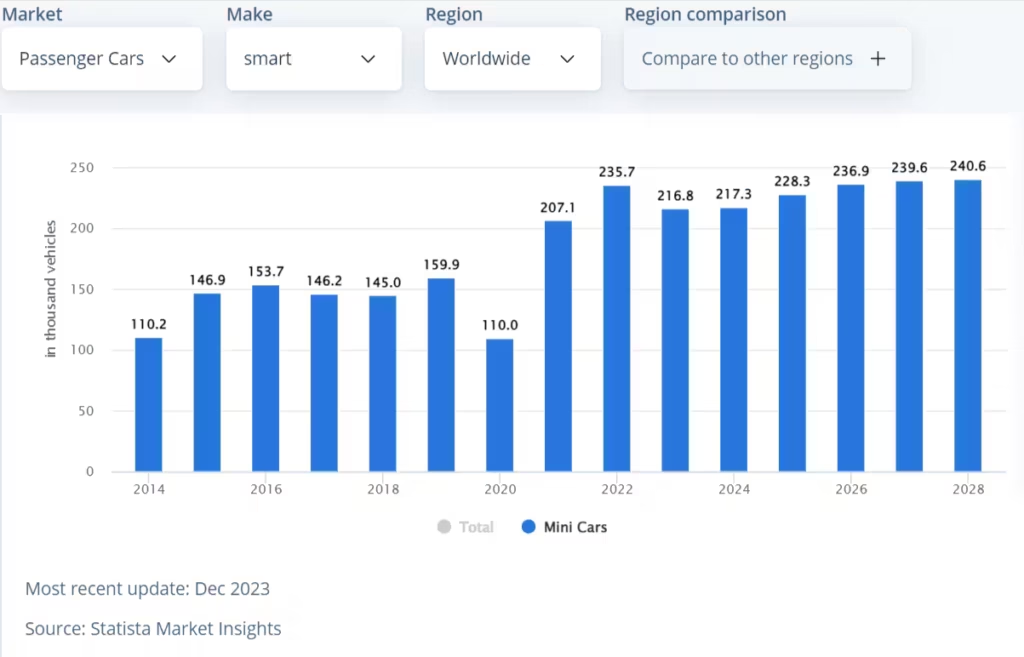
    Smart Car Market Analysis

    Statista reports that the smart car market is expected to rise to $4 billion by 2028, growing at a CAGR of 2.36%. However, smart cars are not the only innovations; there are connected car technologies and several others that are transforming the automotive industry.

    So, what’s the secret sauce to this successful recipe for the automotive industry?

    It’s the Internet of Things(IoT)!

    IoT in the automotive industry has been pivotal, transforming how driving and riding activities happen for people. It has helped automotive companies improve productivity, production, and profits.

    This article focuses on what automotive IoT is and how it impacts modern solutions like smart cars, connected car technologies, and beyond.

    What is automotive IoT?

    Automotive IoT is an approach where sensors and devices connected through the internet are integrated into the vehicles.

    It allows data collection from vehicles, enables analysis, and offers recommendations for better performance. Using Automotive IoT systems, you can track vehicle maintenance and ensure safety.

    Benefits of IoT in the automotive industry

    From predictive maintenance to advanced fleet management, there are many benefits to using IoT in the automotive industry. Here are some of the essential benefits:

    Streamlined manufacturing & floor management

    Automotive manufacturing involves multiple functions, such as engine assembly, chassis assembly, and component manufacturing. These functions will need different methods and resources to optimize their outputs.

    If this is not done, the outputs may not be as desired. With IoT, you can monitor process efficiency and its results.

    For example, Toyota uses IoT-enabled devices for real-time monitoring and data collection in manufacturing plants.

    It has implemented the Toyota Operations Availability System (TOAD) and an extensive data control tower system for streamlined operations.

    Effective fleet management

    IoT-based solutions help you enable effective fleet management through real-time data and insights to optimize operations.

    Automotive industries leverage connected device systems with sensors and IoT devices to track the movement of their fleets.

    These fleets help transport raw materials and end products, so tracking them becomes crucial for automotive companies.

    The total volume of the data captured by sensors from large fleets required a more extensive infrastructure. This is where you can leverage cloud capabilities to create a network of devices, storage, and data processing units.

    A fleet operator will have software access to understand, analyze, and optimize operations. IoT benefits for fleet management are,

    • Real-time location monitoring of the fleet
    • Weight tracking of cargo
    • Truck performance metrics
    • Tracking experience on the road
    • Route optimization and management
    • Driver management

    Using IoT in the automotive industry, you can optimize fleet management and reduce operational costs.

    Predictive maintenance

    IoT-based predictive maintenance offers real-time data from sensors and devices embedded in vehicles.

    This allows automotive companies to forecast potential system failures before they occur. It involves sensor integration, data collection, transmission, analysis, and machine learning.

    Companies also leverage IoT-based systems for predictive analytics, maintenance scheduling, and execution.

    It allows vehicle management by predicting the failures or repairs required for automotive companies. This is crucial for production analysis, product testing, and on-road analysis of vehicles.

    Further, automotive companies can leverage three significant strategies for IoT-based maintenance:

    Run-to-failure

    Run-to-failure or RTF involves maintenance activities executed after the occurrence of failure. This is why it is also known as reactive maintenance.

    Planned preventive maintenance (PvM)

    This time-based or scheduled maintenance involves taking the necessary precautions before equipment failure. Unlike reactive maintenance, it is performed regularly.

    Predictive maintenance (PdM)

    Predictive maintenance employs condition-monitoring technology to measure equipment performance. IoT systems connect electronic devices to mechanical and digital machines and collect significant data.

    Optimal route planning

    IoT-enabled vehicles can provide data on traffic, weather, and road conditions. This information allows drivers to plan the most efficient and safest destination routes.

    Businesses can leverage automotive IoT solutions to equip their vehicles with optimal route-planning features.

    For example, logistics companies can leverage such solutions to enable faster deliveries and reduce operational costs.

    Automobile manufacturers can introduce IoT-based route planning features into their vehicles for enhanced driving experience.

    Optimal route planning using IoT technology offers several benefits.

    • 1. They have reduced travel time and fuel consumption.
    • 2. Improved safety
    • 3. Enhanced customer satisfaction
    • 4. Increased operational efficiency

    Optimal route planning

    Customer-focused manufacturing

    Integrating IoT technology in automotive manufacturing has opened up new avenues for manufacturers to understand their customers better.

    By leveraging IoT automotive solutions, companies can also implement intelligent manufacturing techniques.

    These techniques ensure that data is collected from different sources and analyzed and that specific tasks are automated.

    Using IoT-based systems, businesses understand customer behavior and strategize product developmentaccordingly.

    For example, a car manufacturing company can use an IoT system to understand driver behavior and gain critical insights into performance.

    Based on the data, automotive companies can design products.

    Another classic example is Formula One(F1) cars, whose entire design depends on data from sensors attached to the vehicles. F1 racing cars also leverage IoT to help drivers make data-driven decisions.

    Here is how F1 racing cars leverage IoT:

    • 1. F1 teams can access real-time data from the cars to monitor vehicle performance.
    • 2. Data collected during the driving offers drivers information on driving and strategies they can use to maximize performance.
    • 3. Some critical data that F1 teams access in real-time are engine temperature, suspension, gear ratios, tire pressure, and air intake pressure.

    Ability to update software remotely

    Modern automotive industries are focusing more on connected car technology. This is in sync with customer demand for cars with higher functionalities.

    connected cars market global forecast

    Source

    In fact, the connected cars marketis growing at a rapid pace of 15.9%, promising customers features like never before. Connected cars use the internet to connect and communicate with vehicles, traffic infrastructure, and apps.

    These systems are built into the car and come with specific features to enhance the ride experience for drivers. For example, connected cars help drivers communicate with each other on the app.

    A touchscreen display provides the usual music, weather, and navigation controls. These devices have embedded software that is remotely updated using automotive IoT systems.

    Better driving safety

    Using IoT in automotive industries has improved driver safety. It helps track driving behavior and allows drivers to improve their driving skills.

    Most importantly, the automotive industry uses IoT technology and vehicle safety technologies, such as ADAS(Advanced driver assistance systems), to power drivers.

    ADAS helps vehicles detect collision courses, warn for lane departure, and offer adaptive cruise control and automatic emergency braking.

    These systems continuously monitor vehicle surroundings and alarm drivers if any roadblocks or dangers occur.

    Reduced human errors

    IoT automotive solutions allow companies to reduce human errors in manufacturing using continuous data capture.

    Take the example of the Driver Drowsiness and Attention Warning(DDAW), which the European Commission made mandatory in 2021.

    DDAW systems analyze the driver’s alertness by analyzing steering, and lane keeping and warn a driver if needed. By July 2022, all new vehicles in the EU are shipped with a DDAW pre-built.

    It leverages IoT systems of cameras, sensors, and other devices to ensure reduced manual errors while driving.

    Smarter engineering

    IoT automotive solutions have been pivotal in the Industry 4.0 uprising and offer businesses deep insights. IoT can track driving behavior, customer buying patterns, and vehicle performance.

    Further, IoT automotive solutions allow buyers to interact with brands through connected car apps. They also provide drivers with personalized services, time maintenance, technical assistance, and other services.

    Now that you know the benefits of IoT in the automotive industry, it’s time to understand the challenges you may face implementing it.

    Excited about IoT transforming cars?

    Share your inquiries, project ideas, or collaboration interests with us. Together, we’ll navigate the road to seamless integration of smart technology into your driving experience!

    Challenges in IoT Implementation in the Automotive Industry

    Automotive IoT adoption is increasing with more innovations, but car manufacturers face several challenges, including security and production delays.

    Cybersecurity issues

    IoT devices help businesses build a connected car network through the Internet. Cars act as remote devices where drivers can access data from the Internet. However, these devices are remote, and they can be prone to cyberattacks.

    Maintaining cybersecurity is difficult for companies without implementing specific measures.

    For example, car companies can leverage encryption to ensure data protection. Further, you can ensure secure data access through multi-factor authentication.

    Especially automotive companies that offer Apple and Google carplay features must leverage multi-factor authentication for better cybersecurity.

    Long deployment time

    While manufacturing new products designed with the integration of IoT may not face such an issue, integrating it into an existing system does require more time.

    This can lead to production delays and increase time to market.

    The best way to reduce deployment time is to leverage data analysis and carefully plan integrations.

    First and foremost, try to design your products with integration considerations. Further, try to minimize integration time through automation.

    Connection stability and network bottlenecks

    Imagine several cars running across different state highways, and you want to maintain effective communication.

    The network mesh and infrastructure requirements for such a connected system are massive.

    Such a system requires several IoT devices, network infrastructure, and effort. In addition to infrastructure complexities, you have to deal with congestion and massive traffic.

    Overcoming such challenges requires a thorough network analysis and assessment of the existing infrastructure.

    Further, specific transmitters and receivers across the region are needed for effective network mesh. However, you can partner with local network providers and companies to create a robust setup.

    Lack of required IoT skills

    One significant challenge in implementing automotive IoT solutions is the lack of skills.

    Expanding technologies and innovations in the connected cars space need expert professionals.

    However, most organizations face challenges in finding the right talent to implement IoT in automotive systems.

    While outsourcing does help resolve the challenge of the skill gap, you need to compare all the vendors to analyze the best option.

    Choose automotive IoT experts who can deliver tailored solutions for your business. These vendors need to have a proven track record in delivering IoT-based solutions.

    Impact of the IoT on connected cars, smart cars, and vehicles

    The adoption of IoT in the automotive industry is the core reason behind innovations like connected cars, smart cars, and autonomous vehicles.

    Connected cars

    The impact of IoT on connected cars is multifaceted. It enhances vehicle capabilities, improves safety, increases efficiency, and delivers a superior user experience.

    • IoT sensors can predict potential repairs in vehicles before they become serious issues.
    • It enables automatic braking, collision avoidance systems, and lane-keeping assists.
    • Connected cars use real-time data through IoT devices to offer dynamic routing and re-routing.
    • IoT facilitates mutual communication between cars.
    • It also helps monitor and optimize fuel usage.
    • Connected cars can receive over-the-air software updates using IoT devices.

    Smart cars

    IoT enables infotainment systems, real-time navigation, media streaming, and cloud-based services in smart cars.

    Smart cars can transmit data for diagnostics and maintenance to automotive companies directly through the internet, leveraging IoT systems.

    These cars have advanced safety features like automatic emergency braking and tire pressure monitoring.

    IoT devices with embedded software enable smart cars to track the movements of adjacent vehicles with 360-degree cameras, making it safer for drivers.

    Autonomous vehicles

    Autonomous vehicles are increasingly becoming commonplace. A significant example is Tesla cars in the US, which use IoT sensors to gather data about their surroundings and make real-time decisions.

    Such autonomous vehicles use a combination of IoT sensors to collect information from their surroundings constantly.

    Further, this data is processed in real-time to make informed decisions. IoT in the automotive industry has also led to innovations like Vehicle-to-Everything(V2X) communications.

    What is V2X?

    V2X allows cars to communicate with other cars, devices like smartphones carried by pedestrians, road infrastructure, and others.

    Though automotive IoT security challenges exist for such devices, with robust infrastructure, businesses can avoid such instances.

    Now that you know how IoT has impacted innovations like connected cars and autonomous vehicles, it’s time to understand some critical use cases.

    The most common IoT use cases in the automotive industry

    Automotive IoT use cases over the years have increased with innovations like smart cars and autonomous vehicles. However, some use cases are constantly growing.

    Cellular Vehicle-to-Everything (C-V2X)

    Cellular V2X is a use case where IoT devices enable communication between vehicles and other objects with connectivity features.

    Why is this use case critical?

    • It reduces the traffic congestion and maintains the flow.
    • Offers better safety with vehicle status, road condition, and speed details.
    • Improves data tracking for automotive companies.
    • Allows drivers to share critical information on road safety.

    Smart fleet management

    IoT helps with intelligent fleet management in the automotive industry. Companies can leverage IoT in automotive applications to track details of vehicles, such as location, speed, fuel consumption, and others.

    IoT allows you to,

    • Monitor and optimize routes for drivers.
    • Improve driver behavior.
    • Predict vehicle component failures.
    • Ensure proactive maintenance.
    • Data-driven management for fleet managers.

    In-vehicle infotainment

    IoT has changed the driving experience by enabling advanced in-vehicle infotainment systems.

    It allows seamless integration of smartphones, tablets, and cloud-based services into cars, allowing passengers to access streaming media, the internet, and real-time information.

    Automotive companies also leverage IoT-enabled voice recognition and natural language processing to enable voice-based functions, such as navigation, music playback, and climate control.

    It also allows personalized settings and preferences to be automatically applied when the driver or passengers enter the vehicle.

    Predictive maintenance

    With automotive IoT solutions, companies can predict vehicle downtime and design products accordingly.

    For example, companies can use IoT sensors to understand the strength of the frame in any car design.

    This would help companies make cars last longer. Similarly, using IoT systems, automotive industries can detect issues beforehand and implement preventive measures.

    Advanced car insurance

    Integrating IoT in your automotive manufacturing plans can be beneficial in developing advanced safety features.

    For example, ADAS is a feature that leverages IoT for driver and passenger safety, offering advanced vehicle insurance.

    Further, using IoT in automotive vehicles can help reduce accidents and insurance claims.

    If your use case is defined, the next step will be to develop an automotive IoT app. Well, here are some points you need to consider first!

    Key points to consider when developing an automotive IoT app

    If you are to develop an IoT-based automotive solution, you need to consider the following points,

    Market analysis

    Conduct market analysis to understand current trends, assess potential risks, identify problems, and evaluate solutions. This allows you to,

    • Know the market gap
    • The solution needed to fill that gap
    • Identify features for the solution
    • Plan the entire app project
    • Create a roadmap for the IoT automotive app

    Development team

    Accessing a skilled and experienced development team becomes crucial in navigating the complexity of automotive IoT solutions.

    Choose an IoT automotive app development company with a proven record of delivering innovative solutions.

    The development team must have experience developing built-in systems for vehicles. They must ensure hardware and software connectivity, enabling connections to third-party APIs.

    In addition to domain expertise, you also need to gauge how well-versed the team is with the latest tech stack.

    Tech stack

    Choosing the right tech stack is crucial and should be compatible with the specific requirements of automotive software.

    Here is a recommended tech stack for an IoT-based automotive app

    • Cloud platform- Amazon Web Services (AWS), Google Cloud IoT, or Microsoft Azure IoT
    • IoT protocols and communication- Implement communication standards like MQTT or AMQP
    • Data analytics- Apache Kafka, Apache Spark, or Hadoop
    • Development frameworks- Python, Java, Node.js, and C++
    • API management tools- Apigee or MuleSoft
    • UI/UX- Adobe XD, Figma, or Sketch
    • Databases- MongoDB or CouchDB or SQL databases like PostgreSQL

    Design requirements

    To ensure safety while driving, the car app interface needs to be simple and straightforward. Interactive interface and responsiveness are key here.

    If the in-built system has a non-responsive interface, it can lead to the risk of drivers losing concentration while driving.

    This is where experienced UX designers can help you with a user-friendly and responsive interface.

    Security and QA

    Implementing IoT in the automotive industry requires effective measures for cybersecurity to ensure data protection.

    So, if you are building an app from scratch or trying to create embedded software to integrate into the existing setup, automotive IoT security needs to be planned.

    For example, if you are building a connected car technology for your business, you need to have cloud security measures in place.

    cloud security measures

    Our experience in using the Internet of Things for smart vehicles:

    An automotive startup approached us with a requirement to develop a smart parking solution.

    They wanted to integrate the parking management feature into their connected car app. The entire project was to be set up and developed from scratch.

    As an expert IoT app development company, we provided a comprehensive solution for integrating smart parking features into the connected car app.

    The first step was to analyze requirements and thoroughly understand user needs.

    It helped us formulate the design and architecture of the system with a user-friendly app interface, a robust backend, and secure IoT integration.

    In the solution we applied, IoT components use sensors to monitor real-time parking space availability, with data flowing seamlessly between the car, parking infrastructure, and user interface.

    The mobile app and web portal provide advanced features like parking space reservation, dynamic pricing, and analytics on usage patterns.

    In the end, rigorous testing, compliance checks, and a phased deployment approach allowed us to ensure the solution was reliable and efficient.

    Beyond the product’s launch, we are also helping clients with ongoing maintenance, updates, and fine-tuning to optimize the smart parking system over time.

    Conclusion

    The automotive industry is rapidly transitioning towards innovative automation thanks to IoT and other disruptive technologies.

    The evolution of IoT in the automotive industry has led to the emergence of connected and automated cars.

    This has completely transformed car maintenance capabilities, in-car infosystems, connectivity, and security.

    Vehicle data collection and analysis facilitated through automotive IoT solutions is helping enhance long-range data transmission for an efficient IoT-powered fleet management system.

    With the increasing usage of IoT in the automotive industry, there will be more automobile use cases in the future, completely changing how we interact with our vehicles.

    Finding the right tech partner becomes crucial for companies trying to leverage this transformative technology. Fortunately, Zennaxx is one partner you can count on! So, get your project estimate now!

    FAQs

    Q1.How is the automotive industry utilizing IoT technology?

    IoT technology is being used by the automotive industry to enable connected cars, remote diagnostics, predictive maintenance and driver experiences that are enhanced.

    Q2.What are the various applications of IoT-connected cars?

    Connected cars deliver real-time traffic info, do remote vehicle troubleshooting, conduct over the air software updates, provide voice-controlled infotainment devices as well as offer advanced driver assistance systems.

    Q3.What specific safety features do IoT cars possess?

    In order to improve the safety of both drivers and passengers, IoT-enabled cars incorporate features, including automatic emergency braking, lane departure warning, blind spot monitoring ,and remote vehicle tracking.

    Q4.What can we expect from the future of IoT in cars?

    The future of IoT in cars offers autonomous driving, fuel efficiency, smart home and city integration, and personalized in-car experiences.

    Q5.What challenges may arise while developing an IoT automotive application?

    Potential challenges include ensuring data privacy and security, managing the vast amounts of data generated, integrating legacy systems, and addressing regulatory requirements.

    Read Also: 
  • 9 Unique And New Social Media App Ideas For Entrepreneurs

    9 Unique And New Social Media App Ideas For Entrepreneurs

    Can you remember the last time your day ended without ever scrolling through these unique reels on Instagram or TikTok? Have you ever considered taking a picture without considering these awesome social media filters? Yes, social media applications have grown more than any other type of application over the years.

    A Forbes report indicates that the total number of social media users in 2023 across the world reached 4.9 billion and is expected to reach 5.85 billion by 2027. Not just the audience but as a startup app also, social media use cases have been profitable.

    According to Mordor Intelligence, the social media market is growing at a CAGR of 17.09%, with an expected revenue of $81.42 billion in 2024 and $179.22 billion by 2029. Meta, Byte Dance, Google, Twitter, and Snapchat are five major social media companies.

    So if you are an entrepreneur, the social media market seems to be an attractive choice. However, whether you will have a profitable business in this cluttered market depends on the idea of using social media apps.

    How unique your app is and what features it offers makes all the difference. In this article, you will discover some of the best social media app ideas. But first, you need to understand the process of discovery!

    • Over 5 billion people use social media globally, representing 62.6% of the world’s population, according to DataReportal. This means a massive potential audience exists.
    • The number of users keeps growing, with an increase of 259 million users in the last year, reflecting a 5.4% annual growth rate.
    • The US boasts over 302 million social media users, which translates to a social media penetration rate exceeding 91%, as per Statista.
    • Engagement varies across platforms and industries. Averages on Facebook hover around 0.064%, with sports teams and influencers reaching higher engagement (0.27% and 0.23%, respectively), according to Global social media statistics.

    Steps To Develop A Unique Social Networking App Idea

    Developing a social media application requires consideration of several factors. So if you are brainstorming ideas for social media applications, you need extensive market research. This is crucial to determine product market fit and understand the feasibility of your idea.

    Here are some crucial steps to build your social media app,

    • Research the existing social media applications
    • Take online and offline surveys of social media app users
    • Conduct interviews with social media influencers to understand existing gaps
    • Identify key opportunities in these gaps for your social media app idea
    • Realize the niche you want to target with your social media application
    • Brainstorm features that can fill gaps in existing social media experience
    • Develop minimum viable features and run pilots among specific users
    • Repeat the process for A/B testing until you figure out the best features
    • Build your application and deploy it across the Play Store
    • Test, monitor, and maintain the performance of the application

    Following the above steps, you can build unique social media applications. A crucial aspect of social media app ideas is a distinctive feature that acts as a differentiator.

    For example, video feeds for shorter content were the differentiator for TikTok, which is now a phenomenon that inspires Instagram reels and YouTube shorts.

    So, if you have an idea for an application that helps users enhance social experience, now is the time to test and enter the market- WHY?

    To understand the importance of social media apps in the current era you need to analyze the current social media landscape.

    Social media and networking industry

    Social media and networking industry: Facts and statistics

    • More than 5.17 billion users worldwide use social media applications
    • Among several social media app options an average user uses 6.7 different platforms
    • Internet users worldwide use social media applications for 2 hours and 23 minutes per day
    • TikTok is the faster growing platform with a 100% growth rate between 2020 and 2022
    • Facebook is one of the most used social media applications with more than 3 billion monthly active users

    Now that you know how the social media industry is growing rapidly, being a part of this market requires a distinction. You need a unique idea for your application to stand apart amidst competition.

    Unique Social Media App Ideas For Entrepreneurs

    In a competitive market like that of social media app startups, you need something out of the box to be disruptive.

    Corporate networking app

    Forget LinkedIn you can build a social media apps idea around connecting professionals with real-time collabs and build a community around it. While this seems like a good idea for web app development, you can go beyond the usual.

    For example, a startup app that you can build for corporate networking invites exclusive clubs for specific professionals.

    Unlike LinkedIn or Clubhouse, such an application offers exclusivity for CEOs, CTOs, and top-level C-suite executives to connect, brainstorm, and build a community of professionals.

    Video Social Networking App

    Video Social Networking startup appcan change the way users share and connect with content online. You can offer features like live streaming where users can broadcast videos to their followers, enabling real-time sharing of events.

    Further you can design video chat rooms for asynchronous communication allowing groups of users to create and participate in discussions on shared interests.

    Another key feature to add in your idea for a social media app is premier video-sharing capabilities. It allows users to share high-quality videos and create communities around it.

    Adding augmented reality filters and editing tools can help your users build a creative environment to customize videos.

    Photo-Sharing Social Media App

    A photo-sharing social media app idea can focus on creating and sharing capabilities of a user’s photographic journeys.

    You can integrate features like photo albums and stories. Location tagging can, However, with the recent exhaustion over apps like Instagram, you can look to bring a fresh perspective to photo-sharing applications.

    For example, you can leverage an idea for an app that allows users to share pictures within their close circle only. This privacy-focused app will allow users to define their circles and securely share images.

    Social apps for communities

    Social media applications that help users build communities and maintain the security of connections within a specified limit are some of the best startup apps. This is because such apps allow users to engage in a secure environment with like-minded people.

    Take an example of fitness-based social media applications that allow users to share updates on their workouts, diets, and other daily activities within the community.

    You can create such social media applications providing features like an inner circle where users can choose whom to interact with within the community.

    Relationship Networks

    Whether it’s Tinder or Bumble, relationship-based applications have been successful. However, these apps focus mostly on romantic relationships. This is where you can create social media applications that focus on different relationships like father-son, mother-daughter, or many such relationships to build a network.

    Such an app can revitalize the relationship dynamics, allowing parents to bond better with their children and even share parenting tips with others.

    Writers’ Social Network App

    This idea app for your startup can be fruitful financially and in terms of engagement. You can create a social media app idea for building a community of writers. This app would allow writers across genres and niches to connect.

    Further, these writers can collaborate on different projects, and you can charge a small fee as a facilitator.  You can allow writers to post their achievements on the platform.

    All in one app

    Lastly you can merge all of the above app ideas into a single super application that provides users with features to create communities across professionals, relatives, friends, and colleagues.

    The best way to build such an app idea is to take feedback from peers and users to understand their needs. Based on the surveys, you can decide which of the above features can be the core focus of your application.

    However, you will need some advanced features to enhance the social media experience of users and create a differentiator for your startup app.

    Got a vision for your social app?

    Ready to take your app development to the next level? Collaborate with us for smooth and efficient solutions.

    Best Trending Feature Ideas to Add to Your Social Media App

    Social media apps are continually developing creative features to meet the needs of their users. So, If you want your social media app to stand out from the competition, you should consider incorporating trending features like AR filters, live video streaming, and multi-language support.

    AR and Face Filters

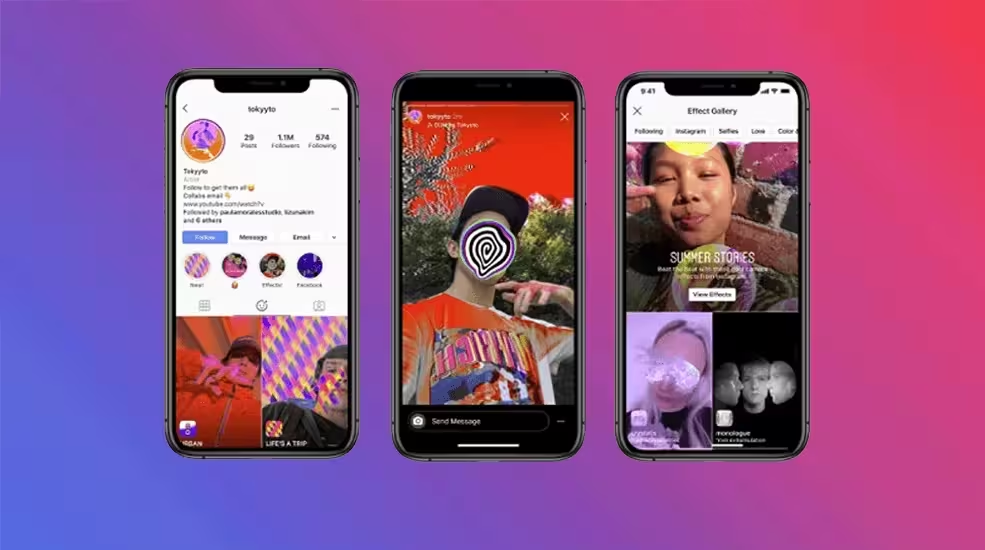
    Augmented reality (AR) and face filters have become increasingly popular on social media platforms, Popular apps like Snapchat provide such filters that allow users to enhance photos and videos. You can integrate AR technology into your app to provide users with a more engaging and interactive experience.

    AR and Face Filters For Instagram

    For example, Instagram launched AR filters using Spark AR which is a tool to create augmented reality face filters from Facebook. Similarly, you can add more creative filters for your application.

    Transient Content

    Transient content, such as stories and posts that disappear after a set time, has become a popular feature. This feature encourages users to share more frequent and authentic updates, leading to increased engagement.

    It induces a sense of FOMO among users who comes everyday on your social media application and posts for engagement.

    Artificial Intelligence (AI) and Chatbots

    AI-based technologies are already changing the way users interact with businesses. But integration of advanced chatbots and AI-based assistants can improve the credibility of your social media app.

    Most social media apps rely on user-generated content(UGC), and moderating such data can be complex. Modern generative AI algorithms can help your app users overcome issues with UGC.

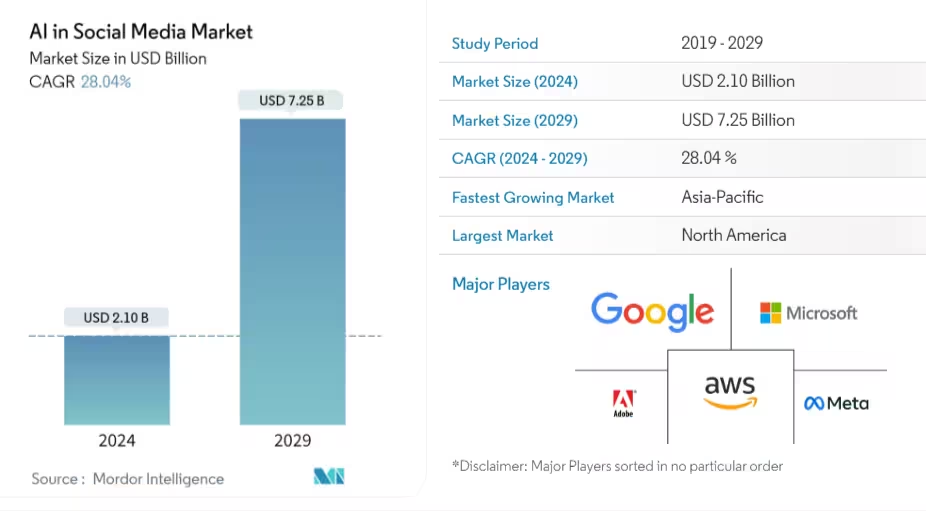
    AI in the social media market

    Source

    According to Mordor Intelligence, AI in the social media market is set to grow at a CAGR of 28.04% which clearly suggests how important it is for your app idea.

    Live Video Streaming

    Live video streaming is already popular on many social media platforms like Instagram and YouTube. It allows users to connect in real-time. If you include the live video streaming feature it can provide users with a more immersive and interactive experience.

    Especially if your idea for an app is based on professional communities like writer’s group or developer’s community, live video streaming can be crucial. It will allow these professionals to connect with each other for collaborations and even podcasting.

    Multi-Language Support

    Social media app ideas need to be designed for a global audience. So, you need to add a multi-language support feature for such apps. It makes the app accessible to users around the world and breaks the language barrier allowing your user base to scale with increased engagement.

    The Virtual Reality (VR) Shift

    VR paradigm shift is already here, and tech giants like Facebook are creating an ecosystem for social media applications to leverage this advanced technology. The Facebook Horizon facilitates virtual workrooms, and interactive spaces for users to connect.

    You can integrate VR features to allow users to connect virtually, experience unique content, and have immersive interactions.

    Brainstorm and build your app

    Now that you have a stream of ideas and features to work on, it’s time to brainstorm and create the best social media app idea. Remember you need to follow a minimum viable idea principle where any idea needs some testing before developing a startup app.

    The best approach is to hire professionals that can help you with testing app ideas, and the development process.

    Zennaxx is one of the leading Social media app development company  with years of experience in helping startups build such applications. Contact us now to learn more about our development services.

    FAQs

    Q1.HOW DO YOU DEVELOP A UNIQUE SOCIAL NETWORKING APP?

    Start by defining your target audience and unique purpose. Next, determine product-market fit to ensure your app meets user needs. Explore innovative features and design elements to make your app stand out.

    Q2.WHAT ARE SOME NEW SOCIAL MEDIA APP IDEAS?

    For targeted platforms, consider niche markets and specific audience interests. Explore virtual and augmented reality for unique experiences. Prioritize security-conscious users with privacy-focused features and communication tools.

    Q3.WHAT IS THE COST OF SOCIAL MEDIA APP DEVELOPMENT?

    Several factors can affect the costs of developing an app, including the platform selected, the features required, and the rates charged by developers. The cost can range from $10,000 for a basic single-platform app to over $100,000 for a complex multi-platform solution. Potential revenue streams, such as in-app purchases or advertisements, can help offset development costs.

    Q4.HOW MUCH DOES HIRING AN APP DEVELOPER IN 2024 COST?

    Hourly rates for app developers vary from $25 to $250 for domestic and offshore developers. Project-based pricing can range from $2,000 to $150,000 depending on complexity. Ongoing maintenance and marketing expenses should be planned and budgeted.

    Read Also: 

  • 7 JavaScript Frameworks For Your Projects to Maximize Profits

    7 JavaScript Frameworks For Your Projects to Maximize Profits

    If you are developing a web app, you will hear one word a lot—JavaScript! So much so that 98.8% of websites use JavaScript.

    However, you must deal with a massive collection of libraries and frameworks when implementing JS.

    Analyzing such a vast ecosystem of JavaScript frameworks and choosing the most suitable one can be overwhelming.

    So, how do you choose the best JavaScript framework?

    It’s simple- “Choose the one that your project needs.” And how do you decide that?

    Each framework has a specific feature, a set of tools with several pros and cons. Analyzing them will help you decide the best framework for your project.

    This article will offer an on-point comparison between the best JavaScript frameworks you can choose for your projects.

    But before making a comparison, you need to understand the basics of any JavaScript framework.

    JavaScript market trend

    • JavaScript is the most popular programming language globally, with over 63% of developers using it.
    • Nearly all websites (around 98%) leverage JavaScript for interactivity.
    • Over 84% of JavaScript developers use it professionally, primarily for front-end development but also for back-end development, mobile apps, and more.
    • The job market for JavaScript developers is strong and expected to grow by 23% by 2031

    What is a JavaScript Framework?

    JavaScript frameworks are an accumulation of libraries and components for software developers.

    It helps developers with pre-built codes, enabling software development. JavaScript frameworks provide a code structure for your web app development projects.

    JavaScript frameworks have tools, utilities, and components that help streamline development. It allows developers to abstract everyday tasks and provide reusable components, improving productivity.

    Their DOM manipulations make JavaScript frameworks so attractive for web app development. Developers can dynamically use DOM manipulations to alter web app content, structure, and styling.

    In addition to the DOM manipulations, you can leverage these frameworks’ data binding, routing, and state management capabilities.

    Now that you know a JavaScript Framework, let’s understand the difference between a library and a framework.

    What is the Difference Between a JavaScript Framework and a JavaScript Library?

    JavaScript frameworks are a set of libraries, tools, and components. So, JavaScript libraries are a subset of an entire framework. A JavaScript library is a code piece. You can use it for specific use cases.

    Every JavaScript library has multiple objects or methods that provide specific capabilities to your application.

    These libraries offer the capability of DOM manipulations, routing, and even the integration of machine learning algorithms.

    JS libraries offer developers classes to develop web apps faster. On the contrary, frameworks are a platform for developers to build apps.

    The level of control comes into play if you want to understand the difference on a deeper level.

    While using the library, you have higher control over the application flow, but with a framework, the framework has power over the flow.

    What are JS Frameworks Used For?

    JavaScript frameworks are versatile, and developers can build scalable and reliable web apps. These frameworks can also simplify development, reducing time and effort.

    You can use JS to build an interactive user interface with dynamic content. You can also leverage JavaScript frameworks for web app development on the go.

    Yes, the hot reloading feature allows you to make changes without disrupting the web application.

    Another major use case for JavaScript frameworks is social media platforms and eCommerce web apps. Building such web applications requires a reliable backend and front end.

    You can leverage frontend JS frameworks like Angular or React with NodeJS at the backend. Similarly, there are several different use cases for JavaScript frameworks.

    While the possibilities are endless, here are some of the more popular apps built on JavaScript frameworks for you to understand how they are used,

    • Facebook uses React to create a dynamic and interactive user interface.
    • Twitter uses BackboneJS for real-time data streaming.
    • Netflix uses NodeJS to power its streaming service.
    • PayPal uses AngularJS to create secure and user-friendly payment systems.
    • Airbnb uses EmberJS to build dynamic and scalable web applications.

    As you can observe, brands use different JavaScript frameworks for specific use cases.

    You can use JavaScript frameworks to develop highly functional web applications, from dynamic UIs to payment systems, streaming apps, and rental platforms.

    However, the most challenging aspect of JS frameworks is the choice! Yes, there are many frameworks for front and backend development, so choosing one that meets your requirements becomes difficult.

    However, you will get a curated list of the seven best JavaScript frameworks for your projects.

    The Top 7 Most Popular JavaScript Frameworks and Libraries for Web Development

    Choosing a JavaScript framework for your project requires thoroughly analyzing your web app’s size, complexity, community support, and libraries.

    Here are some of the best JS frameworks and libraries you need for your projects.

    Angular

    Angular is a JavaScript framework that enables developers to build scalable web applications.

    It is an app design and development framework with TypeScript at the core. Developers get a collection of integrated libraries and features to develop functional apps.

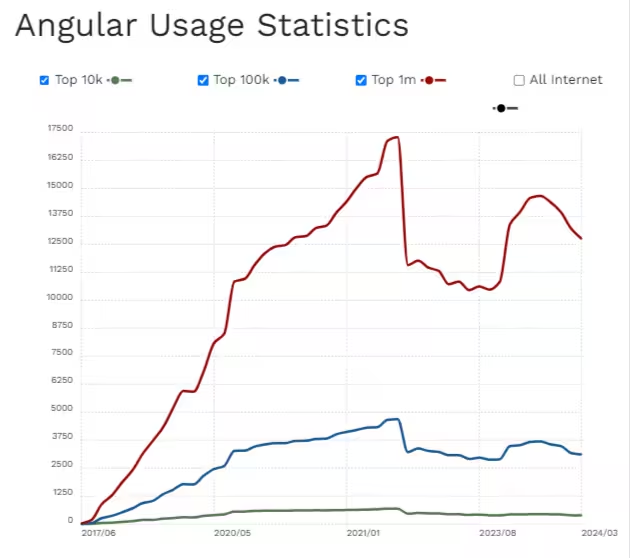
    Angular provides efficient server communications, routing, and a suite of tools. These features and tools have made Angular popular among developers and have enabled it to be used by more than 597,666 sites.

    Angular Usage

    Source

    With Angular, you can speed up front-end development and scale web apps as needed. Its capability of supporting small-scale to enterprise-grade web applications makes it attractive.

    Distinct features of Angular

    • Offers two-way data binding, facilitating seamless communication between the view and component logic.
    • It has a built-in dependency injection system for efficiently managing the dependencies.
    • Promotes code reusability, testability, and maintainability.
    • Allows developers to define navigation paths within the app.

    Pros of Angular

    • Two-way data binding enables efficient DOM manipulation, saving developers much time.
    • Angular type safety with TypeScript and CPU performance-enhancing features offer speedier server performance.
    • Supports Progressive Web Apps (PWAs), native mobile apps, and desktop-installed app development.
    • Angular optimizes templates into highly optimized code, enhancing performance and productivity with automatic code-splitting.
    • Angular CLI offers the scaffolding of apps and components, making development productive.
    • Angular’s architecture is based on MVC, simplifying and separating application logic, styles, and markup.

    Cons of Angular

    • A layered architecture from Angular apps becomes tricky to debug due to hierarchical dependency injection.
    • Dependency upon TypeScript limits its polyglot nature and extensibility.
    • Angular creates complexity and bloat, making it less suitable for microservices.

    ReactJS

    React is not just any JavaScript library but a dedicated one designed for front-end development.

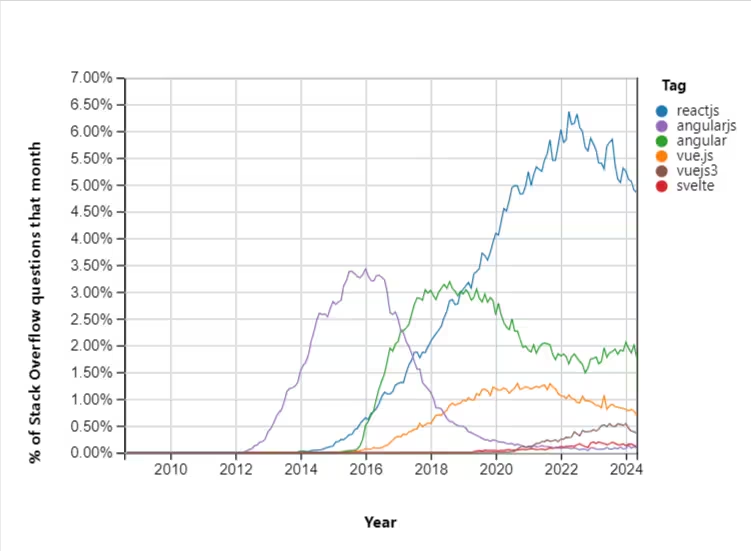
    It is like gold if you are looking to build UI components! It comes with a versatile component-based architecture and declarative views, empowering developers with flexibility and also one of the most popular JavaScript frameworks compared to other frameworks like Angular.

    React Graph

    Using these attributes, React developers can create interactive and complex interfaces. It offers the “learn once write anywhere” principle.

    So, developers can build apps fast and scale them across platforms without continuously rewriting codes for each platform. The best part is that “Facebook manages it.”

    It means you have a vast development community to rely on with continuous improvements and updates.

    Distinct features of React

    • The declarative approach helps developers simplify the development process.
    • JSX in React allows developers to write code like HTML.
    • Virtual DOM allows efficient updates and rendering only necessary parts of apps.
    • Offers one-way data binding, ensuring unidirectional data flow and app state.

    Pros of React.js

    • The component-based architecture allows developers to create reusable UI components easily.
    • Ease of creating a user interface with syntax that resembles HTML.
    • Easier learning curve with simple JSX syntax and JavaScript base.
    • Ease of using the same codebase for web pages and mobile apps.
    • Large ecosystem of react-based frameworks, libraries, and an active community.

    Cons of React.js

    • Need JS expertise to understand JSX, props, state management, and hooks.
    • Integration with other tools and technologies can be challenging.
    • React primarily handles the “view” part of MVC architecture, requiring other libraries for “model” and “controller”.

    VueJS

    VueJS is another JavaScript framework for building modern single-page and front-end web apps.

    The framework is lightweight and versatile, with an unopinionated structure. VueJS allows developers to develop progressive UIs quickly by decoupling from JS.

    VueJS can be Used to extend the functionalities of web apps through custom modules and visual components.

    The framework has been quite popular, with more than 3,647,312 websites developed using it. While a relatively new framework, VueJS boasts a community with 33.6 forks and 207k stars.

    Distinct features of VueJS

    • Migration or integration of Vue is manageable through framework introduction into the code and parallel development of the components.
    • It has built-in solutions for developers to easily create state support for managing components and animations.
    • VueJS offers MVVM-based two-way data binding, enabling developers to make changes in the UI reflected in the data in real time.
    • Allows developers to create interactive UIs with v-on directive.

    Pros of VueJS

    • Provides official CLI, development tools for debugging, Vue Loader, and Vue Router.
    • The framework is roughly 18kb smaller, improving SEO and user experience.
    • Offers HTML-based templates that allow binding of data from the VueJS instance to the DOM.
    • VueJS offers extensive documentation, allowing developers to understand and integrate concepts.

    Cons of VueJS

    • Vue offers the flexibility of choosing multiple options within the framework, which can lead to errors.
    • Lacks extensive plugin support compared to other JavaScript frameworks.

    NodeJS

    NodeJS is not just another JavaScript framework. It’s an open-source JS runtime environment that enables developers to build web apps efficiently at scale.

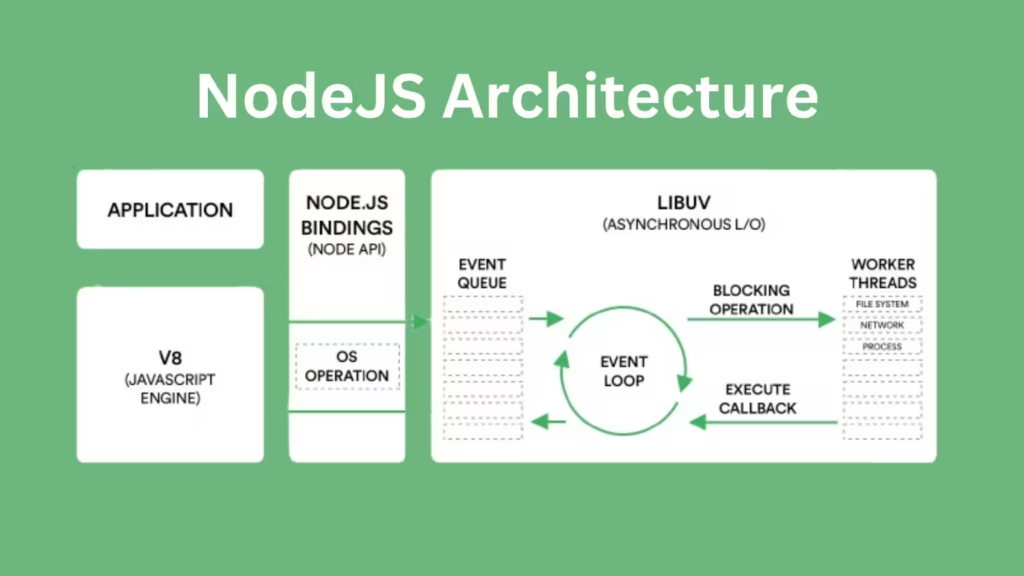
    The real advantage is that it’s built on Google Chrome’s JavaScript V8 engine, providing practical benefits for web app development.

    Node.js Architecture

    So, you get an event-driven, non-blocking I/O model and lightweight framework suitable for all real-time apps.

    In simpler terms, if you are looking for a JavaScript framework for the backend, NodeJS is the best option.

    However, breaking the popular myth, “You can use Node for both frontend and backend.” Such versatility is why Node is one of the most used JavaScript frameworks.

    NodeJS surveyed backend and full-stack developers and found that 4 out of 5 respondents prefer using the framework.

    Distinctive features of NodeJS

    • Non-blocking I/O offers asynchronous capabilities for the framework, enabling the management of multiple tasks simultaneously.
    • Node is single-threaded, needing fewer resources, making it cost-effective.
    • NPM allows developers to streamline the development process with access to a vast ecosystem of packages.
    • Event-driven architecture from Node makes the development of real-time apps scalable.
    • Node is an ideal option if you are looking to leverage microservice design for web app development.

    Pros of NodeJS

    • Reduces delays in processing several user requests parallel to event-driven and non-blocking I/O.
    • Highly productive framework with an easy-to-learn and use syntax for developers.
    • Built-in error handling capabilities, making debugging easier for developers.
    • Designed for scalability, NodeJS allows businesses to build large-scale applications.
    • Support for caching improves performance and improves response time.
    • Cross-platform capabilities offered by NodeJS make the development of web apps across OS easier.

    Cons of NodeJS

    • Some of the NodeJS APIs are unstable, creating compatibility issues.
    • NodeJS has performance bottlenecks, especially when handling CPU-bound tasks.
    • Using relational databases with NodeJS can be challenging due to its asynchronous nature.

    Planning Web App Development with Javascript Framework?

    Explore innovative solutions for your business challenges. Contact us today to discover how we can help you achieve your goals.

    jQuery

    jQuery is a popular JS framework for front-end development. One of the oldest, jQuery, is a lightweight and feature-rich JavaScript library developers use.

    The event-handling capabilities of jQuery make it an ideal choice for scalable web app development.

    The syntax for jQuery is similar to CSS, so using this framework becomes easier if you are familiar with CSS.

    Newer versions of the JavaScript framework enable mobile app development as well.

    Distinctive features of jQuery

    • jQuery simplifies the programming for developers, providing a more condensed syntax.
    • Comes with a pre-defined “css()” method to manipulate styles across HTML elements.
    • It enables easy HTML manipulation through a more accessible selection of DOM elements, traversing them, and modifying the content.
    • Supports event handling like click, “mouseenter,” “ mouseleve,” blur, key up, and keydown elements.

    Pros of jQuery

    • It offers various functions and methods for performing different development tasks, making it a versatile tool for web development.
    • jQuery provides a straightforward JS development approach with the motto of writing less and doing more.
    • Support from Ajax enables developers to build dynamic web applications with minimum coding.
    • JQuery offers a large plugin ecosystem enabling higher extensibility for app functions.

    Cons of jQuery

    • jQuery provides an extensive library, but it does not accommodate more complex projects.
    • Needs an understanding of the CSS, as jQuery relies heavily on it.
    • jQuery offers limited scalability, and page load times are also higher.

    ExpressJS

    ExpressJS is not just any JavaScript framework. It has a Node base and a minimalistic approach to web app development.

    Any developer with NodeJS knowledge and programming skills can learn ExpressJS. It has attributes similar to Node, like a single-threaded approach and non-blocking I/O operations.

    ExpressJS comes with robust APIs that offer more streamlined client-to-server request parsing. Giants like Twitter, Uber, and Accenture use ExpressJS for this purpose.

    Distinctive features of ExpressJS

    • Capability to dynamically render HTML pages based on passing arguments.
    • Developers can build single-page, multi-page, and hybrid web apps with Express.
    • Developers can set middleware to respond to HTTP requests.
    • Offers a template engine for dynamic web page development.

    Pros of ExpressJS

    • The minimalist design philosophy of ExpressJS makes setup quicker for building web applications and APIs.
    • Express provides a powerful and flexible routing system. It allows developers to define routes for different HTTP methods and quickly handle complex URL patterns.
    • Express allows adding middleware functions to the request-response cycle, enhancing flexibility in handling various tasks.
    • Versatile framework to build web apps, whether simple, complex, or enterprise-level projects.
    • Middleware of Express enables error detection in both synchronous and asynchronous code.
    • It is the best option for companies dealing with many customer requests daily.

    Cons of ExpressJS

    • Developers need additional libraries or modules for features like authentication, database integration, and validation.
    • Additional boilerplate code is needed compared to other JavaScript frameworks.
    • Asyncoperations can sometimes be challenging, and developers may need to use additional tools or techniques, like async/await.
    • Security vulnerabilities often detected with Express make it unreliable.

    NextJS

    NextJS has merits as a server-side JavaScript framework. The JavaScript framework works on the principle of write once, run everywhere.

    The framework also offers support for thedevelopment of PWAs. Plus, you get tools and methods to build SEO-friendly web applications.

    Distinctive features of NextJS

    • Enhanced routing system for web pages.
    • Built-in support for CSS styles.
    • Supports server-side rendering.
    • Allows import of JavaScript modules dynamically.
    • Provides cross-browser compatibility.

    Pros of NextJS

    • It comes with auto compilation and bundling capabilities for optimal production.
    • Unique user experience through features like “Fast Refresh.”
    • Support for reusable components with modular architecture.
    • Built to handle higher traffic and can be used to build large-scale applications.
    • Supports TypeScript for better code maintainability.

    Cons of NextJS

    • Learning curve is steeper compared to other JavaScript frameworks.
    • It does not come with state management capabilities and needs additional libraries.
    • Complex to configure for advanced features like custom routing.

    Which JavaScript Framework to Choose for Your Project?

    There is a JavaScript framework for everything!

    So, it’s like shopping in a superstore full of great products, making the choice exciting, right?

    Well, the best JavaScript framework for your project will depend on what you need! For example, if your web app is data intensive, you need NodeJS on the back end and can use Angular or React on the front end.

    At the same time, if extensibility is your priority or you are building an enterprise-grade app, ExpressJS is a good option.

    So, compare all these frameworks based on requirement-based aspects first and then decide on the best option.

    Your comparison must also consider access to talents well-versed in the specific JavaScript frameworks. But if you still need a clear answer!

    Here are the results,

    Best Backend JavaScript framework – NodeJS

    Best Frontend JavaScript framework – ReactJS

    Key Takeaways

    JavaScript frameworks offer different benefits for web app development, like streamlined coding, improved performance, and seamless integration.

    Choosing the right JavaScript framework requires analyzing the team’s expertise and desired features.

    If you compare all the popular JS frameworks, React comes above other frontend frameworks in terms of ease of building complex and interactive UIs.

    At the same time, NodeJS has become an ideal choice for enabling real-time web apps and microservice-based development.

    However, the Express, Vue, and Next frameworks are also worthy contenders, So choosing which one will always take time and effort.

    Fortunately, Zennaxx can help you with hassle-free development. All you need to do is submit your requirements. Get an estimate from our experts on which JavaScript framework will suit your needs.

    Read Also: 

  • 9 Common Types of Agile Methodologies in the Workplace

    9 Common Types of Agile Methodologies in the Workplace

    Agile refers to a collection of techniques and first-class practices for organizing initiatives based on the values and concepts outlined in the Agile Manifesto.

    There is not a single “accurate” way to implement Agile; instead, numerous frameworks exist.

    Software engineers and product managers continually search for new approaches to streamline the software program development process.

    Agile methodologies are broadly used on this subject to manage, market, and enhance products, making sure clients get the most pleasant experience possible.

    For those pursuing a profession as a software engineer, developer, or product manager, expertise in the Agile technique is critical for constructing powerful software programs.

    In this document, we explain the 9 different types of agile methodology and provide a brief overview.

    This document helps you make a clear distinction between the different types of alternative methodologies, so you can select the best one for your project.

    What are agile methodologies?

    What does Agile mean? Let’s learn it in more depth by going back to its beginnings.

    Some people argue that Agile is more of a set of values and principles than a method.

    Agile is better understood as a philosophy or mindset for software development. Agile has changed the way software is made today.

    agile methodologies

    Source

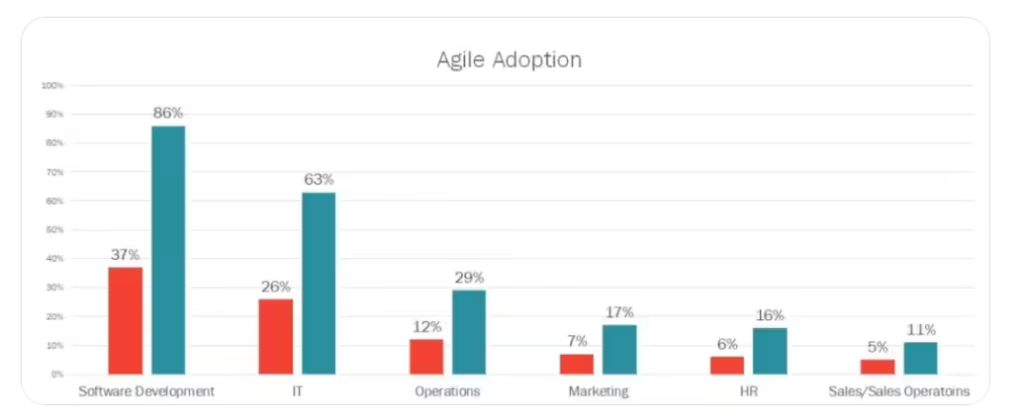
    In 2024, Agile will still be the most popular way to run a business because it encourages creativity and efficiency. In the last 5 years, the number of workers using agile has grown from 37% to 86%.

    Organizations frequently use agile methodologies to improve the efficiency of their software development teams.

    Agile software development methodologies enable teams to become more effective at all stages of the process.

    Agile methods help teams improve their preliminary planning while ensuring timely or early delivery of the final product.

    Benefits of Agile Methodologies

    Improves Collaboration:

    The agile method greatly improves planning and teamwork. Regular meetings and ongoing communication help ensure that everyone is involved and working together.

    Think about a project you’re working on with other people. Your ideas and help are valuable.

    People who work together closely come up with better ideas, solve problems faster, and feel more united.

    Improves Communication:

    One of the best things about agile is that it improves communication. Developers, product managers, and customers often update and give feedback.

    Everyone is on the same page because information is shared constantly. Problems are discussed and solutions are found as a group, which makes the whole process go smoothly and quickly.

    Regular Updates:

    With Agile, customers can get regular updates on the product’s progress. Clients can see how things are going at every stage of development and make suggestions for changes if they think they are needed.

    The owner can also drop by to check progress and offer suggestions.

    Facilitates easy Changes:

    Flexibility is also one of the best aspects of Agile. Changes can be made to a project even if it’s already well underway.

    As you come up with new ideas, imagine writing a book where you can simply add new chapters or edit ones that already exist.

    If customer needs change during development, the final product can be changed to better meet those needs.

    Ensures Timely Delivery:

    Agile divides the project into smaller, more manageable parts called iterations. Each iteration is finished and sent to the client, one at a time.

    Using this method makes sure that every part is tested, analyzed, and sent to the customer ASAP.

    You could compare it to baking cookies one at a time instead of waiting for a big cake to cool down.

    Ensures Timely Delivery

    Common Types of Agile Methodologies

    One of the best ways to plan the software development process is to use the Agile methodology.

    It is easy to integrate into existing projects and allows for quick adaptation to changing requirements.

    Agile methodology encourages team members to work together for a more efficient development process. Some common types of agile methods are explained in this document.

    Kanban

    The Kanban method is adaptable for every project. It focuses on delivering value continuously. It starts with current processes and makes minor improvements over time.

    Team members can see what needs to be done. They can also see what’s being worked on and what’s been done.

    They do this with visual boards that monitor tasks. Visualizing helps find problems and inefficiencies. It makes them easier to deal with and fix.

    This speeds up the process of finishing a task. Adding Kanban to existing workflows is easy because it is flexible and can be used with any method or tool.

    It dramatically helps agile development teams because it gives their processes more structure and visibility, making them more productive and accelerating delivery.

    Scrum

    According to the principles of inspecting and adapting, Scrum is an agile framework. This means that Scrum teams check their progress often.

    They make any needed changes to reach their goals. Scrum makes it easy for people to work together so that teams can achieve their goals without problems.

    Its fundamental principles are transparency, inspection, and adaptation. Scrum offers a structured way for teams to collaborate.

    It improves communication and helps find and remove barriers to success. Scrum teams can improve by inspecting their work. They can adapt their processes often to deliver more value.

    Feature-driven development (FDD)

    The Feature-Driven Development (FDD) method is an iterative and incremental way to make software that depends on the client.

    The best practices from Scrum, Agile, and Extreme Programming (XP) are combined in a risk-driven framework. This framework also includes practices from Unified Processes.

    Compared to other agile methods that focus on timed sprints, FDD is more about developing features. A clear framework for teamwork and communication makes this a helpful approach.

    It is for organizations that want to reach their targets quickly and effectively. FDD also helps teams find and remove roadblocks to progress.

    It ensures that development stays on track and efficiently delivers high-value features to clients.

    Behavior-driven development (BDD)

    Behavior-driven development (BDD) is an agile method that encourages developers who aren’t technical to be involved in making software.

    BDD claims that non-technical individuals, including developers and product managers, can evaluate software. This is different from traditional development.

    This approach helps technical and non-technical teams work together better. It also improves communication within the organization.

    BDD makes sure software stays in line with stakeholder needs. It does this by putting more emphasis on behavior than technical details. This leads to more successful and efficient outcomes.

    Lean development

    Lean is an agile method focusing on increasing value while reducing organizational waste. Continuous improvement is key to Lean.

    In Lean, teams work tirelessly to improve processes and cut all waste. Lean provides a structured way for teams to collaborate and communicate.

    It helps find and remove roadblocks to success. Lean encourages always getting better. It makes companies more flexible and open to change.

    It also makes responding to feedback faster and easier, so teams can change quickly and provide better value.

    Unsure Which Methodology to Choose for Your Software management?

    Contact us today to discuss your needs and schedule a free consultation.

    Adaptive software development (ASD)

    The three main steps in Adaptive Software Development (ASD) are guessing, working together, and learning.

    They pay close attention to what users want and say, and they make sure their software is simple to use.

    Their work is checked repeatedly to ensure it’s good, and they promise to finish on time.

    Businesses that need to change what they offer often to keep customers happy are the ones that benefit most from ASD.

    If you need more time or money to test everything, it might be easy to make complicated software.

    Crystal

    The Crystal method is an agile one that helps businesses give their customers what they want faster and with fewer mistakes.

    According to the idea of continuous delivery, teams always give customers working software. Crystal stresses close collaboration.

    It is between developers and customers to ensure the final product meets their needs.

    This method is great for teams. They want to cut distractions and fix issues fast. Team members and customers can also build strong working relationships this way.

    Crystal has many agile processes. Each has its own features that make working and talking better.

    For teams that want to be more productive and keep in touch with customers, this makes it a great choice.

    Extreme programming (XP)

    Extreme Programming (XP) is an agile method based on courage, communication, simplicity, and feedback.

    It stresses minor releases, simple design, test-driven programming, and continuous refactoring. It helps software developers.

    If your team wants to work closely with their customers, XP is one of the best agile methods for you.

    It provides a structured framework for team collaboration, communication improvement, and effective customer service.

    XP’s main goal is to cut change costs while improving software quality. It is an effective way to make high-quality software.

    Dynamic systems development method (DSDM)

    DSDM stresses the importance of cooperation between developers and customers. It also focuses on quickly delivering working software through sprints.

    The DSDM includes many flexible editing methods. They work together to make customers happier by using strong business principles.

    DSDM makes it easier to create high-quality software.

    It meets the changing needs of both developers and customers by using iterative development and promoting strong teamwork.

    Conclusion

    Agile methodologies have transformed software development. This list of nine types of agile methodologies provides a variety of methods based on working together and being able to change.

    Each method has advantages, ranging from Kanban’s flexible task management to Scrum’s structured approach. Agile helps teams work together better.

    They also communicate more clearly and deliver products faster. This lets them meet changing needs.

    When teams understand these methods, they can pick the best one for their projects. This leads to innovation and success.

    Read Also: 

  • What Does Supply Chain Management Software Do?

    What Does Supply Chain Management Software Do?

    Supply chain management (SCM) manages items, data, and money from raw resources to final goods.

    Many think SCM is just logistics, yet logistics is merely one aspect of a much larger and more intricate system.

    The latest SCM systems use modern software, moving materials, and collaboration to make items, fulfill orders, and track information.

    Supply chain management (SCM) includes a wide range of tasks, such as planning the supply chain, managing logistics, placing orders, and buying things.

    It includes managing multinational suppliers, doing business across borders, and making things.

    In this article, we introduce you to the main benefits of supply chain management, how it can improve efficiency, and how it solves the major problems facing modern businesses.

    • The global supply chain management software market size reached US $18.8 Billion in 2023. Looking forward, IMARC Group expects the market to reach US $50.0 Billion by 2032, exhibiting a growth rate (CAGR) of 11.1% during 2024-2032.
    • The market of SCM Software is valued at around $18.8 Billion to $28.9 Billion in 2023 (depending on the source).
    • It’s projected to reach $45.2 Billion to $50 Billion by 2027 or 2032 (depending on the source).
    • This signifies significant growth at a CAGR (Compound Annual Growth Rate) of 9.4% to 11.1%.

    Benefits of supply chain management

    The primary advantage of supply chain management (SCM) is the ability of firms to control all operations, no matter how big or small.

    Effective SCM not only streamlines operations but also benefits your company in numerous other significant ways. These five outcomes are typical of SCM done well.

    Increased Customer Satisfaction

    Managed supply chains help e-commerce businesses keep their customers happy.

    Reduced order processing time from a well-managed supply chain keeps clients coming back.

    69% of clients are sad with overdue orders, and the best 21% are inclined to position up with them, even though there’s a COVID-19 pandemic.

    Advanced Inventory Management

    Inventory management is an integral part of supply chain management (SCM). It makes it easier to see what’s in stock, prevents late shipments, and shortens the time it takes to place an order.

    This helps you plan your business ahead and lowers the chance that you will have to make it on time.

    Revolutionize Your Supply Chain Efficiency!

    Unlock the full potential of your supply chain with our advanced management software. Experience seamless integration, real-time insights, and improved operational performance.

    Improved Quality Control

    SCM is incomplete without quality control, which means that suppliers and raw materials must be checked on a regular basis to ensure that the quality of the products stays high.

    Facilities and vendors can deal with problems before they get worse because of these audits.

    When you take the initiative to make things better all the time, you not only get better products, but you also build stronger relationships with your suppliers.

    Lower Costs

    Managing the supply chain properly keeps expenses low by stopping production delays, mismanaging stock, and inefficient tactics.

    By streamlining operations from buying to delivering, businesses can make the most cash and get the best return on their investment.

    Using cost-effective Supply Chain Management Software practices ensures that sources are used properly, which is suitable for the enterprise’s general price range.

    Improved Labor Optimization

    For modern warehouses, optimizing labor is very important, especially since there is a lot of staff turnover in the industry.

    Automation can make processes that require a lot of work easier, which cuts down on the need for manual labor and boosts overall efficiency.

    So that the best use of labor resources is made, automation helps figure out the right amount of human involvement that is needed.

    This not only boosts output but also makes it easier to train new employees, which cuts down on the time and money needed for on+boarding.

    build mvp

    How Custom SCM Software Development Can Help

    The main benefit of supply chain management software is that it makes your business more flexible.

    The benefits of supply chain management include solving procurement problems, inventory mismanagement, logistics issues, and difficulties in resource planning.

    Procurement issues

    Procurement is the starting point of the supply chain. Lack of transparency, slow workflows, wasted time, and high expenses can cause large delays.

    Solution: Custom SCM software makes procurement easier by letting you compare prices and details from various vendors before buying materials.

    It can generate quotes, sort through supplier documents, and highlight the best options.

    The software ensures vendors meet your business requirements, making the process faster and more cost-effective.

    Mismanaged inventories

    Managing inventory can be tricky. Running out of stock or having too much can both be problematic. Plus, dealing with damaged or unrepaired goods adds to the hassle.

    Solution: Custom Supply Chain Management software helps you organize and track inventory items using tags, barcodes, or other IDs across multiple warehouses.

    It can send alerts when stock is low and automate reorders. The software also tells you which items sell quickly and which don’t so you can make better inventory decisions.

    Problems in logistics

    Logistics covers everything from ordering to transportation. Problems here, like lost or damaged goods, late deliveries, or wrong delivery locations, can disrupt the whole supply chain.

    Solution: Custom SCM software helps you plan the best shipping methods and routes for your goods.

    It keeps everyone—carriers, shippers, and customers—connected, reducing the chance of errors and ensuring timely deliveries.

    Difficulty in resource planning

    Planning resources efficiently is crucial for balancing supply and demand. Traditional methods, like Excel spreadsheets, often fall short.

    Solution: Custom SCM software makes it easier to forecast customer demands and manage inventory.

    It helps optimize resource use and predict new product demands based on past data.

    This reduces production delays and enhances customer satisfaction by ensuring products are available when needed.

    Choosing the Perfect Developers for a Supply Chain Management System

    Many SCM vendors offer ready-made SCM applications and software, but these solutions often fall short.

    They can be challenging to use and may not meet the specific needs of your industry or provide the full range of SCM benefits.

    That’s why opting for a custom solution tailored to your business is recommended. But you might know about the benefits of supply chain management.

    At We Zennaxx offer supply chain management solutionstailored to your business.

    We provide detailed software requirement specifications (SRS) so you know exactly what your software can do and why it’s being made.

    As a Canadian company specializing in mobile apps and software, we can help you enhance your ideas.

    We also offer a free consultation with one of our technical experts to discuss your needs.

    Discuss your app ideas with us, and we’ll see how we can help you manage your supply chain more efficiently.

    Read Also:

  • Website vs Web application: Differences, Similarities, Pros and Cons

    Website vs Web application: Differences, Similarities, Pros and Cons

    People assume that a website is similar to a web app, but both serve different purposes in real life. A website is a group of static or dynamic web pages that display information to users. A web application is an interactive, dynamic computer program that can be accessed by users via a web browser to execute tasks.

    Websites provide content, whereas web applications provide user interaction and manipulation of data. Websites are static or contain minimal dynamic content, whereas web applications provide sophisticated functionality and sometimes need a user login. Both websites and web applications are browsed using a web browser via URLs and depend on web technologies such as HTML, CSS, and JavaScript for presentation purposes.

    A website is a better option when the main intention is to display information, like company information, portfolios, news articles, blogs, or marketing content. A website’s utility is in efficiently displaying static or rarely changing information to a broad audience with minimal user interaction or data processing.

    A web application is used when users execute certain tasks, manipulate data, or use advanced functionalities such as data management, user interaction, and process automation. Online banking, e-commerce sites, project management software, social networking sites, and interactive games are a few examples. The utility of web applications is in the ability to offer dynamic and personalized user experiences.

    Purpose Type

    The purpose type in the website or web application defines its primary purpose for existence and the central advantage it provides to consumers. Websites are document-centered, built as hyperlinked web pages with multiple media, as illustrated by following a few information pages of a firm’s website. For example, company history and contact information (such as on a company website displaying services) or dynamic information such as blog entries and news updates (such as in the case of news websites and personal blogs).

    Web applications are application-centered, built as interactive software programs callable through a web browser, with emphasis on user input, data processing, and dynamic output. The web application facilitates users carrying out specific activities and interacting with information.

    Web application produces functionalities more than information consumption, like processing accounts and transactions in online banking, collaborative project work, or purchasing and selling goods on shopping websites. For example, the organization of a digital product is its inherent structure and how it delivers content or functionality.

    Interaction Level

    The interaction level of a website or web application talks about the extent to which users are actively interacting with it beyond merely viewing content. Users are primarily moving page to page, clicking on links, and interacting with basic elements such as search boxes or contact forms. For instance, to read a blog entry, one must scroll and click on links inside, and to complete a basic contact form, one must type in pre-defined fields.

    Web applications offer a high level of interactivity by entering data, manipulating objects, invoking actions, and getting dynamic feedback from their actions. For instance, modifying a document in a web-based word processor entails typing, formatting, and saving changes. Playing an online game entails ongoing user input to control actions and react to the game world.

    Content Nature

    The content nature of a website or web application is the intrinsic form and behavior of the information within the digital product. The content of a website is static or dynamically generated and is largely presentational. For instance, text and images on a company’s homepage are the same for all visitors. Though a news website keeps articles regularly updated, the natural purpose of every article is to be read and comprehended.

    The nature of web application content is transactional, dynamic, and based on interactions. The data-handling of web applications is mostly created, edited, and computed. For instance, an e-commerce site has product catalogs whose content varies with user search and stock. A social media timeline is updated in real-time with new posts and user-specific interactions.

    Authentication Necessity

    Authentication necessity in a website or web application requires individuals to authenticate themselves to gain access to and utilize the facilities of the electronic product. Site authentication is not important for the majority of openly accessible websites since the main function is to offer open access to information.

    For example, anyone can surf a firm’s website or view an article on the news without signing in or registering.Web application authentication is required for web applications to deliver customized experiences, protect user information, and manage access to certain functionality.

    For instance, users must log in to their email accounts, online banking websites, and social networking sites to view their confidential information and features.

    Development Complexity

    Development complexity of a website or web application refers to the technical effort, resources, and skills needed to build and maintain the web product.

    Websites are based on front-end technologies and simple server-side scripting. For instance, a simple portfolio site with a few pages can be implemented using HTML, CSS, and JavaScript with relatively less effort than a sophisticated application.

    The complexity of development for web applications is greater because of their complex front-end functionalities, database operations, user management systems, and security needs. Web applications have sophisticated back-end frameworks and designs.

    For instance, to develop an online marketplace with user profiles, product catalogs, shopping carts, and payment gateways, long-term planning, coding, and testing need to be done in multiple layers.

    Function Focus

    The functional focus of a website or web application defines the main tasks or functions that the digital product is programmed for to enable the users.The primary function focus for a website is the presenting and disseminating of information, dispensing messages, bringing forth content, and offering assets. For instance, a government website cares about offering citizens information relating to services and rules, and a marketing website cares about selling things and generating leads.The function focus in web applications is to facilitate users to perform activities and handle data through interactive features and dynamic functionalities. For instance, a customer relationship management (CRM) application gives power to sales personnel to monitor leads and handle customer interactions, and an online survey program allows users to design and analyze surveys.

    Integration Scope

    Integration scope in a website or web application refers to the extent to which the digital product is integrated with other systems, services, or data sources.The limited integration scope of the website offers basic integration capabilities in websites, such as social media sharing and embedded maps. For example, a restaurant website can integrate a Google Maps widget for directions or link to its social media pages.

    The integration scope of web applications is larger, combining more APIs, databases, and third-party services for providing functionality and sharing data. For example, an online shopping website integrates with a payment gateway, courier companies, and inventory management software, and an analytical application integrates with various sources of data for processing and visualization.

    Scalability Difficulty

    The scalability difficulty of a website or web application refers to the complexity of accommodating an increasing number of users or more intensive loads of data. The scalability challenge to websites is less of a challenge, especially to static websites, due to their pre-rendered content, efficient CDN deployment, reduced server load, simple infrastructure, and easy horizontal scaling of static assets. For example, a very highly visited blog can handle an overwhelming amount of visitors with content delivery networks (CDNs) and high-level hosting.

    Web applications have greater scalability challenges due to their complex structure, database queries, and state management requirements and necessitate techniques like load balancing and database sharding. For instance, a social networking website increasing at a fast pace needs advanced techniques of scaling to manage millions of users accessing it together, their data, and real-time communications.

    Maintenance Demands

    Maintenance demands in a website or web application need work and human effort to have the digital product operating in the right manner, safely, and updated. Website maintenance requirements are lower maintenance requirements, mainly updates to content, patching the underlying stack for security, and periodic redesign.

    For instance, website maintenance for a small company can involve product updates and keeping the content management system secure.Web-based applications are likely to require more maintenance since they might require frequent bug fixes, security patches in intricate code bases, performance tuning, and feature enhancements.

    For example, an online banking application requires frequent security monitoring, frequent software updates, and support for evolving browser technologies.

    Cost Considerations

    Cost considerations are a way of understanding how a website or web application involves the different costs of creating, deploying, and hosting the web offering.

    Cost factors for websites involve reduced startup and ongoing costs, such as open-source tools, DIY platforms, cloud services, MVP focus, easy CMS maintenance, affordable hosting, free plugins, simple design, regular backups, and digital marketing. For example, creating a simple personal website using a shared hosting package can be extremely cheap.

    The development cost of web applications is higher because of complex functionality, sophisticated architecture (backend, databases, APIs), rich UI/UX, security needs, scalability needs, and integration with third-party services and cross-platform compatibility. For example, the development and maintenance of a high-scale e-learning website requires plenty of money because of custom development, complex user systems, video infrastructure, scalability needs, and content creation.

    Deployment Methods

    Deployment methods are the way a website or web application is employed in the process whereby a software product (website or web application) is hosted, served, and finally delivered to the user. Deployment methods of websites employ plain, static hosting or content delivery networks (CDNs) for improved performance, scalability, and geographic reach by caching content closer to users. For example, a static HTML website is hosted by uploading its files to a web server provided by a web hosting company like GoDaddy or Netlify. CDNs like Cloudflare can store the files globally for faster distribution.
    Server-based hosting is required for web application deployment to execute dynamic backend code, manage data, handle state, interact with databases, and provide API endpoints. They are executed on code-running servers that are capable of communicating with databases and executing user requests in real time. For example, deploying a Java web application involves installing an Apache Tomcat server on a cloud provider like AWS or Google Cloud, configuring database connections, and configuring the application server to serve user requests and manage sessions. Technologies like Docker and Kubernetes are also being extensively used for deploying and executing web applications at scale.

    Security Standards

    Security standards in a website or web application have procedures and protocols by which the users and the digital product are protected against threats and vulnerabilities. Security standards for websites have minimum security controls to provide defense against widespread threats such as cross-site scripting (XSS) and SQL injection. HTTPS is extremely important for secure communication.

    For example, the use of HTTPS makes sure that information being transferred between a user’s browser and a website, such as login credentials or contact form information, is encrypted and not subject to eavesdropping.Web applications need stricter and more comprehensive security due to their interactive nature, handling of sensitive user data, and complex operations. Web applications are protection against OWASP Top 10 attacks, secure authentication and authorization processes, and periodic security audits.

    For example, a web banking application should offer multi-factor authentication, robust encryption for financial transactions, and ongoing monitoring for suspicious activity to safeguard users’ funds and personal information.

    Content Control

    Content control of a website or web application allows the parties possessing the power and capability to create, modify, and administer the content being shown on the digital product. Content control on a website is centralized or decentralized depending on the setup. Simple static websites could involve developers for updates, while CMS platforms allow approved users to create and modify content without needing code writing.

    For instance, a small business owner may utilize a WordPress dashboard to post blog entries and modify product descriptions on their website without the necessity of a web developer for each adjustment.

    Web application content management is dynamic and user-driven, with users generating and keeping their information within the application space as the application logic governs how this content is displayed and accessed. For example, on a social networking website, users generate and keep their posts, profiles, and interactions.

    The site provides the tools and policies for this content management.

    Update Frequency

    Update frequency in both the website and the web application refers to the frequency with which the content, features, or underlying code of the digital product itself are updated or changed. Update frequency for websites has a low update frequency with periodic updating of content for fresh information, marketing campaigns, or design makeovers. For example, a firm website updates its “News” page on a monthly or quarterly basis with firm announcements.Web apps are more compressed, with creators publishing bug fix releases, security patches, fresh features, and performance updates continually to enhance user experience and update functionality. For example, a software-as-a-service (SaaS) program offers new features or UI updates on a regular, several-week basis to respond to user feedback and needs in the market.

    Technology Stack

    The technology stack in a website or web application defines the set of programming languages, frameworks, databases, and general-purpose tools utilized in constructing and deploying the web application.

    Web technology stacks utilize a modest technology stack based primarily on client-side programming like HTML, CSS, and JavaScript, and if at all augmented with something like a content management system, WordPress or Drupal, based on PHP, with a database like MySQL. For example, a blog can be built with HTML as structure, CSS for appearance, JavaScript for restricted interactivity, and WordPress (PHP and MySQL) for content management.Web application tech stacks have a more mature, heterogeneous technology stack with robust back-end programming languages (Python, Java, Node.js), robust frameworks (Django, Spring, React), databases (PostgreSQL, MongoDB), and other APIs and middleware components. For example, a well-known e-commerce website might use React as the front end, Python and Django as the back end, PostgreSQL as the database, and call a range of third-party APIs for payments, shipping, and analytics.

    Session Management

    Session management in a website or web application maintains a user’s interaction with the state of the digital product across numerous requests. Session management in a very non-interactive website is simple and does not require session management because user interactions are stateless, and each request is handled separately.

    For example, looking at static pages on a company website does not require the server to recall who you are from page view to page view.

    Web application session management relies totally on sophisticated session management to control user logon persistence, trace a user’s activity, and customize the experience through repeated use within a session. For example, when logging into your mail account, the web application uses session management to remember your login status so that you do not have to present your credentials every time you access another part of your inbox.

    Access Requirements

    Access requirements of a website or web application state the conditions or needs that must be fulfilled by the users to access and utilize the digital product. The access requirements of the website are minimal as users require only an internet connection and a web browser to view the content. For example, one can access a news website or a company homepage using a smartphone and an internet connection without the need for authorization or specific software.

    Web application accessibility does have some accessibility requirements, such as user registration, login accounts, particular browser versions, or required plug-ins. Some applications even demand subscription rates or permission classes. For example, to log in to an online graphic design application, users usually need to register and enter a login account. Some other advanced features even demand a premium subscription.

    What are the similarities between a website and a web application?

    Listed below are the similarities between a website and a web application.

    • Accessed via web browsers
    • Use URLs for navigation
    • Built with core web technologies (HTML, CSS, JavaScript)
    • Serve informational or interactive purposes

    What are the advantages of websites compared to web applications?

    Listed below are the advantages of websites compared to web applications.

    • Simpler development
    • Lower development costs
    • Easier deployment
    • Better SEO potential
    • Faster loading times

    Why is a website better than a web application?

    A website is better than a web application, as a website commonly serves as a more straightforward and effective means to convey information to an audience. The ease of use and search engine accessibility of a website make it the perfect option if the primary motivation is to spread information regarding a company, disseminate news, or supply resources.

    What are the advantages of web applications compared to websites?

    Listed below are the advantages of web applications compared to websites.

    • High user interaction
    • Complex functionality
    • Personalized experiences
    • Data manipulation
    • Integration capabilities

    Why is a web application better than a website?

    A web application is better than a website when the primary need is to offer users tools to perform certain tasks or to provide a dynamic, customized web experience. The capacity to handle user accounts, execute transactions, and provide customized content makes web applications better for developing interactive and useful online platforms.

  • How to Start Your Own Food Delivery Business in 2024?

    How to Start Your Own Food Delivery Business in 2024?

    After COVID-19, we all know that the online food business boomed as more and more people wanted contactless meals.

    Marketers market food ordering and delivery services as a boon for individuals who struggle to prepare a substantial dinner after a demanding workweek.

    There are numerous online food businesses that are performing well, particularly after these pandemics.

    People have developed a habit of ordering food, which will almost certainly become the new normal post-pandemic. Many food delivery brands are performing well despite the crisis.

    Starting a food delivery business might be difficult. But with a good idea and team, you can succeed.

    In this blog, we will discuss the factors you should consider when starting your own food delivery business in 2024.

    Is It Worthwhile Investing in a Food Delivery Business?

    Investing in food delivery is more appealing nowadays. Customers want convenience and variety. Thus, internet food ordering is growing worldwide.

    Real-time tracking, variety of cuisines, and ease of use make online meal delivery services popular.

    By 2024, this need will drive the US$1.22 trillion online food delivery industry. Statista predicts that the meal delivery market will have 2.8 billion consumers by 2029.

    This demonstrates the industry’s significant growth potential.

    As user penetration rises to 29.8% by 2024, entrepreneurs can profit. Meal delivery services may be profitable due to customer preferences and market trends.

    Food Delivery Business Models to Choose From

    Selecting the food delivery app business model that best fits your type of business is necessary before you start developing the app.

    We are sharing three types of business models :

    Aggregator business model

    Aggregator-based internet meal delivery firms allow multiple restaurants to register and operate on a single platform.

    This business model integrates restaurant services into a portal. This model connects customers and restaurants via the platform.

    It goes without saying that the exponential growth of food delivery giants such as Uber Eats, Just Eat, and Delivery Hero, which have all adopted the aggregator model, has had a consequence.

    Advantages of Aggregator Model

    Lower Startup Risks 

    The integrated architecture allows platform owners to collaborate with restaurants independently of delivery capabilities, eliminating uncertainty.

    Variety increased

    The integrated model enhances the platform’s food outlets by including restaurants with or without delivery fleets, offering more meals and options for customers.

    Improved customer experience 

    The more food alternatives, the better the customer experience, and the more competitive the platform.

    Challenges of Aggregator Model

    Delivery Streamlining 

    Streamlining delivery processes and assigning orders based on restaurant fleet availability is a fundamental challenge for integrated meal delivery organizations.

    Logistics Complexity

    Coordinating deliveries from restaurants with different delivery capacities can cause logistical issues and delivery delays.

    Solution Needed

    To overcome these problems, entrepreneurs must invest in feature-packed online food delivery systems that allow administrators to manage delivery operations and assign deliveries to restaurants with a sufficient fleet.

    Order and delivery model

    This business model involves an admin or platform owner, merchants or restaurant owners, and a delivery service provider.

    The third party delivers food in this scenario. A courier or logistics company works with the platform owner to deliver food to customers. Delivery service providers establish order delivery fees. Zomato and Swiggy are the best examples of it.

    Order and delivery Model Benefits

    Cost Efficiency 

    This food delivery concept favors companies without delivery fleets. By using a courier service, the platform owner can reduce delivery manpower and fleet management costs.

    Simplified Operations

    Platform owners delegate meal delivery tasks to third-party logistics services using the order and delivery approach.

    This lets the admin handle customer service and marketing instead of deliveries.

    On-Time Delivery

    The platform owner can ensure timely and effective food delivery by using a third-party logistics service that solely delivers.

    This constant delivery can enhance client satisfaction and loyalty, benefiting the firm.

    On-Time Delivery

    Order and Delivery Model Challenges

    Integration Complexity

    Integrating delivery with other food delivery platforms is a significant challenge for enterprises using the order and delivery approach.

    Order placing, payment processing, and delivery coordination require careful preparation and execution.

    On-boarding/Management

    Logistics service delivery agent onboarding and management is a challenge.

    Managing several delivery staff in different locations makes scheduling, training, and performance management challenging.

    Full-service business model

    A full-service business model involves on-site operations. This requires more than simply an app or delivery drivers. Chefs frequently cook in ghost or cloud kitchens.

    These establishments focus on delivery, not dine-in. The internal process will incur significant costs.

    Both individuals and businesses can use this platform.

    With this strategy, customers can customize metabolic meals, administer corporate meal programs, and distribute healthy delights to workplaces.

    Domino’s and McDonald’s are two successful examples of this business model.

    Full-Service Business Model Benefits

    Streamlined Operations

    When one company orders, cooks, and delivers meals, blockages are easy to spot and fix.

    Complete Control

    Users don’t require third-party services to improve their experience. Your company controls every area of operations, giving you greater customization and flexibility to suit consumer needs.

    Full-Service Business Model Challenges

    Price and menu changes

    The restaurant controls its menu and pricing, so changes may be frequent. This may confuse clients and necessitate frequent marketing and online platform enhancements.

    Expensive Setup

    Because only one service provider prepares and delivers food, this approach has a significant set-up cost.

    High courier costs

    The high cost of courier services makes it difficult for many enterprises to turn a profit with this business model.

    contact us for project-related inquiries

    How to Start an Online Food Delivery Business?

    Thinking about creating a food delivery app once you’ve decided on a business model? The concept is smart and has a high chance of working.

    But before you start, make sure you know the market, your competitors, and any problems you might face. Carefully planning things out will help you succeed.

    This is a simple plan to help you begin your food delivery business

    Market Analysis

    Start by learning as much as you can about the food delivery market.

    This information will help you develop the selections for your application and turn your business into a successful enterprise.

    Learn about the complex ways that markets work in order to come up with a strategic entry plan.

    Competitor Analysis

    Learn about the platform-to-consumer and restaurant-to-consumer companies. They have a lot of control over food delivery services.

    When deciding how to position your business among competitors, look closely at how they set their prices. Also, look at what they offer on their online menu and how they advertise.

    You can set your business apart from the competition and get more customers. Doing this depends on knowing their strengths and weaknesses.

    Opportunities and Threats Assessment

    A SWOT (Strengths, Weaknesses, Opportunities, and Threats) analysis can help you see how your company stacks up against others in the same field.

    If you use this analysis, you can make the most of your strengths, fix your weaknesses, take advantage of new opportunities, and protect yourself from possible threats.

    Target Audience

    It is very important to know for whom you are developing your application. For restaurants that already exist, it’s about keeping their customers.

    For new businesses, though, it’s important to pick a market where you can make the most of your efforts. Show off your unique app layout and satisfy your target customers.

    Layout is key. Matching your products and services to your audience’s tastes will make them happier. It will also boost loyalty.

    This will lead to corporate success. Knowing your demographic and tailoring your menu to their likes is the best approach to engage and satisfy customers.

    Ready to Launch Your Own Food Delivery Startup?

    Let’s Build Something Amazing Together! Contact Us Today to Get Started on Your Custom App and Elevate Your Business to New Heights!

    Determine your cost and budget

    Food delivery services cost $2,500–$30,000 to start. Monthly operating costs range from $500 to $10,000. The main costs of starting and sustaining a meal delivery firm are

    Inventory

    Opening a restaurant requires a space, cooking equipment, decorations, and flooring. Cloud or virtual kitchens are cheaper if money is tight.

    You may spend less on stocks after this. Starting with a lesser inventory and adding to it often may help your restaurant expand.

    Technology costs

    Starting a meal delivery app from the start costs $25,000–$200,000. App complexity, builder, and location affect cost.

    Hire an expert food delivery app developer to save money. You may be able to tweak their template or platform to save a lot of money.

    Business Insurance and License

    Licenses and insurance cost more to establish a meal delivery service. Commercial auto and liability insurance may be needed.

    Some states mandate firms to have workers’ comp insurance. Remember that these rules may change, so always know them.

    Costs of marketing

    Advertising your meal delivery service costs more. Advertise to many people online with banners, emails, social media, and other avenues. Fund these ventures with a marketing budget.

    Logistics

    A food delivery service has logistical costs. Starting a delivery service is expensive. You’ll need cars and drivers. Third-party delivery services charge 15%–20% every order.

    Sort out your licenses

    You probably already have all the licenses you need if you run a restaurant in Canada.

    However, if you’re just starting out, it’s advisable to consult your city clerk. You can ask them what licenses you need.

    You can learn more about provincial licenses and permits on the website of the Ministry of the Canadian Government and could also contact the Canadian Federation of Independent Business (CFIB).

    Each province or territory may have its own set of rules.

    Set up order-receiving channels

    People can place orders with your restaurant through phone calls, text messages, WhatsApp, emails, websites, apps, and social media.

    Social media can be an effective tool for both order collection and business promotion.

    You can use food delivery software to make a website. It can also help you manage orders and make deliveries quickly.

    This could help you run your business more smoothly. Locate software that can track your items using GPS and connect to a point-of-sale (POS) system.

    You may also want to look into apps that deliver food and charge a flat fee per order, or a percentage of total sales.

    Set up delivery methods

    Food delivery businesses should consider several factors while setting up delivery techniques for the best service.

    Determine the optimum food delivery timing. Consider when and what locals consume. Find out when your meal delivery service works best—lunch, dinner, or late at night.

    Select city or nation regions to service. Choose between local city deliveries and nationwide shipping. The appropriate day of the week makes deliveries easier.

    Look at traffic and demand to discover the optimal delivery days. Consider whether you will deliver late at night to serve more clients.

    Food delivery should be planned around the weather. Do not deliver in inclement conditions, which could affect food quality and driver safety.

    Follow local weather forecasts and adjust delivery times. Plan your operations around significant events or holidays to serve customers quickly.

    Promote your brand

    Inform people about your new meal delivery service as soon as you’re prepared. Use a range of channels to inform your clients.

    You can utilize tools to track the reactions of your postings to your social media ads. Through SMS or WhatsApp messaging, you may notify users about discounts, chef specials, and daily bargains.

    Food delivery firms frequently offer free internet marketing techniques that are quite effective. These consist of email templates, loyalty schemes, and push alerts.

    By describing your food preparation process to your consumers, you can show them how hygienic and germ-free your kitchen is.

    Make sure the people who deliver for you are courteous and punctual. Providing excellent service will promote your brand.

    What are the Benefits of Starting a Food Delivery Business?

    Advantages of starting a food delivery business

    More Customers

    Food delivery companies can get more customers by offering delivery as well. Getting new customers and keeping the ones you already have is possible.

    Increased Revenue

    Using food delivery services can help you make more money. Making delivery processes more efficient, such as using a route planner like Upper, can help you cut costs. Getting new customers and returning old ones is another way to make more money.

    Scalability

    Starting a food delivery business gives you the chance to grow. After making a plan, you can expect things to go as planned.

    It doesn’t need a big investment to start, and it’s easy to grow and change.

    Cost-effective

    As your business grows, you can gradually expand beyond the minimal resources required at first.

    You can take things one step at a time and worry less about reaching your goals. Beginning a food delivery service is feasible for both small startups and large corporations.

    Monetize Your Food Delivery Business Through Different Channels

    Here’s how you can make money with your food delivery business through various channels

    Restaurant Fees

    Your platform should charge restaurants and eateries to show their ads or menus. The more they pay, the better spot they have on your app. You’ll bring the food to them and show it off on your platform.

    Commission on Orders

    Receive a commission of 15 to 20 percent on every meal order that goes through your service. You get a cut of every order that goes through your platform.

    Delivery Charges

    Customers typically cover the delivery charges. The customer pays for the food and has it brought to them. The amount may vary depending on how far and where the delivery is going.

    Advertisement

    Businesses and brands should be able to advertise on your app. Your users will see their ads because they paid you to do so. For your platform, this could be a big way to make money.

    How Can Zennaxx Help in Launching Your Food Delivery Business?

    Initiate your on-demand food delivery business by collaborating with an app development company.

    For instance, you could work with Zennaxx, a firm based in Canada.  Our primary goal is to develop unique solutions that go beyond simply satisfying your requirements. Many international brands have collaborated with Zennaxx.

    You can work with Zennaxx to create a food delivery application. We will support you during every step of the development process and help you take your company to new heights.

    To begin developing a food delivery app, get in touch with us right now.

    FAQs

    Q1.How much time does it take to create an app for food delivery?

    Food delivery apps take 2–4 weeks to develop. Complexity of the software and desired features will affect the timeline.

    Q2.What features should my food delivery app have?

    Your app should have basic features like menu options, home page customization, and location services. It’s also good to have customer reviews, different payment options, and more.

    Q3.Should restaurants start their own delivery service?

    Yes, if you own a restaurant, starting a delivery service can help it grow. It enables you to reach customers who can’t come to your restaurant. Some people prefer food delivery over dining out, so it can also attract new customers.

    Q4.Can you make money with food delivery?

    Food delivery businesses can make money, depending on where you are and how fast your business grows. A few experts say it’s possible to make $30,000 by using a food delivery app, which is normal.

    Read Also:

  • What is the Software Development Life Cycle?

    What is the Software Development Life Cycle?

    The Software Development Life Cycle (SDLC) is like a step-by-step guide for the software development process. It covers everything from planning and design to coding, testing and deployment.

    SDLC makes the software do what it’s supposed to and is ready on time and within the budget. This helps the team work more organized, making fewer mistakes.

    SDLC is most important in software making. It’s like a map for the team, helping to handle problems early and avoid project failure.

    Testing ensures the software is good quality and has fewer problems after it’s released. Planning projects well and giving tasks clearly helps manage resources.

    SDLC helps the team work in a planned way, leading to successful software making.

    SDLC has changed over time. It used to follow a strict Waterfall model, but now it uses more flexible ways. In 2001, the Agile Manifesto changed things a lot with agile methodology.

    It focused on working with customers, being adaptable, and making software quickly.

    It breaks the development process into stages with specific goals and stakeholders involved all the time for changes. Each step has detailed notes for reference and future work.

    Testing and quality checksare essential to finding and fixing problems at different stages.

    Phases of the Software Development Life Cycle (SDLC)

    There are a total of seven phases in SDLC, including maintenance. Here, we discuss each step of SDLC with detail and understanding.

    Planning

    Focusing on defining project goals, scope, and timelines. It involves outlining required resources like personnel, technology, and budget.

    Identify potential risks and develop mitigation strategies. Involve key stakeholders for input and alignment with business objectives. Divide human resources, tools, and technologies.

    Create a realistic timeline with well-defined milestones. Estimate and divide budgetary resources for each phase.

    Requirement Analysis

    Managers and analysts talk to everyone involved in a project, survey, and study existing systems to determine what’s needed.

    Detailed functional and non-functional requirements, including features, constraints, and expectations. Understanding user requirements ensures the final product aligns with expectations.

    Checking the rules initially helps prevent significant changes later, making everything smoother.

    Design

    Designers make a blueprint for the software. Create design documents guiding developers during the implementation phase.

    Types of Design Phases

    • Architectural Design: Structure the software system and define components and their interactions.
    • UI/UX Design: Design the user interface and experience, ensuring usability and accessibility.

    Implementation (Coding)

    Developers write code to turn the planned design into actual software.

    Collaboration: Developers work together; communication is crucial to ensure consistency in coding.

    Version Control: Implement version control systems to track changes and manage collaboration.

    Testing

    In the Testing phase of checking everything works right. There are four types of testing:

    Unit Testing: This checks each part to see if it works independently.

    System Testing: This looks at the whole system to ensure it does what it should.

    Acceptance Testing: Real users try it to ensure it meets their needs.

    Group ofQuality Assurance that makes sure everything follows the rules. They also keep track of any problems, called bugs. They work closely with the developers to fix these issues quickly.

    Deployment

    When it’s time to start using the new software, there are two ways to do it:

    Rollout Strategies:

    • Phased Deployment: Introduce parts of the software, like releasing some features individually.
    • Big Bang Deployment: Release the whole system all at once.

    Ensuring a Smooth Change from Making to Using:

    • Deployment Plan: Before putting the software out there, have a plan that says exactly how to do it without causing problems.
    • User Training: Teach the people who will use the new system and those who will help others how to use it.

    These ways and steps are like a map to ensure the new software starts working. Whether bringing in things bit by bit or all at once, having a good plan and teaching everyone helps make the change easy.

    Maintenance and Support

    Monitoring: monitor the system for performance and issues.

    Documentation Updates: Update documentation to reflect changes made during deployment.

    Issue Resolution: Address post-deployment issues promptly.

    Feedback Loop: Create a feedback mechanism for users to report issues and suggest improvements.

    This is simple knowledge about the primary phases of SDLC and how they work correctly.

    Importance of Following the SDLC in the Development Process

    Managing software developmentcan be challenging because of changing requirements, new technology, and working with different teams.

    However, the software development life-cycle (SDLC) method gives a structured way to manage things. It has specific goals at each step of making software.

    Product Quality Management

    In the software development life cycle (SDLC), protecting the quality of the finished product is all-important.

    The SDLC’s step-by-step methodology catches problems early on, checking that the end product is high quality. This helps prevent issues after the product is released, smoothing the whole process.

    Managing resources

    SDLC is like a wizard for managing resources. It takes both time and budget constraints seriously. SDLC plans to use resources carefully, ensuring projects finish on time without extra work.

    This helps meet project deadlines and reduces the need for additional work or last-minute changes.

    Improvement of Collaboration

    Teamwork makes the dream work, and SDLC knows it well. SDLC boosts communication and coordination by directing different teams to work together smoothly.

    This teamwork connects everyone on the same page and smoother the development process.

    Meeting customer expectations

    SDLC is all about keeping customers satisfied. It focuses on understanding users’ needs and ensuring the final product hits the mark.

    SDLC doesn’t stop there—it actively listens to customer feedback during development, making continuous improvements to keep customers smiling.

    It ensures the product is good, resources are used wisely, and the team works well together. This way, it always meets or exceeds what customers expect in the ever-changing software-making world.

    Common Methodologies and Models of SDLC

    Standard methodologies and models have different rules and structure styles. The software difficulty and timing team chose the perfect models per client requirements.

    Let’s learn about the five other models of SDLC and the methods of it.

    Waterfall Model

    The Waterfall model follows a step-by-step approach, where each phase has to finish before moving on to the next. It’s like a waterfall flowing down, with a clear and rigid structure that’s easy to understand.

    This model works well when project requirements are precise and stable. It’s effective when the project scope is well-defined and minimal changes during development.

    Industries with costly and impractical changes, like manufacturing or construction, often use the Waterfall model.

    Agile Methodology

    Agile is about making software in small, functional steps. It delivers little software parts regularly, allowing for continuous feedback-based improvement.

    Agile encourages teams, including developers, testers, and business stakeholders, to work together closely. It’s all about adapting to changing requirements and regularly checking and adjusting project priorities.

    Scrum Framework

    Scrum is a specific Agile way, with particular roles and events. There are roles like Product Owner, Scrum Master, and Development Team.

    Events include Sprint Planning, Daily Stand-ups, Sprint Review, and Sprint Retrospective, promoting teamwork.

    Scrum finds a balance between being flexible and having structure. It allows for changing requirements but also has defined roles, events, and artifacts to ensure development happens in an organized way.

    DevOps

    DevOps is a way of working that brings together developers and operations to improve how they work together.

    It uses automation, continuous integration, and continuous delivery to create a shared responsibility culture.

    DevOps is all about automating tasks throughout the software development process. It ensures that code changes can be quickly and reliably sent to production for users to use.

    V-Model

    The V-Model is a way of making software that focuses on checking each stage before moving on. Verification happens at each step, ensuring the final product meets the requirements.

    Compared to other ways of making software like Waterfall and Agile, the V-Model highlights the importance of testing at every stage. It shows how different approaches lead to different outcomes.

    These different ways of making software, like Waterfall, Agile, Scrum, DevOps, and the V-Model, offer various approaches to fit different project needs and industries.

    Planning software development?

    Ready to elevate your software projects? Partner with us for seamless software solutions.

    Key Players in the SDLC Process

    The four leading key players are working in the SDLC model. They cover all kinds of work and provide their role for the best development process.

    Let’s understand that role is everyone’s responsibility, every Manager.

    Project managers oversee the entire Software DevelopmentLife Cycle (SDLC). They ensure the project stays on track, meets goals, stays within budget, and sticks to the plan.

    They handle planning and risk management and keep communication open within the team and with others involved.

    Responsibilities in Each Phase:

    • Planning Phase: Set project goals, define scope, divide resources, and create a detailed plan.
    • Execution Phase: Coordinate activities, monitor progress, and keep the project on course.
    • Testing and Deployment Phase: Oversee the project’s implementation, deployment strategies, and post-deployment activities.

    Developers and Programmers

    Developers and programmers are the builders during implementation. They turn the design into functional code, following standards and ensuring the code matches the plan.

    Collaboration is vital. They work with designers, testers, and cross-functional teams for smooth development.

    Quality Assurance (QA) Team

    The QA team keeps software quality high. They do different tests like unit, integration, system, and acceptance tests to find and fix defects. Quality assurance teams also work with developers. They create and run tests and give feedback to the developer team.

    It always makes sure that software meets quality standards.

    Stakeholders and Clients

    Stakeholders and clients shape the project in various phases. They define goals during planning and may participate in user acceptance testing during the testing phase.

    Client feedback is essential throughout the SDLC. It ensures the development aligns with user needs, refines the product, and enhances satisfaction.

    Project managers, developers, QA teams, and stakeholders/clients work together for the best development process. You can get high-quality software and client satisfaction throughout the SDLC.

    Challenges and Considerations of SDLC

    • Dealing with Evolving Requirements:

    Adapting to changing project needs is challenging. Teams must manage changing priorities, understand how it impacts their current work, and communicate to avoid problems.

    • Challenges in Rapid Development:

    Finding the right balance between fast development and keeping high-quality standards is tricky. If we hurry to finish fast, the code quality might suffer. So, we have to think and manage risks.

    • Communication Breakdowns:

    Team members not understanding each other can slow things down and cause mistakes. Teams need plans to deal with and prevent miscommunication, like regular check-ins, clear notes, and encouraging open communication.

    • Integrating New Tools and Technologies:

    Compatibility and team skills can be tricky when we bring new tools and technologies to the SDLC.

    Teams should see how it affects their work, provide enough training, and make sure it fits well with the systems they already use.

    If you have doubts about software quality metrics, then you can consider software consulting.

    Conclusion

    The Software Development Life Cycle (SDLC) adapts to new trends and technologies. Now, we see DevSecOps improving security. AI, machine learning, and low-code and no-code let non-developers join the team.

    These changes make development more efficient and collaborative. These advancements keep software development focusing on efficiency, security, and designs.

    Following SDLC practices is essential for making your project successful. Starting with SDLC gives you a structured and reliable development roadmap.

    Teams sticking to software engineering principles handle challenges better, deliver top-notch software, and always meet stakeholder expectations.

    SDLC is a significant point in software engineering. Its structured approach, teamwork focus, and quality value make it a cornerstone in tech.

    In the future, SDLC will continue to guide the creation and delivery of software. This gives us a lot of opportunities for innovation and reliability to go hand in hand.

    SDLC’s legacy is one of adaptability and strength, making it crucial for the ongoing evolution of software engineering.

    Read Also: 

  • Flutter vs. React Native: Which One to Choose in 2024?

    Flutter vs. React Native: Which One to Choose in 2024?

    Cross-platform apps are highly desirable for businesses looking to digitize operations.

    There are many reasons for this, like better cost optimizations, reduced efforts, and faster time to market.

    Two significant contenders for cross-platform development are Flutter and React Native!

    But before you compare both the frameworks and choose one, many questions need to be answered, like,

    • Which framework to choose?
    • Which framework helps get the app to market quicker?
    • How do you ensure the app stays stable and user-friendly?
    • Which framework will help me with scalable development?

    Answering these questions will help you understand which one of them offers a better.

    Cross-platform app development features

    The comparison between React Native and Flutter stems from the need to identify the proper cross-platform development framework.

    Both frameworks offer capabilities like hot reloading and ease of building the UI. However, there are many other features to look for in a cross-platform app development framework.

    The comparison between React Native and Flutter stems from the need to identify the proper cross-platform development framework.

    Both frameworks offer capabilities like hot reloading and ease of building the UI. But before you choose either of them, you need to understand what features to expect.

    Developers use neutral programming languages like Dart, C#, and JavaScript to build cross-platform apps that offer a native-like experience.

    Take the example of apps like Airbnb or Skype. These apps look, work, and feel the same across Android and iOS.

    A cross-platform app framework offers more than just native capability with features like,

    Developer–friendliness

    Due to heterogeneous development needs, a cross-platform app framework must be developer-friendly. Such frameworks have dynamic programming at their core.

    So, developers don’t need to spend hours getting acquainted with the unopinionated nature of a specific programming language.

    They only need to know technologies like HTML5, CSS3, and JavaScript, which is enough to get started with cross-platform app development.

    Re-usable code

    Cross-platform app frameworks are worthless if they don’t offer re-usable code.

    The reusability factor makes these frameworks worthwhile, as it reduces the need for developers to create separate code for each platform.

    This means reduced time and effort for developing cross-platform applications. Developers can use these frameworks to create re-usable components that can be reused across apps and platforms.

    Plugins

    Plugins allow developers to build native components integrated into cross-platform apps. Most cross-platform app development frameworks have plugins that enable developers to build complex features.

    These features have native-like qualities, ensuring a uniform experience across Android and iOS.

    Quick compiling

    Every developer wants a shorter time to market without compromising quality.

    Cross-platform frameworks enable quicker compilation, allowing developers to launch their apps and reduce time to market rapidly.

    This can also be beneficial for startups that quickly want to bring their products to market.

    Simple testing

    Testing is simplified, allowing developers to focus more on the core features rather than spending more time on tests.

    Regression tests, for example, require extensive effort, as you need to ensure app changes are tested for all earlier versions.

    So, if your framework is complex in the testing process, it can lead to project delays.

    Cost-efficiency

    Development costsare a significant chunk of any business owner’sowner’s overall cost of ownership.

    So, the cost-effectiveness of your cross-platform development framework becomes crucial. This is why when you choose a cross-platform development framework, ensure it’sit’s cost-effective and fits within your budget.

    Now that you know what features to look for in any cross-platform development framework, here is a detailed comparison of React Native vs.Flutter.

    What is Flutter?

    Flutter is a cross-platform open-source framework for building scalable apps. Google created it, and it has Dart programming at its core.

    It comes with a UI toolkit for creating engaging user experiences.

    Reusable code built in Flutter provides flexibility and native-like performance. With 46% of software developersusing Flutter for cross-platform development, it is undoubtedly a strong contender.

    You now know what Flutter is, but this comparison needs more information on how these frameworks fare against each other, especially regarding performance, development, and other factors.

    What is Flutter

    Flutter’s Development Features

    Flutter offers several development features, including hot reloading ready-to-use components and a single codebase that you can use across Android, iOS, web, and desktop.

    Flutter also offers a set of customizable widgets which are adaptive to different screen sizes.

    Plus, it runs on a high-performance rendering engine, leveraging Dart and the Skia graphics library to compile efficient native code. This ensures smoother animations and fast startup times.

    Flutter’s Performance

    When comparing React Native vs. Flutter performance, you need to consider different aspects. Here, we have compared the performance based on rendering time and frames per second.

    Flutter’s Performance

    A “hello world” test was performed for React Native vs. Flutter performance comparison.

    Flutter outperformed React Native by registering a rendering time of 16 milliseconds at 60 frames per second.

    Flutter Documentation

    It provides extensive documentation along with support for automated testing. Detailed documentation offered by Flutter allows developers to test apps at unit, widget, and integration levels quickly.

    Further, new developers that you onboard for future development needs can quickly get acquainted with the process through Flutter documentation.

    Flutter’s UI Advantage

    Comparing the React Native vs. Flutter UI, you will notice some advantages that Flutter offers, like,

    • Customizable UI widgets
    • Widgets follow Android and iOS design guidelines
    • Offers native-like experience
    • Fast UI rendering
    • Supports responsive and fluid UI animations

    Community Support for Flutter

    The Flutter community offers extensive support for developers through different resources and platforms.

    For example, online communities help developers with information on issues and how to fix them.

    Developers can leverage communities for Flutter, such as Stack Overflow, Flutter Awesome, the Flutter-dev Google Group, and the Flutter-dev subreddit.

    Flutter’s Backend

    Flutter allows developers to build scalable apps leveraging Backend as a Service(BaaS).

    It offers real-time database capabilities in the Backend, enabling developers to gather and query data in parallel.

    Further, Flutter provides cloud code functions, which allow developers to add business logic to apps using JavaScript without server management.

    It integrates easily with Firebase to enable authentication, cloud storage, and hosting services.

    This makes backend setup quick and allows developers to focus on core feature development rather than infrastructure management.

    Pros and cons of Flutter

    Like every other cross-platform app development framework, Flutter has its benefits and limitations that you need to consider.

    Pros of Flutter

    • Instant changes reflection powered through hot reloading to feature
    • Enriched widgets that follow platforms specific design guidelines
    • Quicker time to market with reusability and ease of testing
    • Robust integrations of different third-party services and applications
    • Code once deploy everywhere capabilities make Flutter the best choice for MVP development

    Cons of Flutter

    • Vector graphics and animations can have issues with FlutterUI
    • Compatibility issues for some platforms like tvOS, Android Auto, CarPlay, and others
    • Delays in pushing the patches and updates into the application

    From UI to backend and development features, Flutter is winning this race!

    But is it so?

    Is React Native a better choice? Let’s find out!

    Ready to start your cross-platform app project?

    Contact us for a consultation to choose the best framework for your needs.

    What is React Native?

    React Native is another open-source, cross-platform framework and a strong contender for your app development projects.

    It focuses on native app rendering using XML and JavaScript codes. First built by Facebook in 2015, React Native has been one of the popular cross-platform frameworks developers use.

    React Native allows developers to create applications for different platforms through a single codebase.

    But more significantly, its React core makes the framework an excellent choice for developers.

    It’s based on React, a JavaScript library that was already widely popular for front-end development.

    Developing applications on React Native has become beneficial because it allows you to combine React’s front-end capabilities with native-like functions of platforms like iOS and Android.

    Development With React Native

    React Native allows developers to build complex native applications in a hybrid setup.

    So, you need to leverage not just JavaScript but native development skills to build complex apps with React Native.

    At its core, React Native has a bridge between the native and JavaScript threads. The JavaScript code communicates with the native API and platform for effective request processing.

    For iOS, you can use JavaScriptCore separately from the source code, while for Android, you bundle it with other code in the app.

    software development practice

    React Native Performance

    When you compare React Native vs. Flutter regarding rendering speeds, React Native does not hold up.

    The reason is that the JS bridge communicates with the native modules. In the performance test, a React Native app takes more than 16 milliseconds higher than Flutter, deeming it slower.

    React Native Documentation

    React Native documentation covers critical areas such as setup and environment, project structure, UI, backend, APIs, best practices, version control, and deployment.

    Comprehensive documentation ensures knowledge capture, seamless onboarding, and consistency in development practices for maintainability and scalability.

    React Native UI

    A React Native UI includes every visual element, component, and user interface interaction.

    Further, it consists of the app’s layout, design, and functionality, creating a consistent and engaging experience across devices and platforms.

    A React Native UI includes buttons, input fields, navigation elements, and custom UI elements.

    React Native Backend

    The React Native backend has the server-side infrastructure, databases, and APIs to support the mobile application developed.

    It includes everything that runs server-side: database operations, business logic, and external service integrations.

    It effectively communicates between front-end and backend developers regarding how the application should be integrated with the server, supporting scalability and maintainability.

    Now that you know everything about developing an app on React Native, let’s understand the pros and cons.

    Pros and cons of React Native

    Pros of React Native

    • Native rendering functionality uses the host platform to render APIs natively.
    • Performance is optimized by translating the application’s markup to replicate genuine UI elements.
    • With each state change, the system uses UI libraries to re-render the app’s appearance.
    • It grants accessibility to intelligent debugging tools and error reporting.
    • Hot-reloading enables new code to be added directly into a live application.

    Cons of React Native

    • There is no support for certain native UI elements, causing native rendering issues
    • Outdated third-party libraries
    • No support for parallel threading and multi-processing

    Critical differences between Flutter and React Native

    Flutter and React Native, despite sharing similarities as two core elements of cross-platform app development, are consistently recognized as fierce competitors.

    Here are some key differentiators to help you make the right choice!

    Aspect React Native Flutter
    Documentation Documentation is community-driven and often depends on third-party libraries and packages. Well-structured, comprehensive, and officially maintained documentation by Google.
    Dynamic vs. Static Uses JavaScript, a dynamically typed language that offers flexibility but less compile-time type checking. Uses Dart, which supports both dynamic and static typing, providing better type safety and error detection.
    Project Size Application size can be larger due to the JavaScript runtime and dependencies. Compiled applications may also have larger file sizes, but performance is optimized through native compilation.
    Layout Builds user interfaces using JavaScript and JSX with native UI components. Uses a widget-based architecture with a rich collection of pre-built, Google-developed widgets.

    React Native vs. Flutter: Documentation

    A comparison between React Native and Flutter documentation is critical to identifying the proper framework for your projects.

    Without proper documentation, streamlining the development process becomes challenging.

    React Native’s documentation is not as straightforward as Flutter’s.

    This is due to its heavy dependence on community-developed dependency libraries, which has resulted in unorganized documentation compared to Flutter’s formatted, structured, and detailed documentation.

    React Native vs. Flutter: Dynamic vs. static programming

    If you compare React Native vs.Flutter, it’s important to note the difference between dynamic and static programming.

    React Native uses JavaScript, facilitating versatile value changes. In contrast, Flutter’s Dart programming offers both dynamic and static capabilities.

    This means Flutter has the best of both worlds- better performance and error handling.

    React Native vs. Flutter: Project Size

    The project size is another area to consider when deciding on Flutter or React Native.

    Since React Native applications have a JavaScript runtime environment, they usually generate larger build sizes.

    On the other hand, Flutter apps tend to have larger file sizes, which can add to the overall size of the application.

    React Native vs. Flutter: Layout

    Flutter employs a widget-based approach for building UI, offering pre-made widgets developed and tested by Google.

    React Native, on the other hand, uses JavaScript and JSX for layout construction. This is why creating custom UI components in React Native requires additional effort.

    Flutter and React Native Apps Examples

    Popular apps built on Flutter are,

    • Google Ads using the Dart packages, Firebase AdMob plugins, and static utility classes for portable UX across platforms.
    • Alibaba used Flutter to create a single-tap navigation experience across applications.
    • BMW used FLutter to develop high-performance UI using the flutter_bloc management.
    • Tencent used Flutter to build a connected device experience between users with multi-platform support.
    • Reflectly created quality data events with StreamBuilder widget to improve data synchronization by migrating to Flutter from React native.

    Similarly popular apps built on React Native are,

    • Facebook developed React Native to build a UI with simple navigation for their apps.
    • Walmart created smooth in-app animations based on native functions across platforms with React Native.
    • Instagram used React Native to build push notifications in the form of WebView.
    • SoundCloud pushed simultaneous updates and patched versions across iOS and Android with React Native.

    The future of Flutter and React Native

    The future of React Native vs. Flutter in the context of mobile app development is poised for significant advancement.

    With the integration of modern technologies such as generative AI and IoT, these frameworks are likely to witness a transformative shift.

    Such frameworks can leverage generative AI capabilities to enhance user experiences, personalize content, and automate tasks.

    Further, by integrating IoT functionalities, Flutter and React Native apps can seamlessly connect with various devices and sensors.

    It will enable innovative solutions like smart homes, health monitoring, and industrial automation.

    Also, integrating augmented reality (AR) and virtual reality (VR) in mobile apps developed using Flutter and React Native can offer immersive experiences.

    This will help build immersive gaming apps and interactive interfaces for several use cases.

    React Native vs Flutter: which is better to learn?

    Learning Flutter is approachable despite the initial unfamiliarity of writing code in Dart.

    Beginners with basic knowledge of native Android or iOS development can get started with the framework.

    The learning curve for React Native is easier for those with JavaScript experience, but the gap between web and mobile app development can complicate things for mobile developers.

    React Native has integrated various libraries and documents, making the learning curve steeper. When choosing between React Native and Flutter, consider the project’s nature, development goals, and team expertise.

    Flutter vs. React Native: summary comparison

    Comparing React Native vs. Flutter on different levels of UI, documentation, programming nature, learning curve, and others does offer more profound insights.

    Measuring React Native vs. Flutter performance becomes crucial for businesses looking for a cross-platform development framework. We compared both frameworks on all of the above factors.

    Verdict!- ‘Flutter has the upper hand’

    Yes, Flutter does have the upper hand over React Native, but in terms of UI compatibility across platforms, React Native has an advantage.

    Another significant advantage of React Native is smoother animations. While both offer hot reloading, pushing updates on React Native is efficient.

    On the other hand, Flutter’s structured documentation, widget-based architecture, and ease of integration make it a worthy choice.

    Need help deciding which one to choose?

    Contact Zennaxx consultants to choose the tech stack for your cross-platform app development projects.

    Read Also:

  • How Much Does Tour & Travel App Development Costs

    How Much Does Tour & Travel App Development Costs

    The recent report from Statista suggests significant revenue growth in the travel and tourism industry post-pandemic. so Exploring travel app development cost can be beneficial.

    The numbers indicate that in 2024, the market may reach US$927.30 billion, with an annual growth rate of 3.47%, possibly hitting US$1,063.00 billion by 2028.

    The hotel market, a key segment, is projected to reach a market volume of US$446.50 billion by 2024.

    The hotel market is predicted to reach 1.4 billion users by 2028, with a user entry rate rising from 25.9% in 2024 to 28.1% in 2028.

    These figures indicate opportunities for travel companies to leverage customized travel apps and capitalize on this growth.

    Let’s explore how tailored travel app solutions can help your business thrive in this exciting landscape.

    So, this travel app development guide will help you with precise travel app development cost and the future of travel app development.

    Why must you create a travel mobile application if you think your website is running well? In this blog, we give you more insights into this universal question.

    Why Develop an App when you have a Travel Mobile Website?

    The decision to create an app when you already have a travel website is based on meeting traveler expectations and optimizing user engagement.

    While mobile websites offer convenience and accessibility via URLs, the app experience provides unique advantages that cater to travelers’ needs.

    Research shows that 58% of travelers prefer apps to search for flights and 53% favor apps for finding accommodation.

    Travelers are drawn to apps because of their speed and seamless user experience (UX), making them the preferred option for travel-related activities.

    Travel apps allow travel brands to match consumer expectations, driving more bookings and adding ancillaries for longer-term value.

    Push notifications, a helpful app feature, keep travelers informed and engaged throughout their journey with trip-specific updates and promotions.

    Apps also promote traveler loyalty through automatic log-ins, trip details, air miles, and account management, providing a more personalized experience.

    With apps, brands can interact with travelers throughout the trip, enhancing engagement. In short, it generates more connectivity and revenue than travel app development cost.

    A Few More Stats About The Travel App Industry

    The general adoption of smartphones and social media has dramatically encouraged the travel business in the last few years.

    As more travelers book their lodging, tours, and flights through mobile applications, the travel industry becomes more efficient and convenient.

    This increase in app usage has resulted in growing competition between app developers and travel brands.

    Here are some notable statistics that underscore the rapid evolution and potential of the travel app industry:

    • 61% of US travelers now book their tours and travel through smartphones, indicating a strong preference for mobile convenience.
    • In the next three years, 84% of global airlines plan to integrate AI technology, which will further enhance the travel app experience with intelligent, personalized features.
    • 26% of travel application development companies will leverage chatbots in their apps to provide real-time support and automated assistance, enriching the user experience.
    • Nearly 21% of global travelers have used travel agent mobile applications to make secure payments through integrated payment gateways, reflecting the growing trust in mobile transactions.

    So this is the future of the travel industry, and it will grow more in the coming years if you want to take advantage of this flow but need to be aware of travel app development costs and methods.

    Don’t worry; stick to the blog till the end, and we’ll clear up everything in this blog.

    Top Players of the Travel Booking Sector

    A few major players dominate the travel booking app sector. Simple applications enable users to reserve hotels, flights, rental cars, and more.

    Here are three top travel booking apps:

    Booking.com

    Booking.com is a viral app among travelers because of its vast travel connections.

    It is a trustworthy platform for booking hotels, flights, car rentals, and attractions all on one platform. It also provides personalized recommendations and booking discounts to keep users returning for other deals.

    You can also read verified guest reviews and make flexible booking arrangements.

    Airbnb

    Airbnb’s app connects travelers worldwide and shares a unique experience. It connects small businesses to luxurious hotels and creates a unique platform to find a stay.

    Airbnb offers many travel experiences and activities. It goes beyond accommodations and makes trips more immersive.

    Expedia

    This application is also the same as booking.com. It also links travelers to manage every activity from one platform.

    Travel planning is easy because you can manage your reservations and plans with just one app.

    The app provides exclusive deals, promotions, and a rewards program for returning users.

    The apps provide convenient, personalized travel bookings, making it easy for users to plan trips and find the best options.

    Expedia

    Different Types of Travel Mobile Applications

    Numerous travel apps allow people to plan their trips and offer different services. Some book rooms for you, while others check the roads and traffic.

    Knowing all these factors can simplify the traveler’s problems. Let’s explore the various types of travel mobile apps.

    Travel Planning App

    Travel planning apps allow users to find affordable travel packages, make reservations, and plan a safe trip.

    Users can also read reviews from others before booking. It helps create a proper plan for traveling from one destination to another with a proper map and time.

    It manages the time, plans according to the budget, and has flexible moving times.

    Travelers can make future itineraries for their travel expenses and time management.

    Flight Booking App

    Flight booking apps compete by offering budget-friendly tickets. Users can compare costs across different airlines and use promo codes for discounts.

    This application gives notifications when flight rates go down or up. It provides a perfect discounted offer and gives reward points for making other bookings.

    It also remembers your flight schedule and arrival time so travelers can attend their flight.

    Accommodation Booking App

    Accommodation booking apps connect users with property and hotel owners in a specific area.

    Users can compare the prices and amenities of different accommodations.

    Accommodation booking applications work on the right people’s trust and reviews.

    Travelers prefer a more real-life experience when it comes to choosing accommodations.

    Navigation App

    Navigation apps guide travelers from airports or stations to their destinations in a city.

    These apps offer the quickest, congestion-free routes. It provides features like offline data; travelers can save the map before the trip.

    Some applications give features like pinpointing the destination, and some places are between the routes.

    The Travel Guide App

    Travel guide apps help travelers find events, entertainment, cities, and restaurants in a specific location.

    The app provides personalized results based on search preferences. This application contains a lot of data for every place and guides travel in the right direction.

    The basic types of travel apps are the most used in the travel industry. This is the right fit for travel app development and a successful travel application.

    Understanding the travel app development cost is crucial for planning and budgeting effectively.

    Integrating features like real-time availability, price comparison, and secure payment gateways are crucial for such apps.

    The Travel Guide App

    How to Build a Travel Booking App: Must-Have Features to Implement

    Travel app development costs are based on the three sections. You can manage this by selecting the right viable features in the travel application.

    It can control your travel application development expenses, making it fast and flexible for travelers.

    So before we start developing, a clear graph of development and features gives a better understanding of the cost for travel app development.

    Customer Panel Travel App Features

    The customer panel is the face of your travel application. So, to make your travel application successful, be sure you can satisfy every traveler’s demand.

    Choose every related option to make your customers satisfied and loyal to your brand.

    Search Functionality

    Invest time and money in improving the travel application’s search functionality. Customers can easily explore worldwide destinations depending on the service areas and search.

    Integrate common search queries and forms to match travelers’ everyday expectations. Travelers can find every query they look for in their application search.

    It provides transport and stays from cheap to high as per user need.

    Hotels Tab

    The hotels tab should provide users detailed information such as accommodation options, room availability, prices, amenities, and reviews with a single tap.

    To avoid confusion, keep your descriptions thorough and precise in every section. Show the rules and regulations of hotels and provide every facility the traveler can get from booking through your application.

    Please give them a review bar to rate the properties and review the comments before booking hotels.

    Flight booking management

    Provide passengers with up-to-date flight information via APIs, such as single- or round-trip options, seating configurations, and availability.

    Offer a range of options to comply with varying client preferences. Sent the cheap ticket notification and shared the travel updates based on the traveler’s location.

    Trip Details

    Include a section where users can view their trip history and upcoming trips. This is a valuable resource for future travel.

    From this detailed feature, travelers can get a report of their travel experience and everyday expenses. Also, it helps to give reference to other travelers.

    Currency Converter

    If your app supports international travel, include a currency converter for accurate conversions. It helps travelers check the value of money from every corner of the world.

    Money converters help travelers plan their international trips with easy budget calculations. Maintain real-time updates to maintain accurate booking costs.

    Contact Support

    Make sure you provide users with assistance when they need it. A chatbot can answer basic travel-related questions even without direct human interaction.

    Also, an emergency call facility should be provided for users needing immediate assistance. This will make travelers feel more supported and confident when using your app for international adventures.

    In-App Payment

    Provide safe in-app payment methods so users can quickly pay for bookings through the app. Use the secure payment option with its high security and flexible layout to make payments quick and safe.

    Travelers may always choose the application that offers flexible payment options for booking hotels and transportation without any other hassle.

    Push Notifications

    Push notifications are essential for keeping users updated. They can inform travelers of any critical updates or changes to their travel plans, such as room availability, booking changes, and special offers.

    Push notifications are the traveler’s best friend. Provide an engaging push notification about the next move, like picking up the bus or booking the room before it sells out.

    Upsell Features

    Consider the following features that can improve the user experience and engagement:

    • Bundle Deals: Offer combinations like flight + hotel or motel + car to simplify trip planning.
    • Car Booking: Facilitate transportation in a foreign country.
    • Things to Do: Provide insights into local events and activities based on their location.
    • Travel Insurance: Include a travel insurance option to improve the security and comfort of your trip.

    Property Agents Panel Features:

    What should be included in the travel app agent panel? We’re linking to hotels or transport companies that provide services through your app.

    We’re linking to travel companies and local travelers that offer flexible transportation.

    We provide them with a flexible and simple admin panel to manage everything and register properties and services easily.

    Property and Package Management:

    Owners of trip packages or property managers can manage their offerings with this application.

    They can easily adjust dates, room availability, guest counts, and payment information.

    They can implement discounts and offers based on their business needs.

    Provide communication channels or platform details for travelers so they can connect easily with the property manager with straightforward bookings.

    Make sure it is simple to manage for anyone with a basic understanding of business.

    Booking Management:

    Property managers can process booking requests and decide whether to accept or reject them based on their needs and preferences, such as room type (smoking or non-smoking).

    They can manage requests, add days, and add extra-hour charges. They can filter the requests based on availability and set up automatic responses for quick communication with travelers.

    Property managers can track booking history and generate reports to analyze the business.

    Payment Management:

    Property managers can easily collect guest payments using credit cards, PayPal, or bank transfers.

    They can also automatically create invoices and receipts for every reservation to maintain accountability and transparency in financial transactions.

    Property managers can also set up payment reminders and alerts to avoid delays or missed deadlines. It makes monetary management easy for property managers.

    Analytics and Reporting:

    Managers can access a dashboard that provides information about their properties or packages.

    This includes booking trends, reviews, and payment information, which helps them make informed decisions to improve their services. Give different filter options to make the analysis more in-depth and enhance the business.

    Because of long-term study, the property manager can understand the traveler’s requirements and adjust them to their flexibility.

    Admin Panel Travel App Features

    Here are some important features for an admin panel in a travel app to help manage customers, agents, and advertisements:

    User Management:

    This allows the administrator to manage all aspects of the customer’s accounts, such as their information, payment methods, and bookings. Assuring customer satisfaction with the app and organizing bookings are its two main functions.

    Agent Management:

    his allows the administrator to manage agent information, such as properties and packages. The administrator can verify that the agents and properties meet the app’s requirements.

    Advertisement Management:

    The advertisement administrator has control over the app’s advertisements. They make sure the ads are accurate and follow the app’s rules, helping to keep the app’s content high-quality and trustworthy.

    Ready to Transform Your Travel Business?

    Reach out to us for a consultation and discover how we can help you expand your travel business through a powerful, feature-rich app.

    Factors To Consider While Developing a Travel App

    No matter how good your app idea or travel app features and functionalities are, they’re only worthwhile if they add value to end users. When creating a travel application, you should consider the following factors:

    Understanding the user’s needs and market

    If you follow market trends or want to make a business from travel applications, you must understand the business base before finding the cost of a travel development app.

    Understand the current market situation, and then plan your product roadmap for the travel application.

    It would help if you also understand your client’s needs and whether your app would solve the problem. Find the answer to some of the questions below for a clear vision.

    • Who is your target audience?
    • What is the purpose of developing a tourism app?
    • Will you get better results from your app?
    • What kind of app should you look at first for travel?

    These questions will help you determine the success of your travel application.

    The more you understand the market and your target audience, the more valuable your app will be when it launches.

    Analyzing data and researching competitors

    The travel industry has become highly competitive as mobile applications have opened doors in every field and sector.

    Thorough competitor research and data analysis can help you learn how your competitors are currently positioned in the market and what tactics they use to dominate it.

    You will also learn about the market leaders’ databases and critical resources through in-depth data and competitor analysis, providing a comprehensive picture of how you can progress.

    Make a Wise Selection of Your Development Team

    Even if you have a fantastic idea for a travel app, your hard work and money will be well-spent if you hire a professional and knowledgeable app development team.

    Application development firms like Zennaxx can provide a feature-rich, scalable travel and transportation management app.

    Develop your pre-planned travel app or travel app from scratch with Zennaxx development.

    How to Get Hotel Listing and Real-Time Flight Details on Your Travel App?

    When you’re on a tight budget or starting a new travel company, incorporating APIs into your travel app can help you get up and running quickly.

    We’ve worked with over fifteen clients to create successful travel apps and discovered the best affiliate programs and APIs for comprehensive listings to make your job easier.

    Using these affiliate programs and APIs allows you to avoid the hassle of finding hotel partners while lowering app development costs.

    We’ve compiled a list of well-known brands that offer affiliate programs and APIs from open-source content sites that can help your app function better.

    • 1. Booking.com
    • 2. TripAdvisor
    • 3. Airbnb Affiliate Program
    • 4. Agoda Affiliate Program
    • 5. Google Maps API
    • 6. Amadeus API
    • 7. Zomato API

    These resources help you simplify the process of providing users with a smooth travel experience and the best hotel deals.

    The Probable Tech Stack of a Robust Travel Booking Application

    The Probable Tech Stack for a Robust Travel Booking Application:

    Application and Data

    Consider programming languages and tools such as Python and Java to build a mobile version of a travel booking app.

    Hosting the application on platforms like Amazon EC2 and utilizing data storage solutions like Amazon S3 can provide reliability and scalability.

    Tools such as Apache Impala, Scala, and Kafka can be useful for handling data processing and analytics.

    Location Tracking

    Accurate location tracking is vital for a smooth user experience.

    Ensure your app can track user locations effectively through GPS or other tracking methods to help guide users through their travel journey.

    Cloud Services

    Given the diverse data requirements of travel apps, cloud services are essential.

    Providers like Amazon Web Services (AWS) or Google Cloud offer secure, efficient storage and access to large volumes of data.

    This facilitates real-time information transmission, ensuring a responsive app experience.

    Real-time Analytics

    Continuous improvement requires constant monitoring of app performance. Tools like Google Analytics, Flurry, or Localytics can monitor user behavior, performance metrics, and trends.

    This will help you read customer behavior and make changes according to customer needs.

    User Verification

    To maintain app integrity and user trust, implement verification measures using email, phone, and SMS APIs. This helps authenticate users and keep your app secure.

    Database

    A robust app relies on a solid database structure. Options such as Aerospike, MongoDB, Cassandra, HBase, MySQL, and Postgres offer a variety of scalability, performance, and data management advantages.

    There are some of the best databases you can choose to reduce costs.

    Travel App Development Cost Estimation

    You have the right idea about features and using technology in developing applications. It’s time to get a cost estimate for developing the application.

    Here are some factors that affect your estimated cost of a travel app development. So, let’s review them one by one.

    Consider the above factors to get a more accurate cost estimate for your travel app release. These factors will either raise or reduce the cost of a travel app development.

    Location of the Agency

    The location of the development company you’re considering for the project will affect your cost. It significantly affects the overall expenses.

    Hourly rates typically decrease as you move from Western to Eastern countries.

    You can expect to be paid more per hour if you work for a company based in Australia or the United States.

    It could be $70 to $100 or increase with the organization’s location and years. Working with an Indian agency may result in less expensive solutions.

    Their hourly rates are typically between $30 and $80. This price difference is dependent on location.

    Backend Architecture Choice

    Aside from geographic considerations, the choice of backend architecture significantly impacts the travel app development cost.

    Backend architecture is primarily concerned with deciding between monolithic and microservice frameworks.

    Choosing a microservices architecture may result in higher initial costs, but it also provides improved scalability and future-proofing.

    Conversely, the monolithic approach tends to be more cost-effective upfront but may need to be revised regarding scalability and adaptability to future needs.

    Thus, choosing between these architectures impacts the immediate development costsand shapes the app’s long-term viability and ability to adapt to evolving requirements.

    Technology Incorporation

    Using new tech to attract users is key. It sets your travel app apart from the competition. But, the average app cost will rise.

    This will happen if cutting-edge technologies like blockchain, the Internet of Things (IoT), Augmented Reality (AR), and Virtual Reality (VR) are added.

    These features could increase user engagement and offer unique experiences. But they require special skills and resources. This adds to higher development costs.

    When pursuing a tech-boost strategy, you must weigh the benefits against the costs. You must also ensure that you meet your budgetary constraints and business objectives.

    Travel Booking App Design and Development

    When development of a travel app, it’s important to remember that mobile app design costs significantly affect the overall cost.

    While animations and videos can increase user attraction to your application, they also cost development.

    We recommend starting with basic animations and simple vectors for your app design.

    You can progressively improve your design style as your app becomes more well-known and has higher download rates.

    Using this approach, you can control costs and maintain a compelling user cost of developing a travel app, which usually ranges from $100,000 to $130,000, depending on several variables and features.

    It’s important to remember that this estimate may change depending on the features and requirements of your app.

    It’s best to list your requirements. Then, work with developers to check they fit your budget and goals.

    Cost of travel app development

    Type of Application Total Cost Timeline
    Basic App (Core Features) $50,000 – $120,000 3 – 5 Months
    Full Product (Complex Features, Single Platform) $120,000 – $150,000 4 – 9 Months
    Mid-Sized App (Advanced Features, Multiple Platforms) $150,000 – $320,000 6 – 12 Months
    Large App (Complex Design, Cross-Platform Support) $300,000+ 12+ Months

    Advantages of Travel Industry Software Solution

    Travel apps have entirely changed the tourism landscape. They’ve made it incredibly simple to book trips and plan their adventures.

    Now, let’s look at the fantastic benefits these apps provide!

    Easy Accessibility

    The travel apps on your phone give you instant access to a wealth of information. Everything is available, from flight prices and schedules to hotel options.

    No more waiting on hold or visiting travel agencies—booking tickets online is now as simple as a tap. Using this application, you can handle everything alone without anyone’s help.

    Advanced Customizations

    Travel apps are well-known for their advanced customization features. This means that users can fine-tune the settings to match their preferences exactly precisely.

    These apps also keep up with the latest tech trends, growing to meet the diverse needs of travelers.

    This flexibility makes every user’s journey more pleasant and seamless, guaranteeing a customized experience for each user.

    Effortless Maintenance

    Regularly updating travel mobile apps makes it simple to keep them up to date.

    They efficiently manage, track, and refresh all data, ensuring users have the most up-to-date information.

    Furthermore, with seamless maintenance, users can rely on these apps for smooth and dependable travel experiences.

    Instant Booking

    The Traveler app can help travelers manage hotel and transport bookings if they want to go anywhere.

    It provides details on the introductory rate and total distance of the road. It also includes information on local areas, tourism sides, and ticket amounts over time.

    Aside from that, travelers can also take advantage of exclusive discounts to get the best deal on a hotel room, train ticket, or flight.

    Travel apps allow Travelers to book taxi rides to and from airports or train stations.

    Safety Information

    Safety is the priority when preparing for a travel application. Nowadays, travel apps are helpful because they give you all the latest safety information.

    This contains information that could affect your trip, such as weather updates. So, if a storm or other emergency approaches, these apps will alert you immediately.

    They also provide 24-hour access to emergency services, allowing you to feel more secure while traveling. It’s all about ensuring that travelers’ trips are both safe and enjoyable!

    Learn how to make an app like Uber: process, costs, and tips. Start your ride-hailing app development journey now!

    How to Make Money on Your Travel Booking App?

    Now, it is time to learn how to cover the travel app development cost.

    If your application is performing best in the market and you have a lot of users, it is a good sign that you can earn money from this successful project.

    But you must know how to get a return by providing travel details to the public.

    Merchant Model

    Purchase tickets and bookings directly from suppliers and then resell them to users.

    Please take advantage of lower prices and make money by selling at a markup when they buy in bulk.

    This trick allows you to adjust your profit margins according to market conditions.

    Commission Fees

    The commission charge model, suggested by Booking.com and Goibibo, allows you to make money by charging hotels or travel planners a fee to be displayed on the app.

    This means you will receive a portion of the booking fee whenever someone books a hotel through your app.

    You increase profitability by providing your customers with highly flexible services and various booking options.

    Advertisement Model

    The advertising model is one of the most profitable options for covering the cost of developing travel applications.

    Small OTAs particularly favor this model. It lets you make money by charging airlines and hotels for ad space in your app. The model typically works on a cost-per-click basis.

    According to last year’s statistics, mobile travel sales had reached $343.3 million by the end of 2023, further showing the profit potential of using such models.

    How to Stand Apart from the Rest in the Crowded Travel Booking Sector?

    Thousands of competitor websites and applications offer the same services.

    To stand out in the crowded travel booking sector, you must upgrade your project and provide better services. Your application must also offer the best deals and a flexible travel experience.

    If you have any ideas outside the box, contact us to get the cost of Tape app development from our manager.

    Find a New Niche Travel Application Market

    Travel to Western Europe, North America, and the Asia-Pacific region is already very popular.

    Do you want your app to stay visible among the crowd? Instead of concentrating solely on those popular destinations, why not explore a new niche?

    You could provide places based on special events like the Oscars or the Commonwealth Games.

    You could also cater to different interests, such as those who enjoy relaxation, nature, or history. You’re thinking outside the box and looking for unique places or themes open to tourists.

    Use Disruptive Technologies to Better Customer Experience

    Implement new technologies and upgrade your travel application using today’s generation and devices. Technology is more important.

    Technology is critical for any latest online travel agency (OTA) looking to make an impact in the market. It may raise the cost of developing a travel application, but this will put your application at the top of the market.

    AI and machine learning

    Use AI-powered recommendation engines to provide personalized travel recommendations based on user preferences, browsing history, and previous bookings.

    Understanding customer movements is beneficial when taking on a large business.

    Virtual reality (VR) and augmented reality (AR)

    Integrate VR/AR features to provide users with immersive previews of destinations, accommodations, and activities, allowing them to experience potential trips before booking.

    If users get a better overview, they will not decide on only images.

    Blockchain Technology

    Use blockchain for secure and transparent transactions, loyalty programs, and identity verification, increasing user trust and security.

    Voice assistants and chatbots

    Integrate voice-enabled search and AI-powered chatbots to provide instant assistance, answer questions, and streamline the booking process, improving the overall user experience.

    Also, travelers can send any urgent message or feedback by only saying so on the application.

    It makes travelers’ lives easy with packing; they ask for the next bus or destination to stay at as they want.

    Start Your Travel App Project With Zennaxx

    Creating an excellent travel app is about making travel quick and simple for users. To develop a travel app, you’ll need a smooth search engine, a simple layout, precise information, some personalization options, and reliable payment methods. Remember, however, that technology and trends are constantly changing.

    Mobile and web apps continue to improve as users demand more from them. Monitor your app’s performance and what users want in terms of flexibility.

    If you’re looking for a professional development company and understand the travel app development cost, we’re specialists in creating excellent mobile and web apps.

    We’ll be with you to guide you even after your app is live. We will continue to help you upgrade your application to meet changing demands and technology. Contact our tech experts to understand the process and travel application development expenses.

    FAQs

    Q1.Is creating expensive travel apps profitable?

    Your business can profit from travel apps. Add software to your travel agency to boost revenue. Travel applications could reach $927.30 billion by 2024, expanding 3.47% annually. Thus, a well-built travel app can be lucrative.

    Q2.What factors affect the cost of developing a travel app?

    Travel app development costs depend on the agency’s location, backend option, technology, and design and development requirements.

    Q3.What are the must-have features of a successful travel booking app?

    It involves rigorous searching. It lists hotels thoroughly. You can book flights and vacations. Currency converters are included. It supports customers. A secure in-app payment system. Push notifications deliver information and special offers.

    Q4.What is the revenue model for travel booking apps?

    Various monetization tactics might produce revenue for travel booking apps. The merchant model involves suppliers buying tickets and bookings and reselling them to customers at a profit; commission fees involve hotels or travel planners paying for app bookings; and advertisement models involve airlines and hotels paying for app ad space.

    Q5.How can a travel booking app stand out in a crowded market?

    To differentiate your vacation booking app, try new niches. Consider targeting certain demographics or hobbies. Additionally, disruptive technologies like AI, VR/AR, blockchain, and chatbots can improve user experience and differentiate your app. You must update your app to satisfy user needs and make a backup for technology upgrades.

    Read Also:
  • 13 Top Mobile App Development Frameworks: Ionic, Meteor, Flutter, Quasar, and Framework7

    13 Top Mobile App Development Frameworks: Ionic, Meteor, Flutter, Quasar, and Framework7

    Mobile app development frameworks provide developers with pre-built tools, libraries, and structures to create mobile applications efficiently.

    The main types of mobile app development frameworks are web-based, native, hybrid, cross-platform, and game development frameworks. Web-based frameworks are used to create apps that run on web browsers such as Google Chrome, Safari, and Mozilla Firefox using technologies such as HTML5, CSS, and JavaScript. Native frameworks are used for building apps for specific platforms such as iOS or Android, utilizing languages such as Swift and Kotlin.

    Hybrid frameworks combine web and native features, enabling a single codebase to work on multiple platforms such as iOS, Android, and Windows cost-effectively. Cross-platform frameworks enable app development for platforms such as iOS, Android, and Windows using a single codebase, ensuring wider reach and faster development.

    Game development frameworks are specialized tools for creating h1 2D and 3D games with advanced graphics and interactive features, supporting platforms such as mobile devices, PCs, and consoles.

    The top 5 mobile app development frameworks are React Native, Flutter, Xamarin, Ionic, and SwiftUI. The most used mobile app development frameworks are React Native, Flutter, and Xamarin, known for their extensive community support, and ability to create reliable applications.

    The most user-friendly mobile app development frameworks are Flutter, Ionic, and SwiftUI, offering intuitive interfaces and easy documentation.

    Listed below are the 13 types of mobile app development frameworks.

    Ionic Framework: Ionic Framework is an open-source hybrid app development framework that leverages web technologies such as HTML, CSS, and JavaScript. Ionic Framework is widely used for building cross-platform applications such as MarketWatch for financial insights, Sworkit for fitness tracking, and Diesel for retail shopping.

    Meteor Framework: Meteor Framework is a full-stack JavaScript framework designed for creating real-time web and mobile applications. Meteor Framework is used for collaborative and interactive applications such as Chatra for live chat, Hive for team project management, and Telescope for community forums.

    Flutter Framework: Flutter Framework is a Google-developed open-source framework for creating natively compiled applications from a single codebase using the Dart programming language. Flutter Framework is used to power visually appealing apps such as Google Ads, Alibaba for e-commerce, and Hamilton Musical for multimedia content.

    Quasar Framework: Quasar Framework is an open-source framework that simplifies cross-platform app development with a single codebase. Quasar Framework is used for business and educational applications such as Expense Manager for budgeting, TaskMaster for task management, and EduLearn for e-learning tools.

    Framework7: Framework7 is a hybrid web app development framework with pre-built UI components and native-like functionality. Framework7 is used for lightweight apps such as Progressive Web Apps for small businesses and enterprise tools for task management.

    React Native Framework: React Native Framework is a cross-platform framework developed by Facebook that enables the creation of high-performance mobile applications using JavaScript. React Native Framework is widely used for scalable apps such as Instagram, Facebook, and Uber Eats.

    Ruby on Rails Framework: Ruby on Rails Framework is a back-end development framework designed for building scalable systems and APIs. Ruby on Rails Framework is used for applications such as Shopify for e-commerce, GitHub for code collaboration, and Airbnb for vacation rentals.

    NativeScript Framework: NativeScript Framework is an open-source framework that provides direct access to native APIs using JavaScript or TypeScript. NativeScript Framework is commonly used for high-performance apps such as Daily Nanny for childcare management and BitPoints Wallet for cryptocurrency management.

    Onsen UI Framework: Onsen UI Framework is a hybrid app framework designed for creating mobile applications with a native-like user experience using HTML, CSS, and JavaScript. Onsen UI Framework is used for apps such as Monaca for app development, FoodRadar for restaurant recommendations, and retail management tools.

    Appcelerator Titanium Framework: Appcelerator Titanium Framework is a cross-platform development tool for building native applications using JavaScript. Appcelerator Titanium Framework is used for scalable apps such as Avis for car rentals, Comerica Bank for financial services, and Zipcar for vehicle sharing.

    Expo Framework: Expo Framework is an extension of React Native that simplifies mobile app development with pre-configured tools and libraries. Expo Framework is commonly used for lifestyle and productivity apps such as GoFit for fitness tracking, BeReal for photo sharing, and Blinkist for book summaries.

    Jetpack Compose Framework: Jetpack Compose Framework is Google’s modern UI toolkit for building native Android applications with declarative programming. Jetpack Compose Framework is used for Android-specific apps such as Reddit Client Apps for social engagement.

    Sencha Ext JS Framework: Sencha Ext JS Framework is a data-intensive application framework offering advanced UI components and data visualization tools. Sencha Ext JS Framework is used for enterprise apps such as Inventory Management Systems and CRM tools for business operations.

    What Is a Mobile App Development Framework?

    A mobile app development framework provides developers with tools, libraries, and a structured environment to create mobile applications. These mobile app development frameworks simplify the development process by offering reusable code, pre-built components, and features such as debugging utilities and testing tools.

    These development frameworks support various types of applications, including native, hybrid, web-based, and cross-platform apps. Popular frameworks such as React Native, Flutter, and Xamarin enable developers to build high-quality applications for platforms such as iOS, Android, and Windows using a single codebase.

    Mobile app development frameworks improve development speed, reduce costs, and ensure consistent performance across different devices.

    What Are the Main Types of Mobile App Development Frameworks?

    Mobile app development frameworks, categorized into web, native, hybrid, cross-platform, and game development frameworks, serve specific purposes based on app functionality, platform requirements, and user experience goals.

    Listed below are the 5 main types of mobile app development frameworks.

    Web App Development Framework

    A web app development framework is designed for creating applications that run in web browsers such as Google Chrome, Safari, and Mozilla Firefox without requiring installation on devices. The features of web app frameworks include support for responsive design, for cross-browser compatibility, for efficient testing tools, and for integration with backend services.

    Listed below are the 4 examples of web app development frameworks.

    1. Angular
    2. Solar2D
    3. Laravel
    4. Django

    Native App Development Framework

    A native app development framework is used for building applications specific to a single platform, such as iOS or Android, using platform-specific programming languages such as Swift, Objective-C and Java. The features of native frameworks include optimized performance, easy access to native device features, and support for advanced hardware integration.Listed below are the 4 examples of native app development frameworks.

    1. UIKit
    2. SwiftUI
    3. Android SDK
    4. Java (Android)

    Hybrid App Development Framework

    A hybrid app development framework combines web and native capabilities, enabling a single codebase to run across multiple platforms. The features of hybrid frameworks include faster development, cost-effectiveness, and compatibility with a wide range of devices.

    Listed below are the 4 examples of hybrid app development frameworks.

    1. Ionic
    2. Flutter
    3. Framework7
    4. Ext JS

    Cross-Platform Framework

    A cross-platform framework allows developers to write code once and deploy it across multiple platforms such as iOS, Android, and Windows. The features of cross-platform frameworks include reusable codebases, support for native UI components, and integration with third-party libraries.

    Listed below are the 4 examples of cross-platform frameworks.

    1. React Native
    2. Flutter
    3. Xamarin
    4. NativeScript

    Game Development Frameworks

    Game development frameworks are specialized tools for creating 2D and 3D games across platforms. The features of game development frameworks include support for advanced graphics, for physics engines, and for real-time rendering.

    Listed below are the 4 examples of game development frameworks.

    1. LibGDX
    2. Phaser
    3. MonoGame
    4. SDL (Simple DirectMedia Layer)

    What Are the Top Mobile App Development Frameworks in 2025?

    The top mobile app development frameworks in 2025 provide developers with tools to create scalable, high-performing applications across platforms such as iOS, Android, and the web, addressing the growing demand for versatile solutions.Listed below are the 13 top mobile app development frameworks in 2025

    Ionic Framework

    Ionic Framework is an open-source framework for building hybrid mobile applications using web technologies such as HTML, CSS, and JavaScript. The founders of the Ionic Framework are Max Lynch, Ben Sperry, and Adam Bradley, and it was created by Drifty Co. in 2013. The market share of Ionic Framework is over 10% of mobile applications globally, and its popularity is supported by a large and active developer community.

    The features of Ionic Framework include pre-built UI components, integration with Angular, React, and Vue.js, browser-based testing tools, and PWA support. The Ionic framework is mainly used for creating hybrid mobile applications, progressive web apps (PWAs), and enterprise solutions because it supports a single codebase across multiple platforms, ensuring cost-effective development and faster deployment.

    The framework’s strong UI components and integration capabilities make it ideal for e-commerce applications, productivity tools, and lightweight social media platforms. Examples of applications built using the Ionic Framework include MarketWatch, Sworkit, Diesel, JustWatch, and Untappd. Ionic Framework is also used for developing Progressive Web Apps such as Pinterest, Starbucks, and Forbes.

    The pros of Ionic Framework are its ease of learning, rich UI library, and detailed documentation. The cons of the Ionic Framework is its reliance on plugins for advanced device features, which can be a limitation.

    Meteor Framework

    Meteor Framework is a full-stack platform designed to simplify web and mobile app development with real-time data capabilities. The founders of Meteor Framework are Geoff Schmidt, David Greenspan, Matt Debergalis, and Nick Martin, and it was created by Meteor Development Group in 2012. Meteor Framework holds a market share of 6% among cross-platform developers, making it a popular choice for smaller teams.

    The features of Meteor Framework include real-time data synchronization, server and client code integration, and an extensive plugin ecosystem.Meteor Framework is ideal for developing applications such as real-time chat platforms, collaborative tools, and small-scale e-commerce solutions.

    Applications built using Meteor Framework include Chatra for live chat, Hive for team management, WishPool for social fundraising, Respondly for customer support, and Telescope for community discussions. Besides application development, Meteor Framework is used for back-end real-time data management.

    The benefits of Meteor Framework include its ease of use and full-stack capabilities, while its disadvantages are its limited scalability for larger applications.

    Flutter Framework

    Flutter Framework is a UI toolkit designed to build natively compiled applications for multiple platforms from a single codebase. The founder of Flutter Framework is Eric Seidel, and it was developed by Google in 2017. Flutter has rapidly grown to be one of the most popular frameworks, with 42% of developers globally using it.

    The features of Flutter Framework include a rich widget library, high-performance rendering, and a hot reload feature for faster iteration during development.Flutter Framework is used to create applications for finance, e-commerce, and entertainment sectors.

    Applications built using Flutter Framework include Google Ads for advertising management, Alibaba for e-commerce, Hamilton Musical for multimedia, Reflectly for journaling, and BMW for connected car services. Flutter Framework is also utilized for developing web and desktop applications.

    The advantages of Flutter Framework include its rapid development capabilities and seamless UI integration, while its disadvantages are its larger app size and limited support for platform-specific APIs.

    Quasar Framework

    Quasar Framework is an open-source framework designed for developing web, desktop, and mobile applications using a single codebase. The founder of Quasar Framework is Razvan Stoenescu, and it was created in 2015. Quasar Framework’s market share is still emerging, its growing popularity stems from its ability to support multiple platforms. The features of Quasar Framework include Material Design and iOS themes, built-in testing tools, and support for Progressive Web Apps and Single Page Applications.

    Quasar Framework is widely used for developing applications in productivity, business, and educational domains. Applications built using Quasar Framework include Expense Manager for financial tracking, TaskMaster for task organization, EduLearn for e-learning, Workify for workflow management, and SalesTracker for sales analytics. In addition to applications, Quasar Framework is also used for creating web extensions and browser-based tools.

    The advantages of Quasar Framework include its customizability and flexible deployment options, while its disadvantages are its steeper learning curve, which can be challenging for new developers.

    React Native Framework

    React Native Framework is an open-source framework designed to build cross-platform mobile apps with a native-like experience. The founder of the React Native Framework is Jordan Walke and it was created by Facebook in 2015. React Native remains one of the most widely used frameworks, with a market share of 38% in cross-platform app development.

    The features of React Native Framework include hot reload, extensive third-party library support, and reusable code across platforms. React Native Framework is recognized for enabling developers to create high-performing, cross-platform applications using JavaScript. The applications that can be developed using React Native Framework include social networking platforms, utility tools, and e-commerce solutions.

    Examples of applications built with React Native Framework include Instagram for photo sharing, Facebook for social networking, Walmart for online shopping, Bloomberg for financial updates, and Uber Eats for food delivery. Beside applications, React Native Framework is also used for creating smart TV and desktop apps.

    The advantages of React Native Framework include its strong community support and reusable code capabilities, while its disadvantages are its limited support for complex animations and hardware-intensive features.

    Ruby on Rails Framework

    Ruby on Rails Framework is a server-side web application framework designed to simplify application development with its rich set of tools and libraries. The founder of the Ruby on Rails Framework is David Heinemeier Hansson, and it was created in 2004. The market share of Ruby on Rails Framework in 2025 is 7% of all web and mobile applications globally, and its popularity remains high due to its strong reputation.
    The features of Ruby on Rails Framework include rapid development capabilities, built-in testing tools, support for MVC architecture, and a vast plugin ecosystem called “Gems.” Ruby on Rails Framework is a server-side framework designed for building robust web applications and back-end systems.

    Applications that can be developed using Ruby on Rails Framework include content management systems, e-commerce platforms, and customer relationship management tools. Examples of applications built with Ruby on Rails Framework include GitHub for code collaboration, Shopify for e-commerce solutions,

    Airbnb for vacation rentals, Basecamp for project management, and Hulu for streaming services. Beside applications, the Ruby on Rails Framework is used for building APIs and back-end systems for large-scale applications. The advantages of the Ruby on Rails Framework include its scalability and simplicity, while the disadvantages are its higher resource requirements for handling extremely complex systems.

    NativeScript Framework

    NativeScript Framework is an open-source platform for developing native mobile applications using JavaScript or TypeScript. The creators of the NativeScript Framework are Progress Software, which developed it in 2014. NativeScript Framework holds approximately 5% of the cross-platform app market, known for its performance and flexibility. Key features of the NativeScript Framework include native UI rendering, direct API access, and integration with Angular, Vue.js, and React.Developers use the NativeScript Framework to build diverse applications, such as enterprise solutions, e-commerce platforms, and educational tools. Examples of applications built with the NativeScript Framework include Workbox, Daily Nanny, Regelneef, Pilly, and BitPoints Wallet. Beside applications, NativeScript Framework is also used for creating desktop and web applications. The advantages of the NativeScript Framework are its native performance and flexibility, while the disadvantages include its steeper learning curve, which can challenge new developers.

    Onsen UI Framework

    Onsen UI Framework is an open-source platform designed for building hybrid and mobile web applications, emphasizing simplicity and performance. The creators of the Onsen UI Framework are Monaca, Inc. and Asial Corporation, which developed it in 2013. Onsen UI Framework is used in approximately 3% of hybrid app development projects globally and is valued for its fast learning curve, making it popular for lightweight and efficient applications.

    Onsen UI Framework features include pre-built components for iOS and Android, automatic styling based on the platform, and integration with Angular, React, and Vue.js.Developers use the Onsen UI Framework to create mobile web applications, utility tools, and e-commerce platforms. Examples of applications built with Onsen UI Framework include Hybrik, Monaca IDE apps, and custom internal business apps. Besides application development, Onsen UI Framework is used for prototyping and Progressive Web Apps, such as AliExpress, Flipkart, and Twitter Lite.

    The advantages of the Onsen UI Framework include its simplicity and automatic platform-specific styling, while its disadvantages are its limited market share and smaller community support compared to larger frameworks.

    Appcelerator Titanium Framework

    Appcelerator Titanium Framework is a cross-platform mobile app development platform that uses JavaScript to create native applications. The Appcelerator Titanium Framework was created by Appcelerator, Inc., a company founded in 2006 by Jeff Haynie and Nolan Wright, and the framework itself was introduced in 2008. Appcelerator Titanium Framework holds a 2% market share, maintaining its popularity through a niche presence in the mobile development industry.

    Appcelerator Titanium Framework features include an extensive library of APIs, direct access to native device features, and built-in analytics tools.Developers use Appcelerator Titanium Framework to build enterprise applications, small-scale e-commerce platforms, and productivity tools.

    Examples of applications built with Appcelerator Titanium Framework include Avis, Comerica Bank, MIT Sloan, Zipcar, and Voya Financial. Beyond mobile applications, Appcelerator Titanium Framework is also utilized for creating IoT solutions.

    The benefits of Appcelerator Titanium Framework include its strong performance and robust analytics tools, while its disadvantages are its steep learning curve and limited scalability for large-scale applications.

    Expo Framework

    Expo Framework is a modern framework built on top of React Native to simplify the development of cross-platform applications. Expo Framework was co-founded by Charlie Cheever and James Ide under Expo.io in 2016 and has gained popularity for accelerating the development process with its pre-configured tools. Expo Framework holds a 4% share among React Native developers, valued for its ease of use and efficiency. Expo Framework features include a built-in development environment, support for push notifications, and easy deployment through the Expo CLI.Developers use Expo Framework to build social networking apps, fitness trackers, and educational tools.

    Examples of applications built with Expo Framework include GoFit, Blinkist, BeReal, Attain by Aetna, and Cowin. Beyond application development, Expo Framework is widely used for rapid prototyping and testing React Native apps.

    The advantages of the Expo Framework are its simplicity and pre-built tools, which streamline the development process. Expo Framework has limitations in customizing native features, making it less suitable for complex applications.

    Jetpack Compose Framework

    Jetpack Compose Framework is a modern, declarative UI toolkit for building native Android applications with simplified and efficient code. The Jetpack Compose Framework was developed by Google in 2020 and has quickly gained traction among developers.

    As of 2025, Jetpack Compose holds a 7% market share among Android developers, driven by its modern features and simplicity. Key features of Jetpack Compose Framework include seamless Kotlin integration, live previews, and modular UI development.Developers use Jetpack Compose Framework to create Android-specific applications, including productivity tools, social applications, and multimedia platforms. Examples of applications built with Jetpack Compose Framework include Now in Android, Reddit client apps, and internal tools at Google.

    Beyond application development, Jetpack Compose Framework is also used for creating dynamic prototypes and testing Android UI elements. The advantages of Jetpack Compose Framework are its modern architecture and smooth Kotlin integration, while it has a lack of cross-platform support, which limits its usage to Android-only applications.

    Sencha Ext JS Framework

    Sencha Ext JS Framework is a web application framework designed for building cross-platform and data-intensive applications. The Sencha Ext JS Framework was created by Sencha Inc. in 2007 and has established itself as a preferred choice for enterprise-grade projects. As of 2025, it holds a 4% market share in enterprise app development, valued for its robust features and enterprise focus. Key features of Sencha Ext JS Framework include a comprehensive component library, advanced data visualization tools, and support for single-page applications such as dashboards and project management tools.

    Developers use the Sencha Ext JS Framework to build dashboards, financial systems, and analytics tools. Examples of applications built with Sencha Ext JS Framework include Statistical Analysis Tools, Inventory Management Systems, HR Portals, and CRM Solutions. Beyond applications, the Sencha Ext JS Framework is also used for creating browser-based tools and reporting dashboards.

    Sencha Ext JS Framework is a strong contender for large-scale projects, but its high licensing cost is a consideration for smaller teams or budgets.

    Framework7

    Framework7 is an open-source mobile app development framework designed for creating hybrid, web, and Progressive Web Apps with a native look and feel. Framework7 was created by Vladimir Kharlampidi in 2014 and is well-regarded for its simplicity and flexibility. By 2025, it holds a 4% market share in hybrid and Progressive Web App development, maintaining strong adoption among small to mid-scale developers.

    Key features of Framework7 include pre-built UI components such as modals, panels, and forms, support for Material Design and iOS themes, built-in routing and state management, and extensive documentation supported by an active community.Framework7 is used to develop small-scale business applications, mobile dashboards, and Progressive Web Apps. Examples of applications built with Framework7 include custom CRM dashboards, local event management apps, inventory tracking tools, lightweight news aggregators, and weather forecast apps. Beyond application development, Framework7 is widely employed for prototyping and building web-based tools with advanced UI elements.

    The framework is valued for its extensive UI components, flexibility, and compatibility with popular JavaScript frameworks, making it an excellent choice for lightweight projects. Framework7 limited scalability for large-scale applications and dependency on front-end frameworks for handling complex features may pose challenges for more demanding projects.

    How to Decide for the Best Frameworks According to Your Needs?

    You can decide the best framework according to your needs by assessing the type of application you are building, whether native, hybrid, or cross-platform, and ensuring compatibility with your target platforms. The framework’s learning curve, community support, and cost-effectiveness ensure efficient development, troubleshooting, and resource optimization. Factors such as performance, scalability, and ease of integration with third-party tools are crucial for supporting the app’s functionality and growth.

    What Are the Best Frameworks for Android App Development?

    The best frameworks for Android app development are Flutter, React Native, and Jetpack Compose. These android app development frameworks integrate effectively with technologies such as Android Studio, Firebase, and REST APIs, enabling developers to build scalable, flexible, and feature-rich apps tailored for Android devices.

    What Are the Best Frameworks for iOS App Development?

    The best frameworks for iOS app development are SwiftUI, React Native, and Flutter. These iOS app development frameworks offer powerful tools and pre-built libraries to create high-performance applications such as Airbnb, Instagram, and Google Ads. These iOS app development frameworks work effectively with technologies such as Xcode, Core Data, and CloudKit, enabling developers to build scalable, feature-rich, and visually appealing apps optimized for iOS devices.

    What Are the Best Frameworks for Hybrid App Development?

    The best frameworks for hybrid app development are Ionic and Framework7. These hybrid app development frameworks provide robust tools and libraries to create applications such as MarketWatch, Wikipedia, and JustWatch. These frameworks integrate effectively with technologies such as HTML5, CSS, JavaScript, and Angular, enabling developers to build cost-effective, responsive, and cross-platform apps with native-such as functionality.

    What Are the Best Frameworks for Cross-Platform App Development?

    The best frameworks for cross-platform app development are React Native, Flutter, and Xamarin. The cross-platform app development frameworks provide developers with tools and libraries to build high-performance applications such as Instagram, Google Ads, and Alaska Airlines. These frameworks integrate effectively with technologies such as Visual Studio, Firebase, and REST APIs, enabling the creation of scalable, flexible, and efficient apps that run seamlessly across multiple platforms.

    What Are the Best Frameworks for Web App Development?

    The best frameworks for web app development are Angular, React, and Vue.js. The web app development frameworks offer advanced tools and libraries to create high-performance applications such as Netflix, Facebook, and Grammarly. These frameworks integrate effectively with technologies such as Node.js, Webpack, and REST APIs, enabling developers to build scalable, responsive, and feature-rich web apps tailored to diverse user needs.

    What are the best frameworks developed in Java?

    The best Java frameworks in 2025 are Spring Framework, Hibernate ORM, and Quarkus.
    Spring Framework powers enterprise and web apps. It builds scalable backends, REST APIs, and cloud-ready microservices. It suits large apps like e-commerce platforms and mobile backends.

    Hibernate ORM links Java apps to relational databases. It handles data efficiently, perfect for CRMs and data-heavy mobile apps.
    Quarkus is built for cloud-native development. It starts fast and runs well on Kubernetes. It fits serverless apps, real-time analytics, and AI services.

  • What is Augmented Reality Mobile App development: Best Practices, Frameworks, Languages and Cost

    What is Augmented Reality Mobile App development: Best Practices, Frameworks, Languages and Cost

    Augmented Reality (AR) mobile app development involves creating applications that enhance real-world environments by overlaying digital elements using AR technologies. AR mobile applications use motion tracking, spatial mapping, and interactive 3D rendering to provide immersive experiences for gaming, retail, healthcare, and education. AR mobile app development is the process of building applications that integrate augmented reality features to blend digital and physical interactions smoothly. The development process of AR applications includes designing AR content, optimizing graphics, ensuring platform compatibility, and enhancing real-world interaction.

    The main steps in AR mobile app development include defining the concept, selecting AR tools, designing UI/UX, implementing AR features, optimizing performance, and launching the application. The best practices for AR mobile app development focus on enhancing performance, ensuring security, and improving user experience.

    The mistakes to avoid in AR mobile app development include poor motion tracking, inefficient resource usage, weak security measures, lack of scalability, and ignoring user experience. The frameworks used in AR mobile app development include ARKit, ARCore, Vuforia, Wikitude, and Unity AR Foundation, each providing essential tools for building interactive AR experiences. The programming languages used in AR mobile app development include Swift, Kotlin, C#, JavaScript, and C++, enabling AR functionality across various platforms.

    Listed below are 10 steps in the AR mobile app development process. ar app development process steps

    1. Define goals and project requirements: Defining goals and project requirements ensures a clear roadmap by identifying objectives, target audience, and technical specifications.
    2. Select a development approach and technology: Selecting a development approach and technology determines whether the AR app will be native, hybrid, or web-based for optimized performance and scalability.
    3. Decide on the type of AR application: Deciding on the type of AR application involves choosing between marker-based, markerless, projection-based, or location-based AR to match the use case.
    4. Choose an AR SDK: Choosing an AR SDK such as ARKit, ARCore, Vuforia, or Wikitude ensures access to tracking, rendering, and interactive AR features.
    5. Create UX/UI design mockups: Creating UX/UI design mockups enhances the user experience by integrating immersive, intuitive, and interactive design elements.
    6. Onboard team members: Onboarding team members bring together developers, designers, and testers to ensure a collaborative and efficient development process.
    7. Begin AR mobile app development: Beginning AR mobile app development involves implementing 3D models, motion tracking, and real-time rendering to bring AR features to life.
    8. Test your AR app: Testing your AR app ensures compatibility, performance, and usability across multiple devices and environments.
    9. Release the AR application: Releasing the AR application makes the app available to users through platforms such as Google Play Store and Apple App Store.
    10. Provide support and maintenance: Providing support and maintenance ensures long-term functionality by updating features, fixing bugs, and improving performance.

    Define Goals and Project Requirements

    Defining goals and project requirements in AR development establishes a clear vision for the AR application by identifying the application’s purpose, target audience, and key functionalities. A structured roadmap helps align the development process with market demands and business objectives.

    To define goals and project requirements, conducting market research is essential to analyze user expectations, industry trends, and competitor strategies. Identifying core features such as image recognition, spatial tracking, or interactive 3D content ensures a focused development plan.

    Best practices for defining goals and project requirements include aligning the app’s scope with business needs, using wireframing tools to visualize user interactions, and documenting all technical specifications for smooth execution.

    Select a Development Approach and Technology

    Selecting a development approach and technology in the AR development process determines whether the AR app will be native, hybrid, or web-based, impacting its performance, compatibility, and scalability.

    The right choice of development technology enables smooth integration with cloud computing, AI-driven features, and real-time rendering capabilities. Selecting a development approach requires analyzing project needs, with Swift and Kotlin ensuring high performance, Unity and React Native enabling cross-platform support, and cloud services optimizing real-time processing.

    Best practices for selecting a development approach include optimizing for low latency and high frame rates, validating cross-platform compatibility early, and leveraging cloud-based solutions for efficient data processing.

    Decide on the Type of AR Application

    Deciding the type of AR application in AR development determines how users will interact with AR elements, whether through marker-based, markerless, projection-based, or location-based technology.

    To decide on the AR application type, evaluating the target use case is essential. Marker-based AR relies on predefined images or QR codes for object tracking, while markerless AR enables real-world scanning for interactive experiences. Projection-based AR creates holographic visuals, and location-based AR integrates GPS functionality for outdoor navigation.

    Best practices for deciding on the AR type include ensuring accurate tracking for seamless interaction, optimizing AR content based on environmental factors, and balancing realism with system performance to prevent excessive battery consumption.

    Choose an AR SDK

    Choosing an AR SDK provides essential tools for rendering, tracking, and interaction, reducing development time and improving efficiency. The SDK selection impacts scalability, performance stability, and cross-platform support. To choose an AR SDK, evaluating platform compatibility and feature requirements is crucial.

    Best practices for choosing an AR SDK include testing SDK performance across multiple devices, verifying API support for real-time rendering and object recognition, and selecting SDKs with strong documentation and community support.

    A well-supported SDK simplifies development and enhances AR application reliability.

    Create UX/UI Design Mockups

    Creating UX/UI design mockups ensures intuitive user interactions by designing gesture-friendly, immersive interfaces. A structured UI design enhances usability, accessibility, and engagement in AR environments. To create UX/UI design mockups developers use wireframing tools such as Figma or Sketch to help visualize layouts and interactions.

    Implementing gesture-based controls, adaptive UI elements and dynamic overlays enhances the user experience.

    Best practices for creating UX/UI design mockups include prioritizing a clean and minimalistic interface, ensuring UI responsiveness across screen sizes, and using animation blending to create a smooth transition between real-world and AR content.

    Onboard Team Members

    Onboarding team members ensure collaborative execution by assigning specific roles for AR development, UI/UX design, backend integration, and 3D modeling. A well-structured team enhances project efficiency and reduces development time.

    To onboard team members, defining clear responsibilities for developers, designers, and testers is crucial. Providing training on AR SDKs, 3D rendering tools, and real-time tracking technologies prepares the team for development challenges.

    Best practices for onboarding include establishing agile workflows for iterative improvements, ensuring seamless communication between technical and creative teams, and scheduling regular team reviews to track progress.

    Begin AR Mobile App Development

    Beginning AR mobile app development involves implementing core functionalities such as motion tracking, real-time rendering, and backend integrations.

    Developers start AR development by coding essential features such as spatial mapping, AI-driven object detection, and real-time motion analysis.

    Best practices include structuring code for modularity and scalability, optimizing GPU processing to prevent overheating, and using real-time debugging tools for early error detection.

    Test Your AR App

    Testing your AR app ensures functionality, compatibility, and stability across multiple devices. Proper testing prevents motion-tracking errors, rendering delays, and usability issues in AR applications. Developers test the AR app by running unit tests for motion detection, real-time rendering, and frame rate consistency.

    Performing compatibility tests on Android, iOS, and wearable AR devices ensures broad accessibility.

    Best practices for testing include simulating real-world conditions such as lighting variations and occlusion, using analytics tools to monitor user behavior, and implementing automated testing for debugging efficiency.

    Release the AR Application

    Releasing the AR application makes it publicly available on app stores and digital platforms. A structured launch of AR applications ensures higher adoption, engagement, and market success. Developers release the AR app by publishing it on the Google Play Store and Apple App Store, optimizing app descriptions, and setting up analytics tracking is necessary.

    Best practices for releasing an AR app include running pre-launch marketing campaigns, monitoring early user feedback for quick improvements, and ensuring regular app updates for continued engagement.

    Provide Support and Maintenance

    Providing support and maintenance ensures long-term functionality, security, and feature enhancements. Regular updates to the AR application help keep the app relevant and competitive. Developers maintain the app by tracking user feedback, monitoring cloud server performance, and optimizing real-time rendering.

    Periodic bug fixes and security patches improve stability in AR applications.

    Best practices for maintenance include automating error detection, keeping SDKs updated for compatibility, and scaling cloud infrastructure to handle increased traffic.

    What Are the Best Practices to Follow for AR Application Development?

    augmented reality app development best practices

    The best practices for AR application development include performance optimization, accurate motion tracking, seamless user experience, security implementation, and cross-platform compatibility to ensure immersive and reliable AR experiences.

    Listed below are 5 key best practices for AR application development.

    1. Optimize Performance (Efficient Rendering/Low Latency Processing): Optimizing performance improves frame rates, reduces lag, and enhances real-time AR interactions. Performance optimization is essential for 80% of AR applications, as slow performance causes 53% higher user abandonment rates. Applying performance optimization requires implementing efficient rendering techniques, leveraging GPU acceleration, and compressing assets for smooth responsiveness.
    2. Ensure Accurate Motion Tracking (Spatial Mapping/AI-Powered Detection): Ensuring accurate motion tracking provides precise object positioning and seamless real-world interaction. Motion tracking is crucial for 85% of AR applications, as inaccurate tracking reduces user engagement and usability. Applying motion tracking involves using AI-powered depth sensing, integrating spatial mapping algorithms, and calibrating sensor fusion for precise object placement.
    3. Enhance User Experience (Gesture-Based Controls/Minimal UI Disruptions): Enhancing user experience ensures intuitive navigation and improved engagement in AR applications. A well-designed UX/UI is important for 75% of AR applications, as smooth interactions improve user satisfaction and retention rates. Applying user experience improvements requires designing gesture-based interactions, maintaining a minimal UI layout, and ensuring adaptive controls for seamless interaction.
    4. Strengthen Security (Data Encryption/Privacy Protection): Strengthening security safeguards user data, prevents unauthorized access, and ensures regulatory compliance. Security measures are mandatory for 100% of AR applications, as 43% of cyberattacks target mobile applications. Applying security measures requires implementing end-to-end encryption, securing cloud storage, and enforcing permission-based access controls to protect user privacy.
    5. Enable Cross-Platform Compatibility (AR SDK Integration/Multi-Device Support): Enabling cross-platform compatibility ensures consistent AR experiences across iOS, Android, and AR headsets. Multi-platform support is necessary for 90% of AR applications, as fragmentation leads to inconsistent performance and limited accessibility. Applying cross-platform compatibility includes integrating multi-platform AR SDKs, utilizing standardized APIs, and designing adaptive UI frameworks for a seamless experience.

    What Mistakes Should Be Avoided While Developing AR Applications?

    augmented reality app development mistakes

    You should avoid mistakes while developing AR applications to ensure optimal performance, seamless user experience, and strong security. Ignoring critical aspects of AR development can lead to tracking inaccuracies, poor usability, and security vulnerabilities.

    Listed below are 10 mistakes that should be avoided while developing AR applications.

    1. Poor motion tracking reduces AR accuracy and disrupts real-world object placement.
    2. Inefficient rendering causes lag, frame drops, and performance issues in AR applications.
    3. The lack of user-friendly UI/UX design makes AR interactions complex and less engaging.
    4. Ignoring cross-platform compatibility restricts AR functionality across multiple devices.
    5. Weak security measures expose AR applications to unauthorized access and data breaches.
    6. Failure to optimize battery consumption drains device power quickly and impacts usability.
    7. Neglecting real-world environment adaptability leads to poor AR object integration.
    8. Overlooking scalability limits AR applications from handling increased user demand.
    9. Insufficient testing results in tracking failures, visual glitches, and usability issues.
    10. Ignoring hardware limitations causes inconsistent performance across different AR devices.

    What Frameworks Are Used to Develop AR Applications?

    augmented reality app development frameworks

    The augmented reality frameworks provide essential tools for motion tracking, 3D rendering, and real-world interaction. These frameworks ensure smooth performance, accurate spatial mapping, and easy integration with AR devices.

    Listed below are the 3 most used frameworks for AR application development.

    • ARKit: ARKit is Apple’s native AR framework designed for iOS applications, offering advanced motion tracking, plane detection, and real-time object rendering. ARKit framework ensures high-precision spatial mapping using LiDAR technology, enhancing AR experiences with accurate depth sensing and realistic object placement. Apple’s ecosystem support makes ARKit a preferred choice for creating AR applications that seamlessly integrate with iPhones and iPads.
    • Unity MARS: Unity MARS is an advanced AR development framework that enables AI-driven environmental understanding, real-world object recognition, and cross-platform deployment. Unity MARS framework enhances scene perception and adapts AR interactions based on real-world conditions. Its integration with Unity allows developers to build scalable, interactive AR solutions with superior performance and real-time responsiveness.
    • RealityKit: RealityKit is Apple’s high-performance AR framework that provides realistic rendering, real-time physics simulations, and seamless integration with ARKit. RealityKit framework enhances AR applications with occlusion-based rendering and allows virtual objects to interact naturally with real-world environments. The built-in animation and physics engine makes RealityKit a powerful tool for developing immersive AR experiences on iOS devices.

    What Tools Are Used to Develop AR Applications?

    An AR development platform provides essential tools for creating, testing, and deploying augmented reality applications across various devices. These platforms offer real-time rendering, motion tracking, and AI-driven spatial mapping to enhance AR experiences. Developers use these tools to integrate AR functionality with mobile applications, headsets, and wearable devices for interactive digital environments.

    Listed below are the top 3 tools used for AR application development.

    • Unity
    • Unreal Engine
    • Vuforia

    Do AR Applications Work on Every Platform?

    Yes, AR applications work on multiple platforms, including mobile devices, AR headsets, and smart glasses, but compatibility depends on the chosen AR framework and hardware support. Developing AR applications requires platform-specific SDKs such as ARKit for iOS, ARCore for Android, and Unity for cross-platform deployment to maintain smooth functionality across different devices.

    What Programming Languages Are Used to Develop AR Applications?

    ar app development programming languages

    The programming languages used for AR application development enable real-time rendering, motion tracking, and interactive 3D experiences. These programming languages ensure efficient performance, seamless integration with AR SDKs, and cross-platform compatibility.

    Listed below are the top 5 programming languages used for AR application development.

    • C#: C# is a widely used programming language for AR application development, known for its strong integration with Unity and real-time 3D rendering capabilities. With Unity’s AR Foundation and XR plugins, AR applications use C# to develop interactive environments, physics simulations, and object tracking. C# provides optimized memory management and smooth performance, making applications ideal for complex AR experiences.
    • C++: C++ is a high-performance programming language for AR applications requiring advanced graphics rendering and real-time computations. AR applications use C++ to develop immersive simulations, AI-driven tracking, and low-latency interactions in Unreal Engine. C++ ensures faster execution, deep hardware-level optimization, and seamless integration with AR SDKs.
    • Swift: Swift is Apple’s primary programming language for AR development and offers high-speed execution and native support for ARKit. AR applications use Swift to develop iOS-based AR experiences with advanced motion tracking, spatial mapping, and depth sensing. Swift ensures smooth AR interactions, real-time object placement, and optimized performance on Apple devices.
    • Kotlin: Kotlin is a modern programming language for AR development on Android and offers clean syntax and robust compatibility with ARCore. AR applications use Kotlin to build Android-based AR features such as object detection, plane tracking, and augmented overlays. Kotlin enhances app stability, memory efficiency, and seamless integration with Android AR frameworks.
    • JavaScript: JavaScript is a widely used language for web-based AR applications and enables interactive augmented experiences within browsers. AR applications use JavaScript with frameworks like Three.js and A-Frame to create marker-based and WebAR applications. JavaScript allows cross-platform AR development without app installation, making it ideal for lightweight AR experiences.

    How Much Does It Cost to Develop an AR Application?

    The AR application development cost ranges from $5,000 to over $2,000,000. A basic AR app costs between $5,000 and $50,000, while medium-complexity apps range from $50,000 to $200,000, and high-end AR applications exceed $250,000, sometimes reaching $2 million or more for enterprise-level solutions. The factors that affect the cost of AR applications include advanced features like 3D object recognition, real-time tracking, content creation, hardware integration, and custom API development.

    The AR application developer salary varies by experience, with entry-level developers earning $70,000–$80,000 per year, mid-level professionals earning $90,000–$110,000, and senior developers making $120,000–$150,000 or more. Additional cost factors include developer location (North America being the most expensive), project timelines (faster development increases costs), and specialized skills in AI or blockchain integration.

    What Is an AR App Development Company?

    An AR app development company specializes in designing, developing, and deploying augmented reality applications for mobile devices, smart glasses, and AR headsets. These companies offer end-to-end services that include UI/UX design, 3D modeling, real-time tracking, and integration with AR frameworks like ARKit, ARCore, and Unity. Businesses hire AR app development companies to enhance user engagement, improve interactive experiences, and create innovative solutions for gaming, retail, healthcare, and education.

    Zennaxx provides comprehensive Augmented realtiy application development services, ensuring high-performance, scalable, and immersive AR experiences. The company utilizes cutting-edge AR frameworks, advanced AI-powered tracking, and cloud-based data processing to deliver feature-rich and future-ready AR applications.

    What Is Included in an AR Application Development Service?

    An Augmented realtiy mobile app development service includes UI/UX design, 3D modeling, motion tracking, and integration with AR frameworks like ARKit, ARCore, and Unity to create immersive experiences. Backend development, cloud-based data synchronization, and AI-powered object recognition enhance real-time performance and scalability. Post-launch maintenance, security implementation, and performance optimization ensure long-term functionality and a seamless user experience.